NETGEAR is aware of a growing number of phone and online scams. To learn how to stay safe click here.
Forum Discussion

FURRYe38
Feb 16, 2022Guru - Experienced User
New - R7000 Firmware Version 1.0.11.134 Released
Security Fixes: 02/16/2022
Fixes security vulnerabilities.
For more information about security vulnerabilities, visit https://www.netgear.com/about/security/
Download Link:
https://w...

Bob254
Feb 20, 2022Guide
I did both. I failed to mention that I had powered down my modem and, factory reset is what I meant when I wrote "hard reset". Here's details on the steps I took.
- Install 1.0.11.134
- Modem rebooted as part of update process, came online
- Used paper clip to trigger Factory reset
- Waited for modem to come online (all LED's were lit white)
- Powered-off both R7000 and Cable modem, wated a few minutes
- Powered-up CM, it came online, waited for a minute and...
- ...powered R7000 on
I had to go through initial setup on the R7000, set admin password and so on. Also reset SSID, passcode etc. Tested internet access after all of that was completed.
Repeated that sequence when I downgraded to 1.0.11.130. If it works out for someone else then I'm open to trying 1.0.11.134 again.
Bob254
Mar 13, 2022Guide
Update
Went ahead and reinstalled 1.0.11.134 using the steps I detailed in my last post. For reasons unknown, all of the issues I initially encountered did not manifest this time around. Download and upload speeds exceed what my plan offers by little. It's been over 2 weeks since the update. I use VPN for work all day and, family members stream Full HD video, play Xbox online etc. I have had no connectivity or speed issues. Both wired and wireless.
I did experience 3 spontaneous R7000 reboots (so far). I suspect the reboots are load related. They've consistently occurred when I'm in a Teams meeting and, there's another device streaming HD video. Could be power supply or it could be heat is what I've read online so far. I have had these spontaneous reboots occur in previous firmware versions as well.
Router settings
5Ghz radio - Off
QOS - Off
WMM - On only for 2.4MHz
Enable 20/40 MHz Coexistence - Off
Beamforming - Off
Airtime Fairness - Off
I don't want WPS (for security reasons) but I cannot turn it off. Firmware has not allowed turning off WPS for as long as I can remember. You can uncheck them but they'll just come right back after applying changes.
- FURRYe38Mar 14, 2022Guru - Experienced User
I set my R7000 up yesterday as main home router:
Router settings
Smart Connect - Enabled
5Ghz radio - On
Manual Channels 1 and 40(Was 161 however one camera kept going off line so I changed channels)
QOS - Off (Onboard speed test app fails to report accurate speed results. Seen this on other NH routers as well.)
WMM - Enabled for both
Enable 20/40 MHz Coexistence - Off
Beamforming - On
Airtime Fairness - On
One issue I found is that I can't get the Nighthawk app to connect on iPhone or Android. Keeps saying log in time has expired. Filed a bug report thru the NH app for this.
Otherwise, stable and working well. I may connect up a EX7700 to see how it does.
 blodg8Mar 29, 2022Tutor
Hi There,
I am currently on 1.0.11.110_10.2.100 Firmware version and it seems my download wifi speed on my wifi computer and phone are averaging 200mbps. my ISP modem speed tested has a 950+mbps DL and 500mbps (UL) speed. I would be happy to get close to 700mbps for my home computer and iPhone 12 Pro max
do you think the most recent firmware is reliable and can give me that speed?
My connection signal seem to be weak late in the evening when we have 10 devices online. should I do the update to the frimware 1.0.11.134? Please let me know Thank you.
- FURRYe38Mar 29, 2022Guru - Experienced User
Most Wi-Fi devices will max out at around 400-500Mpbs on the down on any 5Ghz AC class router. This mostly by design of the Wi-Fi spec and configuration on how devices connect and how Wi-Fi devices are designed.
https://www.duckware.com/tech/wifi-in-the-us.html
What I saw when I loaded my R7000 up:
blodg8 wrote:
Hi There,
I am currently on 1.0.11.110_10.2.100 Firmware version and it seems my download wifi speed on my wifi computer and phone are averaging 200mbps. my ISP modem speed tested has a 950+mbps DL and 500mbps (UL) speed. I would be happy to get close to 700mbps for my home computer and iPhone 12 Pro max
do you think the most recent firmware is reliable and can give me that speed?
My connection signal seem to be weak late in the evening when we have 10 devices online. should I do the update to the frimware 1.0.11.134? Please let me know Thank you.
- blodg8Mar 29, 2022Tutor
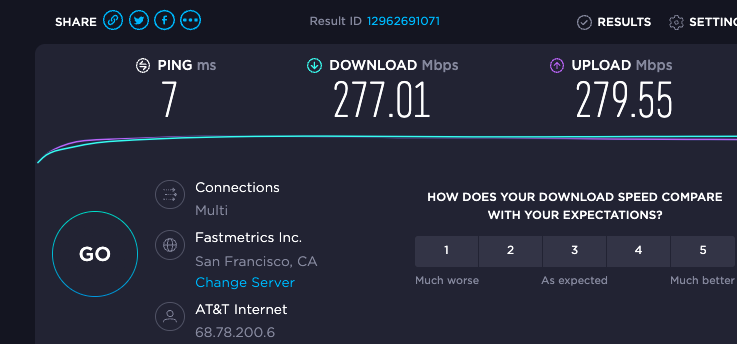
Thanks for the input. Would you recommend me upgrading to the new firmware? It just bothers me when my PC connected to 5ghz is only getting 200 mbps average DL. My upload is higher then download in most cases. see my screen shot that I just did for my pc running Mac OS on intel i9.