NETGEAR is aware of a growing number of phone and online scams. To learn how to stay safe click here.
Forum Discussion

FURRYe38
Oct 06, 2022Guru - Experienced User
New - R7900P/R7960P/R8000P Firmware Version 1.4.4.94 Released
Security Fixes: 10/06/2022
Fixes security vulnerabilities.
For more information about security vulnerabilities, visit https://www.netgear.com/about/security
NOTE: May have long awaited ...

cybot
Oct 17, 2022Luminary
I0p-V1.4.4.94_.3Installing The Firmware Version You Suggested. Upgraded With Out ANy Issues. That's Not To Say That There Are No Issues With The Firmware ItSelf Though. Trying To Install The Firmware File R8000p-V1.4.4.94_1.3.56.chk still Results With A Message Saying The Firmware File Is Incorrect. It Also Still Will Not Auto Install Via The Update Button.

FURRYe38
Oct 17, 2022Guru - Experienced User
Does same thing happen when you try an manually update to v1.4.1.68?
cybot wrote:
I0p-V1.4.4.94_.3Installing The Firmware Version You Suggested. Upgraded With Out ANy Issues. That's Not To Say That There Are No Issues With The Firmware ItSelf Though. Trying To Install The Firmware File R8000p-V1.4.4.94_1.3.56.chk still Results With A Message Saying The Firmware File Is Incorrect. It Also Still Will Not Auto Install Via The Update Button.
- cybotOct 17, 2022Luminary
No, the manual update to .68 went normally. trying to then update to .94 still presents with same error.
just for kicks.... could we compare the hash for the file that i have and the someonelses R8000P .94 file?
Here is the hash for the .zip file: SHA256 DE3BC7E9B2F103530AFC9D684AB66F8364BD0D58FE1E33EA22AD68998B4951BB\
here is for the file within: SHA256 0556C17B83C4C7ADE35D387B35DF742A0990592A7F33677CD6B3729C51B36B8A
i would be very surprised if i happened to get a bad file all three times i have downloaded the file.
- FURRYe38Oct 17, 2022Guru - Experienced User
I would keep the v.68 loaded for now. Users have already posted that there are problems with v.94 so keep v.68 for now. I've already passed this onto NG.
- cybotOct 18, 2022Luminary
So.... it looks like the .68 suffers from the long standing ipv6 dns issue as well. on top of that, it appears that because of the error, the 6to4 ipv4 address is entered but not used. all attempts at accessing ip6 addresses fail, even when ipv5 dns server address is entered into windows.
- FURRYe38Oct 18, 2022Guru - Experienced User
Just use auto config.
- cybotOct 18, 2022Luminary
it is set to autoconfig
- FURRYe38Oct 18, 2022Guru - Experienced User
Set the 6to4 to Auto
- cybotOct 18, 2022Luminary
i am unable to apply the switch to auto becuase the routore says the DNS is address is invalid (the gabage text that THE ROUTER changed what i had put in it)
- FURRYe38Oct 18, 2022Guru - Experienced User
Need to remove the config values. Or factory reset and set up from scratch.
- cybotOct 18, 2022Luminary
setting the server and dns entries to auto just fills both DNS entries with garbage text.
- FURRYe38Oct 18, 2022Guru - Experienced User
Factory reset and set up from scratch.
- cybotOct 18, 2022Luminary
I have don so i don't know how many time in the last day or so. I can enter the DNS info into the ipv6 DNS section, but when i hit apply, the router changes it too garbage text. this is why i was using such old, out dated firmware
- FURRYe38Oct 18, 2022Guru - Experienced User
try using v.94.
- cybotOct 19, 2022Luminary
.94 is the latest one right? the one that the router said was the wrong file?
- cybotOct 19, 2022Luminary
My R8000P is over 4 years old. I have seen some netgear routers come with like V1 and V2 and so on. they are the same router, but with minor changes meaning different firmware. I am wondering if somehow Netgear has made a minor change in the hardware and neglected to label it as v2 or whatever. it would explain why the firmware would not work in my r8000P but works with others.
- michaelkenwardOct 19, 2022Guru - Experienced User
cybot wrote:
My R8000P is over 4 years old. I have seen some netgear routers come with like V1 and V2 and so on. they are the same router, but with minor changes meaning different firmware.
The extent of the changes may or may not be minor, but it is usually in the hardware. That's why it needs different firmware. The V hardware variants are not "the same router".
V1 and V2 versions are not the same as the "P" variants. In those cases, the hardware can be completely different. For example, the main chipset for the R7000 is not the same as that in the R7000P. They come from different chipset makers.
it would explain why the firmware would not work in my r8000P but works with others.Your R8000P needs firmware for the R8000P. Any other variant will not work.
A quick check suggests that the are no "V" hardware variants of the R8000, just the R8000 (V1) and the R8000P.
- cybotOct 19, 2022Luminary
lol so much for that idea. so either the file is somehow corrupt on the netgear server, or it is somehow getting corrupted in transit.... or internet gremlins are at fault.
 RalfyMOct 19, 2022Guide
Adding a new device for Address Reservation in R8000P, firmware V1.4.4.94_1.3.56 seems to be broken. Error received after clicking Add shown below. What are the chances this might be noticed and fixed?
Invalid MAC address. ABCDEF123456
This screen will automatically return to the previous screen in a few seconds...
- FURRYe38Oct 19, 2022Guru - Experienced User
Yes. This is a known issue and has been passed on to NG.
You'll need to either avoid using IP address reservations until it gets fixed or revert back to FW that was working for you.
RalfyM wrote:
Adding a new device for Address Reservation in R8000P, firmware V1.4.4.94_1.3.56 seems to be broken. Error received after clicking Add shown below. What are the chances this might be noticed and fixed?
Invalid MAC address. ABCDEF123456
This screen will automatically return to the previous screen in a few seconds...
- FURRYe38Oct 19, 2022Guru - Experienced User
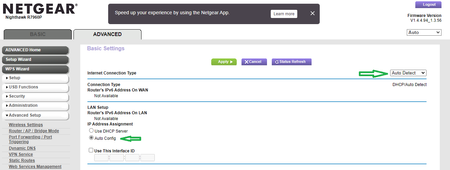
Yep same version I have loaded on my R7960P and had IPv6 Auto Detect enabled and was working while we were trouble shooting this persons router problems:
Try downloading the FW file using a different PC or laptop and different browser. I use Opera and MS Edge.
cybot wrote:
.94 is the latest one right? the one that the router said was the wrong file?
- michaelkenwardOct 19, 2022Guru - Experienced User
cybot wrote:
lol so much for that idea. so either the file is somehow corrupt on the netgear server, or it is somehow getting corrupted in transit.... or internet gremlins are at fault.
This conversation is getting horribly confused, with different people talking about different problems with different routers. A recipe for chaos.
Which router are you using?
What firmware are you trying to install?
How are you trying to install it?
What message do you see when you try to install the firmware?
- cybotOct 20, 2022Luminary
I have an r8000P
I am trying to install the .94 (latest) firmware.
I have tried to install it via the routers web update interface, and i have downloaded the firmware from the R8000P page and tried to install it manually. installing it manually the router says the file is not correct. I have even gone so far as to perform a factory reset and after going through the initial setup, going directly to the upgrade page. file still is not accepted, and web update does not work either.
- cybotOct 20, 2022Luminary
unfortunately, setting IPv6 to anything auto does not work for me, since the only access i have to IPv6 is through the 6to4 IPv6 tunnel i setup through hurricane electric. the DNS addresses NEED to be entered, otherwise they are not "automatically" known. the long standing bug where the router changes the text entered into the ipv6 DNS to garbage text meant until my trying to update to .94, i was using a very old firmware, that did not have the bug present. that version was V1.4.1.36_1.3.1
- cybotOct 20, 2022Luminary
just happened to notice that the version of the firmware (1.4.1.36) i was using is no longer listed in the r8000P firmware download list. good thing i still have a copy.
- michaelkenwardOct 20, 2022Guru - Experienced User
cybot wrote:
just happened to notice that the version of the firmware (1.4.1.36) i was using is no longer listed in the r8000P firmware download list. good thing i still have a copy.
When that happens, it is often because Netgear discovered something nasty in the firmware and has withdrawn it. Use at you own risk.
- Retired_MemberOct 20, 2022
Hi,
After so many problems with Firmware Version 1.4.4.94 Released, when will the new firmware be fixed?
Tanks.
