NETGEAR is aware of a growing number of phone and online scams. To learn how to stay safe click here.
Forum Discussion

FURRYe38
Aug 13, 2022Guru - Experienced User
New - R8500 Firmware Version 1.0.2.160 Released - EOL
Security Fixes: 08/05/2022
Fixes security vulnerabilities.
For more information about security vulnerabilities, visit https://www.netgear.com/about/security/
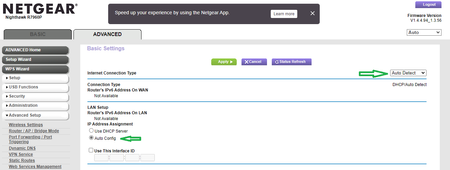
Enable IPv6 Auto if you con...

CogX
Sep 07, 2022Aspirant
Well, my R8500 router went belly-up again two hours later and I had to unplug the power cord and plug it back in a second time. It all seemed to be fine the rest of the day and evening, but we'll see what a new day brings. Clearly, either the upgrade to the current firmware is the cause and/or the fact that I was forced to enable IPv6 6to4 to finally get rid of the infamous DNS_PROBE_FINISHED_NXDOMAIN errors that have plagued Netgear routers (multiple models, if one scours this forum site) for going on two years now.
The sad thing is, I had been hoping to limp along with this router until (definitely non-Netgear brand) WiFi 7 routers showed up on the market, until I started reading that isn't going to be realized now until 2024. I guess a stop-gap Asus router is in my near future...
DanKI6X
Sep 07, 2022Tutor
I turned on the 6to4 couple days ago and have not had an issue. DHCP setting in IPv6 was also working for last week+ before that. My only remaining issue is using OPENDNS custom settings with IPv6 turned on. I have not tested with "6to4" setting. OPENDNS does not support IPv6 for IP address custom setting so using the general filters that do work on IPv6 (see my note above). But, IPv6 does need to be on to not get the DNS errors.
Dan
- CogXSep 08, 2022Aspirant
My router crashed again (spontaneously rebooted) this morning, as soon as I got up.
It didn't crash all day yesterday, but did those two times the day before. Actually, it could be crashing and rebooting multiple times when no one is around to actually notice, as I don't have any external logging to track it.
I just disabled IPv6 and manually rebooted, to see if this router crashing continues at which point I'll assume it is ultimately due to installing the current firmware revision and not the IPv6 settings.
(My gut tells me it will keep crashing, but now it's a waiting game. Of course, I also just purchased a new router, because although I've been doing IT support since the 1990s, and this all second nature, my entire work life has been dealing with this kind of nonsense 50-70 hours a week, I don't need to be having this aggravation at home all the time as well. Can't a person just buy anything reliable anymore, ever? EVER??)
- FURRYe38Sep 08, 2022Guru - Experienced User
Kind of hard to help out or get a better idea of your environment if you don't give feedback to the questions presented.
I guess all this is no longer important as you have something else replacing the R8500.
Good Luck. - CogXSep 10, 2022Aspirant
The not so funny thing is that there are multiple different threads for multiple different Netgear models, but we all have the same DNS error issues, but there's no easy way for us to collectively try to work through any of this, across all models, to maybe see if there is some "ah ha" solution beyond just wishful thinking that the Netgear programmers will some day figure this all out - you know, that they haven't been able to figure out in the past 18 months.
My R8500 did the same thing, after upgrading to the current firmware, finally relenting to enable IPv6, saw the DNS errors go away, but then the router started crashing. I was about to order a new Asus brand router, but then change my mind as now I think I'm going to go the build-your-own router router, so in the meantime I disabled IPv6 and so far my R8500 has stayed up since. But then of course the DNS errors came back. In the scheme of lesser evils, having the periodic DNS errors is better than having one's entire home network crap out for 5 minutes at a time as the router reboots.
