NETGEAR is aware of a growing number of phone and online scams. To learn how to stay safe click here.
Forum Discussion

drew_s
Jul 24, 2018Aspirant
Nighthawk R6700v2 - No internet from modem - Gets IP for a few seconds then WAN link goes down
Hello everyone, I've read every(!) post about the R6700 and no internet connection. I've tried all the suggestions with no avail. So hopefully someone can help me with my specific setup.
TL;DR...
- Jul 25, 2018
If your older router works fine, Probably your R6700 is bad. I would go to a local store with NG routers and a good refund policy and check out out for a few days.
Also need to check your network adapter card as well. Make sure it's able to connect to a router, modem and a switch at 1000mb and not 100Mb.


myersw
Jul 24, 2018Master
drew_s wrote:
Hello everyone, I've read every(!) post about the R6700 and no internet connection. I've tried all the suggestions with no avail. So hopefully someone can help me with my specific setup.
TL;DR
Internet randomly stopped passing through the router. WAN goes on/off constantly now. Internet works when plugged into PC. Tried every step I've seen on this site.
My Setup
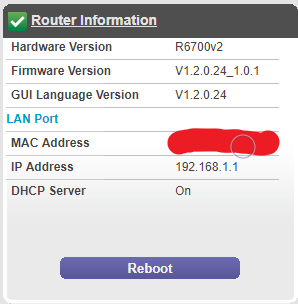
I'm running Windows 10 Home 64-bit, Arris SB6183 Suddenlink modem, Netgear R6700v2 firmware V1.2.0.24_1.0.1 (latest from website). See Router Info picture.
Background
I bought it about 2 months ago, then one night it stopped giving internet. I have Suddenlink and pay for 400mb/s
Problem
No internet connection. More specifically, the internet statics show the WAN link is going on and off rapidly. It will sometimes say link down and others it says 1000mb/s (see Internet Statistics: WAN Dead and Internet Statistics: WAN Working photos). When the link is working, I get an IP address and gatway (see Connection Status: WAN Dead/Working photos). The WAN only tries to come on when I attempt to access the internet, all other times it's down. Suddenlink tech confirmed 400mb/s is coming out of my cable connection.
Internet capped to 100mb/s. I pay for 400mb/s but when I plug my modem directly into my computer I only get 100mb/s.
Troubleshooting Steps Taken
- "Reset" the modem/router by unplugging both, plugging in modem, waiting for solid lights, then plugging in router
- Factory reset router
- Suddenlink service tech tried three different modems
- Important Note: when he gave me a modem/router combo, the connection was working but was limited to 100mb/s
- Tried three different sets of ethernet cat5e cables
- Played with internet setup using all options (dynamic and static dns/ip/gateway)
- I recorded my dns/ip/gateway from when the modem is plugged directly into the computer and input that into the router
- Plugged modem directly into PC (the internet works when doing this, but limited to 100mb/s)
- MAC spoofing: I've tried the MAC of my PC, the "Default" in settings, and hard-coding the MAC from my modem
- Feedback looping the router. I plugged a cable from the WAN port into a LAN port and both lights were a solid amber.
- Used Windows 10 "Network Reset" feature
- Turned off "Windows Auto Tuning" feature as described in this article
Any help will be much appreciated!
-Drew
Router InformationConnection Status: WAN downConnection Status: WAN workingConnection Statistics: WAN DeadConnection Statistics: WAN WorkingInternet SetupRouter Logs
- myerswJul 24, 2018Master
My oops. Was thinking of a reply and changed my mind and did not do cancel.
- drew_sJul 24, 2018Aspirant
So I've tried a few things
- Install firmware R6700v2-V1.2.0.16_1.0.1
- Factory reset button
- Power cycle modem + router
- Same problem of WAN going off/on
- Install firmware R6700v2-V1.1.0.42_1.0.1
- Factory reset button
- Power cycle modem + router
- Same problem of WAN going off/on
- Used new router WNR2000v2 with same modem and same PC
- It works
So I'm pretty sure this means it's the R6700 that is messed up right?
- Install firmware R6700v2-V1.2.0.16_1.0.1