NETGEAR is aware of a growing number of phone and online scams. To learn how to stay safe click here.
Forum Discussion

e_lester3
Dec 08, 2020Aspirant
Nighthawk R6700v2 - WiFi suddenly dropped
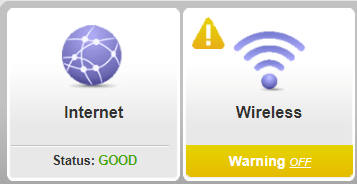
Yesterday our Wi-Fi suddenly dropped. I can still access the internet since my computer is directly connected with ethernet but we have no Wi-Fi. I've tried rebooting both the modem and the router (m...
- Dec 08, 2020
Thank you! I did a factory reset (using the below instructions) and went through setup again and it works!
- Have the router powered on (if just booted wait around one minute for it to load)
- With a sharp pen or paper clip, press down the Restore Factory Settings button and hold it for about 7 seconds
- When the power light starts to blink you can release the reset button and wait for the router to start up
- The power light will be solid (not blinking) once the router is started. (Source: https://www.router-reset.com/info/Netgear/R6700v2)

plemans
Dec 08, 2020Guru - Experienced User
Did you try a factory reset and reinstalling (don't use a backup configuration)
e_lester3
Dec 08, 2020Aspirant
Thank you! I did a factory reset (using the below instructions) and went through setup again and it works!
- Have the router powered on (if just booted wait around one minute for it to load)
- With a sharp pen or paper clip, press down the Restore Factory Settings button and hold it for about 7 seconds
- When the power light starts to blink you can release the reset button and wait for the router to start up
- The power light will be solid (not blinking) once the router is started. (Source: https://www.router-reset.com/info/Netgear/R6700v2)