NETGEAR is aware of a growing number of phone and online scams. To learn how to stay safe click here.
Forum Discussion

equn
Mar 17, 2021Aspirant
Nighthawk R7900P X6S no wifi
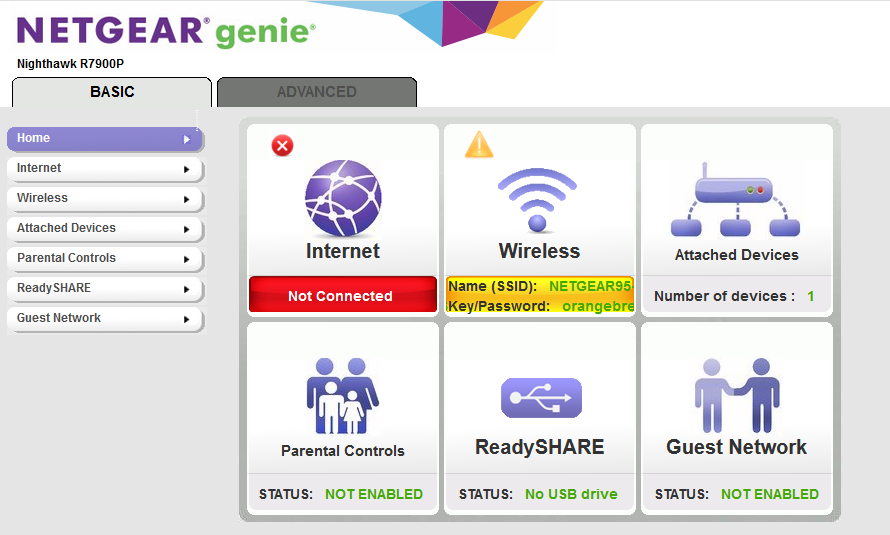
Model: Netgear R7900P X6S Issue: No wireless broadcasting Router light 2.4GHz on and white Router light 5GHz 1 on and white Router light 5GHz 2 on and white 192.168.1.1 router setting showi...

michaelkenward
Mar 18, 2021Guru - Experienced User
You don't tell us how you know that there is no wifi. Are you saying that the SSID is not being broadcast and/or is not visible to wifi clients?
What do you see in the Basic WiFi Network Settings? (Check the manual for where to find that.)
Visit the support pages:
Support | NETGEAR
Feed in your model number and check the documentation for your hardware.
You may have done this already. I can't tell from your message.
I see that you also have Internet "Not Connected" so you appear to have more serious problems.
Have you tried this?
- Turn off and unplug modem.
- Turn off router and computers.
- Plug in and turn on modem. Wait 2 minutes for it to connect.
- Turn on the router and wait 2 minutes for it to connect.
- Turn on computers and rest of network.
equn
Mar 18, 2021Aspirant
Hi Michael Kenward,
Thanks for replying.
I know there is no wifi because:
- non of my clients (phones, computers) can detect a wifi network named Netgear95 or Netgear95-5G
- admin panel (192.168.1.1) is showing a yellow exclamation mark and wifi section is showing yellow
- router indicator lights appear to be normal
Basic wifi setting screen attached.
