NETGEAR is aware of a growing number of phone and online scams. To learn how to stay safe click here.
Forum Discussion

ChristianWis
Jan 28, 2023Aspirant
Nighthawk X6 R8000 - cpu problem
Hello friends, I have a Nighthawk X6 R8000, excellent router. But I have a problem that I'm noticing recently. I have 28 devices connected and the router in standby mode has a consumption of cpu1:34%...
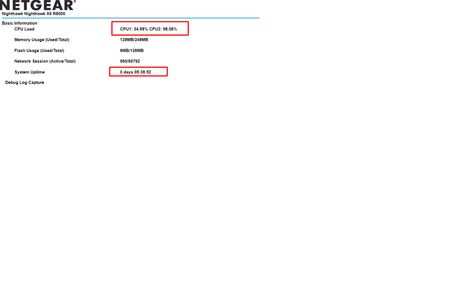
- Jan 28, 2023
Now do same thing with the router disconnected from the ISP modem or ONT. Observe CPU usage.
What is the Brand and model# of the Internet Service Providers modem or Fiber ONT the NG router is connected too?
Try a factory reset and setup from scratch..A complete pull of the power adapters for a period of time after the factory reset then walk thru the setup wizard and setup from scratch. Recommend setting the default DHCP IP address pool range to the following after applying and a factory reset: 192.168.#.100 to 192.168.#.200.Try this with just one wired PC connected. When the setup wizard completes, check the CPU usage. Don't connect anything else just yet. Set a different SSID name to prevent wireless devices from connecting.
Also there is newer version of FW as well:

FURRYe38
Jan 28, 2023Guru - Experienced User
What happens when you disconnect all from the router accept for 1 wired PC? CPU usage still high?
What all you have connected at one time?
Is Armor, Circle or Traffic meter enabled?
What Firmware version is currently loaded?
What is the Mfr and model# of the Internet Service Providers modem/ONT the NG router is connected too?
Be sure your using a good quality LAN cable between the modem and router. CAT6 is recommended.
Has a power off for 1 minute then back ON with the ISP modem and router been performed since last update?
Be sure to restart your network in this sequence:
Turn off and unplug modem.
Turn off router and computers.
Plug in and turn on modem. Wait 2 minutes for it to connect.
Turn on the router and wait 2 minutes for it to connect.
Turn on computers and rest of network.
Has a factory reset and setup from scratch been performed since last FW update? A complete pull of the power adapters for a period of time after the factory reset then walk thru the setup wizard and setup from scratch. Recommend setting the default DHCP IP address pool range to the following after applying and a factory reset: 192.168.#.100 to 192.168.#.200.
- ChristianWisJan 28, 2023Aspirant
What happens when you unplug everything from the router for 1 wired PC? CPU usage still high?
1 pc only,
CPU loadCPU1: 17.45% CPU2: 19.15%
Everything you have connected at once?
And it isIs the Armor, Circle or Traffic meter enabled?
nopeWhat firmware version is currently loaded?
firmware version
V1.0.4.76_10.1.82
What is the Mfr and model number of the ISP modem/ONT that the NG router is also connected to?I don't know what is the "Mfr and model number of the ISP modem/ONT"
Make sure to use a good quality LAN cable between the modem and the router. CAT6 is recommended.I have cat 8, but most devices connect via wifi to the 2.4 ghz network
Has it been turned off for 1 minute then back on with ISP modem and router since last update?
Yes..
Be sure to reboot your network in this sequence:
Turn off and unplug the modem.
Turn off the router and computers.
Plug in and turn on the modem. Wait 2 minutes for it to connect.
Power on the router and wait 2 minutes for it to connect.
Turn on the computers and the rest of the network.yes i did that
Thanks
- FURRYe38Jan 28, 2023Guru - Experienced User
Now do same thing with the router disconnected from the ISP modem or ONT. Observe CPU usage.
What is the Brand and model# of the Internet Service Providers modem or Fiber ONT the NG router is connected too?
Try a factory reset and setup from scratch..A complete pull of the power adapters for a period of time after the factory reset then walk thru the setup wizard and setup from scratch. Recommend setting the default DHCP IP address pool range to the following after applying and a factory reset: 192.168.#.100 to 192.168.#.200.Try this with just one wired PC connected. When the setup wizard completes, check the CPU usage. Don't connect anything else just yet. Set a different SSID name to prevent wireless devices from connecting.
Also there is newer version of FW as well:
- ChristianWisJan 28, 2023Aspirant
ok.. i was able to solve the problem.
The problem was not the router, but a PC with ubuntu and 5 docker images including transmission soft...
all right!
Thanks for the help