NETGEAR is aware of a growing number of phone and online scams. To learn how to stay safe click here.
Forum Discussion

ChristianWis
Jan 28, 2023Aspirant
Nighthawk X6 R8000 - cpu problem
Hello friends, I have a Nighthawk X6 R8000, excellent router. But I have a problem that I'm noticing recently. I have 28 devices connected and the router in standby mode has a consumption of cpu1:34%...
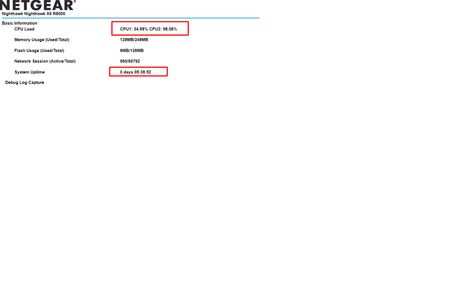
- Jan 28, 2023
Now do same thing with the router disconnected from the ISP modem or ONT. Observe CPU usage.
What is the Brand and model# of the Internet Service Providers modem or Fiber ONT the NG router is connected too?
Try a factory reset and setup from scratch..A complete pull of the power adapters for a period of time after the factory reset then walk thru the setup wizard and setup from scratch. Recommend setting the default DHCP IP address pool range to the following after applying and a factory reset: 192.168.#.100 to 192.168.#.200.Try this with just one wired PC connected. When the setup wizard completes, check the CPU usage. Don't connect anything else just yet. Set a different SSID name to prevent wireless devices from connecting.
Also there is newer version of FW as well:

FURRYe38
Jan 28, 2023Guru - Experienced User
Now do same thing with the router disconnected from the ISP modem or ONT. Observe CPU usage.
What is the Brand and model# of the Internet Service Providers modem or Fiber ONT the NG router is connected too?
Try a factory reset and setup from scratch..A complete pull of the power adapters for a period of time after the factory reset then walk thru the setup wizard and setup from scratch. Recommend setting the default DHCP IP address pool range to the following after applying and a factory reset: 192.168.#.100 to 192.168.#.200.
Try this with just one wired PC connected. When the setup wizard completes, check the CPU usage. Don't connect anything else just yet. Set a different SSID name to prevent wireless devices from connecting.
Also there is newer version of FW as well:
ChristianWis
Jan 28, 2023Aspirant
ok.. i was able to solve the problem.
The problem was not the router, but a PC with ubuntu and 5 docker images including transmission soft...
all right!
Thanks for the help
- FURRYe38Jan 28, 2023Guru - Experienced User
Glad you got it working. Be sure to save off a back up configuration to file for safe keeping. Saves time if a reset is needed.
https://kb.netgear.com/24231/How-do-I-back-up-the-router-configuration-settings-on-my-Nighthawk-routerIts recommended to install a USB laptop cooler under the router for 24/4 cooling. Helps keep the router cool and helps avoid heat damage to the electronics.
Enjoy. 📡