NETGEAR is aware of a growing number of phone and online scams. To learn how to stay safe click here.
Forum Discussion

Fraser101
May 06, 2019Aspirant
Nighthawk X6 R8000 providing slow speeds
So I recently bought a Nighthawk X6 R8000 to improve my sky internet. after I followed the instructions and set it up I ran 6 speed tests where I averaged 15.39 download speed and 0.24 upload speed, ...
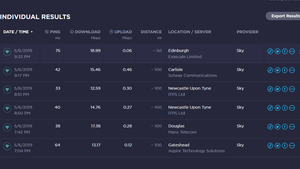
- May 07, 2019
okay yeah, was very confused my self but I just binged a lot of youtube videos and not I feel like I fixed the problem.
I ended turning off the sky routers wireless wifi so that only the new router would send the wifi out and the sky router would only provide it internet. I guess its in modem mode now then.
thank you for all your help so far, is there any recommended setting that would further improve the wifi or do you recommend I just leave the wifi along now.
Fraser101
May 06, 2019Aspirant
Okay, so I did not realize that and it's helpful to know, and I expect something like 25+ for download and something around 10+ for upload. and I currently have around 15 for download and 0.20 for upload.
I say very low as in the speed is not meeting what I used to have for the upload, the download is higher than what it was but the upload speed is not.
At the moment my provider is Sky. ( I assume that's what ISP is )
I am using an internet speed test to measure it. this one I am using. https://www.speedtest.net/
I just have the Nighthawk X6 R8000 Router.
my security is on WPA2-PSK [AES] and I am unsure of my SSID's since I don't know how to check them. I do have smart connect on if that matters.
I am not able to turn my sky router into Modem mode so to say, so I currently have it connected to the sky router and I am getting better speed on the 2.4GHz but not by much.
Fraser101
May 06, 2019Aspirant
Ohh my bands are all default with 2.4GHz on 600Mbps, channel 11 and both the 5GHz ones on 1300Mbps with 1 on channel 44 and 1 on channel 100(DFS).
 IrvSpMay 06, 2019Master
Answering the last 2 posts by you...
"I expect something like 25+ for download and something around 10+ for upload. and I currently have around 15 for download and 0.20 for upload. "
Meaningless unless you can state WHAT the ISP (SKY) delivers? Did you have those speeds before your connected the R8000? Again, without device details I have no idea if this is reasonable or not?
"I say very low as in the speed is not meeting what I used to have for the upload, the download is higher than what it was but the upload speed is not."
This is where it get 'interesting'? How did you have those before, especially on wireless? Who connected to what? Sky 'modem' means NOTHING to me. Obviously it had a router function if you connected to it wirelessly. That alone if still active can cause ALL SORTS of problems. That modem/Router should be put into BRIDGE mode so it only sends out the Internet signal to the R8000.
"I am unsure of my SSID's since I don't know how to check them. I do have smart connect on if that matters."
With Smart Connect enabled the ROUTER determines what BAND (2.4 and 5Ghz) the device will connect to. It isn't that 'smart' and I turned it off. Mixed too many different devices on the 5Ghz bands which slowed some down. I suggest you turn it off and then one EACH devices, determine which SSID you want to connect to and do that.
"I am not able to turn my sky router into Modem mode so to say, so I currently have it connected to the sky router and I am getting better speed on the 2.4GHz but not by much. "
If what you say is true, then you have 2 routers running WHICH CAN cause problems and interference. If you do NOT have access to the modem/router to put it into Bridge mode, then contact the ISP and they can do it.
"and 1 on channel 100(DFS)."
I don't have that channel, but I'm in North America. You are in England I guess with Sky as the ISP. Not sure if you even need to be on the DFS channel? You should also have 149 and up on 5Ghz #2 which are non-DFS. If unsure, check with SKY to see if it is needed.
- Fraser101May 07, 2019AspirantOkay thank you for the modem tips and my internet speeds before I put the new router in where at 2.14 download and 0.35 upload ( I noticed that the upload was intact faster sorry ) and I tested from my computer for both tests and did one or two wireless test which o forgot the results but they where low.
As for putting my router into bridge mode. I’ve heard that that is against the sky terms of service and they do not allow it ( I am Unsure if this is true I will call to ask ).
Sky is meant to provide me with fibre broadband and the router for that is just there normal standard router, fibre is meant to provide around 36Mbs ( what there site says ).- IrvSpMay 07, 2019Master
Right now, you have me quite confused?
Fraser101 wrote:
Okay thank you for the modem tips and my internet speeds before I put the new router in where at 2.14 download and 0.35 upload ( I noticed that the upload was intact faster sorry ) and I tested from my computer for both tests and did one or two wireless test which o forgot the results but they where low.
As for putting my router into bridge mode. I’ve heard that that is against the sky terms of service and they do not allow it ( I am Unsure if this is true I will call to ask ).
Sky is meant to provide me with fibre broadband and the router for that is just there normal standard router, fibre is meant to provide around 36Mbs ( what there site says ).I have no idea what was the tested speed direct from the SKY 'modem' or even if it is modem only or modem/router?
" my internet speeds before I put the new router in where at 2.14 download and 0.35 upload"
Was this testing BOTH wired and wireless from the SKY whatever? If so, you WILL not get better speed out of ANY router. Routers can't make speed coming in faster. I'm not sure you understand that?
I just GOOGLED "sky modem bridge mode" and found a LOT of hits. Not only that, SKY has forums. See https://helpforum.sky.com/ and you might have better luck there getting help?
Sorry, but I can't be of more help.