NETGEAR is aware of a growing number of phone and online scams. To learn how to stay safe click here.
Forum Discussion

teddy_c
Dec 01, 2020Aspirant
Nighthawk X6 R8000
I was trying to set up a ssh server that is able to allow me to access it remotely. First, I did port forwarding for my server that has a static address:192.168.1.6. Above is ...
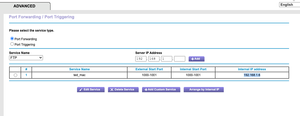
- Dec 02, 2020
> [...] so if you guys cannot see pictures that I posted, I won't post
> anymore.Your port-forwarding rule is now visible. I doubt that it's correct.
Why two ports ("1000-1001") for SSH? Why an internal port other than
22?> [...] I assigned an static IP address for it in my router [...]
Terminology: A "static" address is configured on the device itself.
What you configure on a (DHCP server on a) router is a reserved dynamic
address, not a static address. Either one should fix the address of a
device, but some implications are different.> [...] I've turned on the 'Remote Login' in 'Sharing' setting and
> allowed 'All users' to access.Not related. I'd disable it, unless you _really_ want it enabled.
> [...] I just tried to enter 'ssh <myserver_name>@119.74.57.xxx -p
> <port_of_my_server>' [...]I don't care if you hide some of your external/public IP address
("xxx"), but "-p <port_of_my_server>" is a waste of everyone's time.
What is it? "-p 22"? "-p 1000"? "-p 1001"? Other?You've already showed your port numbers. Which part of "actual
actions (commands)" was unclear?> [...] "ssh: connect to host 119.74.57.xxx port xxxx: Connection
> refused"I'd expect that. Almost certainly, your SSH server is listening on
port 22, not anything in the range "1000-1001". When you try to talk to
port 1000 (or 1001) on your router, then, with that port-forwarding
rule, the router will forward that message to port 1000 (or 1001) at
"192.168.1.6", where no one is listening.
> > https://community.netgear.com/t5/x/x/m-p/1859106
>
> Did you do any of the tests there? Answer any more questions?Still wondering. Another thread which goes through the same set of
"usual problems", and includes an example of a better port-forwarding
rule for SSH:https://community.netgear.com/t5/x/x/m-p/1836366
(Note: External port "2022" is not required. Internal port "22" _is_
required, if your SSH server is listening at that port, which is very
likely.)
teddy_c
Dec 02, 2020Aspirant
so if you guys cannot see pictures that I posted, I won't post anymore.
Basically my server is set at my home, which is just my MacBook pro, I assigned an static IP address for it in my router and did port forwarding for this IP(protocol TCP&UDP). In the system setting, I've turned on the 'Remote Login' in 'Sharing' setting and allowed 'All users' to access.
the public IP address for my home internet environment is 119.74.57.xxx
now, whenever I want to access this server remotely, I just tried to enter 'ssh <myserver_name>@119.74.57.xxx -p <port_of_my_server>'
and this message will show: "ssh: connect to host 119.74.57.xxx port xxxx: Connection refused"
antinode
Dec 02, 2020Guru
> [...] so if you guys cannot see pictures that I posted, I won't post
> anymore.
Your port-forwarding rule is now visible. I doubt that it's correct.
Why two ports ("1000-1001") for SSH? Why an internal port other than
22?
> [...] I assigned an static IP address for it in my router [...]
Terminology: A "static" address is configured on the device itself.
What you configure on a (DHCP server on a) router is a reserved dynamic
address, not a static address. Either one should fix the address of a
device, but some implications are different.
> [...] I've turned on the 'Remote Login' in 'Sharing' setting and
> allowed 'All users' to access.
Not related. I'd disable it, unless you _really_ want it enabled.
> [...] I just tried to enter 'ssh <myserver_name>@119.74.57.xxx -p
> <port_of_my_server>' [...]
I don't care if you hide some of your external/public IP address
("xxx"), but "-p <port_of_my_server>" is a waste of everyone's time.
What is it? "-p 22"? "-p 1000"? "-p 1001"? Other?
You've already showed your port numbers. Which part of "actual
actions (commands)" was unclear?
> [...] "ssh: connect to host 119.74.57.xxx port xxxx: Connection
> refused"
I'd expect that. Almost certainly, your SSH server is listening on
port 22, not anything in the range "1000-1001". When you try to talk to
port 1000 (or 1001) on your router, then, with that port-forwarding
rule, the router will forward that message to port 1000 (or 1001) at
"192.168.1.6", where no one is listening.
> > https://community.netgear.com/t5/x/x/m-p/1859106
>
> Did you do any of the tests there? Answer any more questions?
Still wondering. Another thread which goes through the same set of
"usual problems", and includes an example of a better port-forwarding
rule for SSH:
https://community.netgear.com/t5/x/x/m-p/1836366
(Note: External port "2022" is not required. Internal port "22" _is_
required, if your SSH server is listening at that port, which is very
likely.)