NETGEAR is aware of a growing number of phone and online scams. To learn how to stay safe click here.
Forum Discussion

sh1ro
Dec 15, 2021Aspirant
Packet loss between my PC and modem
So I'm trying to figure out why I'm experiencing some pretty heavy packet loss within the past few days that seems to be affecting only my desktop PC. I have a Netgear Nighthawk AC3200 Wi-Fi Router w...

FURRYe38
Dec 17, 2021Guru - Experienced User
What trace do you see with just 1 wired PC connected to the modem and with ALL other devices turned OFF and disconnected from the modem. Turn OFF the wifi radios on the modem as well. Use the pingplotter.com site to test. Do not get with a game server.
Have the ISP check the signal and line quality UP to the modem. Be sure the ISP provisions the modem correctly.
Be sure there are no coax cable line splitters in the between the modem and ISP service box.
Be sure your using good quality RG6 coax cable up to the modem.
Be sure to power OFF the modem for 1 minute then back ON.
https://community.netgear.com/t5/Cable-Modems-Routers/General-info-and-Troubleshooting-for-Cable-Modems/m-p/1530376#M12853
https://www.duckware.com/tech/solving-intermittent-cable-modem-issues.html
sh1ro
Dec 17, 2021Aspirant
FURRYe38 wrote:What trace do you see with just 1 wired PC connected to the modem and with ALL other devices turned OFF and disconnected from the modem. Turn OFF the wifi radios on the modem as well. Use the pingplotter.com site to test. Do not get with a game server.
Have the ISP check the signal and line quality UP to the modem. Be sure the ISP provisions the modem correctly.
Be sure there are no coax cable line splitters in the between the modem and ISP service box.
Be sure your using good quality RG6 coax cable up to the modem.
Be sure to power OFF the modem for 1 minute then back ON.
https://community.netgear.com/t5/Cable-Modems-Routers/General-info-and-Troubleshooting-for-Cable-Modems/m-p/1530376#M12853
https://www.duckware.com/tech/solving-intermittent-cable-modem-issues.html
Out of curiosity, I plugged a brand new M1 Mac Mini into the modem/router using the ethernet cable and gave packetlosstest.com a shot. According to that site, there are zero dropped packets, but 44% were late (1321/2999). Average latency of 53, 6ms jitter. I can see that some packets had response times upwards of 177ms, while the best ones were 46ms. I turned off wifi radios prior to testing, ensuring all devices were disconnected. I also noticed that there is no known ISP service box from what I could see, as the coax cable that enters my home runs up the side of the house and is then suspended in the air, connecting to a utility pole. I tried another coax coupler in case that was the problem, but no change. I checked again for any splitters and did not find any, nor did I find any cable line issues after performing a thorough physical inspection. Confirmed that the coax cable up to the modem is a high quality RG6 cable, and did another one-minute power cycle on the modem. I think I am running out of ideas here.
- FURRYe38Dec 17, 2021Guru - Experienced User
Certainly less that your first findings.
What does pingplotter.com site trace result in with the wired PC?
You are using CAT6 LAN cables between modem and PC?
- sh1roDec 17, 2021Aspirant
FURRYe38 wrote:Certainly less that your first findings.
What does pingplotter.com site trace result in with the wired PC?
You are using CAT6 LAN cables between modem and PC?
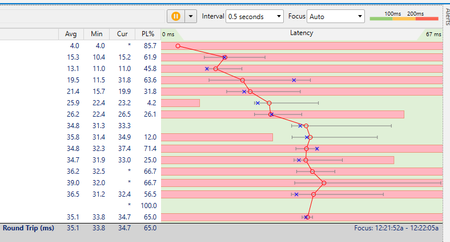
A pingplotter trace with my wired PC had essentially the same results except I was seeing packet loss at the first hop as well. The cable is a CAT6. Here is an updated result with the Mac. I cannot imagine that the 330ms time to the last hop is good.
- FURRYe38Dec 17, 2021Guru - Experienced User
You might contact your ISP have have them check the line and signal up to the modem.
Might show them your results and see if they have any suggestions.
You might try one of there modems as a short term rental to see if the problem continues or not. This could be telling.