NETGEAR is aware of a growing number of phone and online scams. To learn how to stay safe click here.
Forum Discussion

Ratz
Apr 08, 2018Guide
Port aggregation
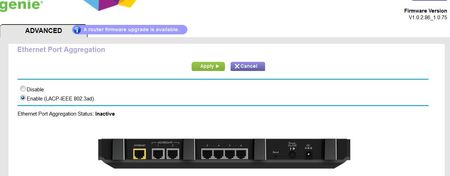
I thought I posted it, so please if someone finds it somewhere else it is likely my mistake. To the point. I am under impression the port aggregation should say active if connection to QNAP NAS ...
- Apr 10, 2018
Ratz wrote:I just know 1 + 2 adapter in QNAP are sharing same IP address. This is likely incorrect
as it only supports if one adapter fails, the other takes over.
No, perfectly correct. The bonding adapter does hold an IPv4 address, the individual ones don't.
Ratz wrote:
I tried with two different IP addresses for balance load but I had no Internet Access. I think I will try to assign a static address for both adapters.
Impossible to configure on QTS - and that's OK. In case your NAS can't reach the Internet, check if you had fixed the interface to a different NAS interface before in the Default Gateway selection settings.
Ratz
Apr 09, 2018Guide
Thanks for the link. That helps a lot. You are pointing me in the right direction. Although I do not have it configured as of yet. The link you supplied confirms the Aggregation Status: should state ‘Active”
They both, NTGEAR and QNAP match (LACP-IEEE 802.3ad)
There is really no other option in R8500 so it is all in the QNAP NAS configuration.
I only wanted to know if by chance I am overlooking something in the router.
I just know 1 + 2 adapter in QNAP are sharing same IP address. This is likely incorrect
as it only supports if one adapter fails, the other takes over.
I tried with two different IP addresses for balance load but I had no Internet Access.
I think I will try to assign a static address for both adapters.
I will come back and let you all know where I was going wrong.
Cheers,

schumaku
Apr 10, 2018Guru - Experienced User
Ratz wrote:I just know 1 + 2 adapter in QNAP are sharing same IP address. This is likely incorrect
as it only supports if one adapter fails, the other takes over.
No, perfectly correct. The bonding adapter does hold an IPv4 address, the individual ones don't.
Ratz wrote:
I tried with two different IP addresses for balance load but I had no Internet Access. I think I will try to assign a static address for both adapters.
Impossible to configure on QTS - and that's OK. In case your NAS can't reach the Internet, check if you had fixed the interface to a different NAS interface before in the Default Gateway selection settings.
- RatzApr 10, 2018Guide
Port aggregation works just great. Thank you all for the input.
In QNAP NAS I did choose right setting which is:
Supports Active-Backup, Balance-tlb, and Balance-alb- schumakuApr 10, 2018Guru - Experienced User
Ratz wrote:In QNAP NAS I did choose right setting which is:
Supports Active-Backup, Balance-tlb, and Balance-albSorry for chiming in again: These three modes can be used with generic switches which are not configured for either a static or 802.3ad LACP trunk. For the router here supporting 802.3ad only, you have to choose IEEE 802.3ad on the NAS side, too. QNAP has a nice table ref. "Switch Required" in the docs -> QNAP QTS 4.3: Network & Virtual Switch