NETGEAR is aware of a growing number of phone and online scams. To learn how to stay safe click here.
Forum Discussion

gsbacon11
Feb 14, 2021Aspirant
port forwarding not working HELP!!!
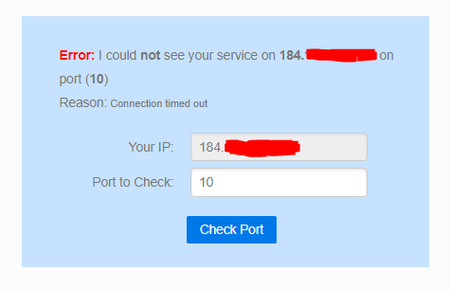
If images are not loading I have attached them in posts below the inital main post!!! Background: I am deploying a simple server that I coded in python which is listening on 192.168.1.2 port 10 whi...
gsbacon11
Feb 14, 2021Aspirant
Images seem to be not working either... just my luck
Image 1 attached

gsbacon11
Feb 14, 2021Aspirant
Image 2 attached

- gsbacon11Feb 14, 2021Aspirant
Image 3 attached
- antinodeFeb 14, 2021Guru
For the usual problems with port forwarding, see:
https://community.netgear.com/t5/x/x/m-p/1859106
If your server and client can connect LAN-to-LAN, then you'd seem to
have "3" (and probably 2) covered.I'd worry about "1". What's the IP address of the WAN/Internet
interface on the router? Does it match the "YOUR IP [address]" in the
picture?> Model: R6400|AC1750 Smart WiFi Router
Is that accurate? R6400[v1] or R6400v2? Look for "Model" on the
product label. Firmware version? Connected to what?- gsbacon11Feb 14, 2021Aspirant
Attached is the picture when following the other post procedure: ADVANCED > ADVANCED Home : Internet Port : Internet IP Address
It doesnt show my public IP it just says it is getting it from the ISP. Whenever I use findmyip.com or a similar site it always matches the one in the second picture. I also have a dynamic DNS which returns the same public IP as well.
There is no version on the R6400. All it says is "Model: R6400".
Firmware version is V1.0.1.68_1.0.43 (this was just updated, see update section). The router auto updates so I am not sure the last time it was updated.
The router is connected to the ISP modem. Then both computers are pluged into the router among other things connected overr wifi and plugged in. Both computers can be seen by the router as they are shown on the web app and phone app (with correct local IPs).
UPDATE:
The software (python server-client) worked as expected when the server was hosted on my friends network and he port forwarded on his router so it has to be something with my router.
Also he mentioned I used to host a Minecraft server which used port forwarding and it worked at the time (about 6 months ago).
Tried it again by making a new port forwarding for the Minecraft server and it wasnt able to connect. (worked locally).
Also I manually updated the firmware from V1.0.1.62_1.0.4 to V1.0.1.68_1.0.43 (latest on Netgear site) and it still doesn't work.
Or is just time for a new router? This was purchased proabbly 10 years ago...

