NETGEAR is aware of a growing number of phone and online scams. To learn how to stay safe click here.
Forum Discussion

gsbacon11
Feb 14, 2021Aspirant
port forwarding not working HELP!!!
If images are not loading I have attached them in posts below the inital main post!!! Background: I am deploying a simple server that I coded in python which is listening on 192.168.1.2 port 10 whi...
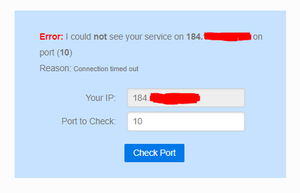
antinode
Feb 15, 2021Guru
> There is no version on the R6400. All it says is "Model: R6400".
That's a "[v1]". Which is consistent with your reported firmware
version.
> The router is connected to the ISP modem. [...]
With my weak psychic powers, I don't know what your (unspecified)
"the ISP modem" might be, other than that it would appear to be a
modem+router, not a simple modem, which is causing your port-forwarding
problem. Has it a maker and model number?
> [...] so it has to be something with my router.
The fact that it's not your only router is its primary problem in
this case.
> 1. Wrong external IP address (different from the port-forwarding
> router's WAN/Internet IP address). (An intermediate NAT router, for
> example, could cause this. [...]
Port forwarding works much better when you have one router, not two.
If your (unspecified) "the ISP modem" has a modem-only ("bridge")
mode, then you might want to configure it that way, which would make
your R6400 your only router.
An alternative one-router arrangement would be to configure the
R6400 as a wireless access point, leaving your (unspecified) "the ISP
modem" as your only router. Visit http://netgear.com/support , put in
your model number, and look for Documentation. Get the User Manual (at
least). Read. Look for ""Use the Router as a Wireless Access Point".
Doing that would make the R6400 stupid, so your port forwarding would
need to be configured on your (unspecified) "the ISP modem"(+router).
> Or is just time for a new router? [...]
Cascading a new router with an old modem+router wouldn't solve the
multiple-router problem. (Disabling one of your current routers
should.)
gsbacon11
Feb 16, 2021Aspirant
The modem is a modem/router however it is already configured in bridged mode which is why I specified it as a modem.
Attached is an image veryfying this.
I took this out of bridged mode and setup port forwarding on the modem/router and it works.
Took it back out of bridge mode and now my R6400 wont even connect to the internet even though I can hardwire something to the back of the modem (same place the router WAN port is being plugged in) and the plugged in computer can connect to the internet.
Now troubleshooting this issue I have factory reset, power cycled modem and router in diffrent orders, and am losing hope...
Leaning towards just getting a new router at this point, it seems to be having all types of issues.

- antinodeFeb 16, 2021Guru
> The modem is a modem/router however it is already configured in
> bridged mode which is why I specified it as a modem.
>
> Attached is an image veryfying this.But:
> Attached is the picture when following the other post procedure:
> ADVANCED > ADVANCED Home : Internet Port : Internet IP Address
> It doesnt show my public IP it just says it is getting it from the ISP.Which picture? If the WAN/Internet IP address of the R6400-as-router
is not your external/public IP address, then there must be some other
router between the R6400-as-router and your ISP. At least one of us is
confused.
> https://community.netgear.com/t5/x/x/m-p/1859106
>
> I'd worry about "1". What's the IP address of the WAN/Internet
> interface on the router? Does it match the "YOUR IP [address]" in the
> picture?Still unclear.
> I took this out of bridged mode and setup port forwarding on the
> modem/router and it works.In that case, configuring the R6400 as a WAP might make some sense.