Did you try just disabling smbv1 and not actually removing the windowsfeature?
edit: by running this command in an elevated powershell prompt:
Powershell
Set-SmbServerConfiguration -EnableSMB1Protocol $false
NETGEAR is aware of a growing number of phone and online scams. To learn how to stay safe click here.


EruvWeather, TheEther, guys, this is driving me nuts...
As it stands NOW my wife's PC continues to have NET VIEW work properly, and has since I did a clean install of her X64 W10 Pro Ver. 1709. On the other hand mine will only work IF I reboot the Router and her PC is not on. Once her's comes on, it no longer works, and will never work again until I reboot the router.
I opened the POWERSHELL on both PC's and ran "get-smbserverconfiguration" and compared results.
Interesting, on mine EnableSMB1Protocol is set to True, but on her's, it is set to False?
Checking Features installed I have SMB1 Server checked where her's has Client checked?
Odd, what do you have?
I've set mine to Client now but need to re-boot. Will update when I come back on.
EDIT:
FIXED IT!!!!
GET-SMBSERVERCONFIGURATION now matches her's and it WORKS as expected!!!
C:\>net view
Server Name Remark
---------------------------------------------
\\IRV8700 Irv's 8700
\\LARAINE-XPS8500 Laraine's XPS8500
\\READYSHARE readyshare
The command completed successfully.
I don't KNOW how my SMB1 features were set or when, or even why.
Suspect at this point a change happened during one of MS's Updates?
Searching the web I found this page, https://community.spiceworks.com/topic/1995592-disabling-smb1-stops-domain-authentication marked SOLVED.... in it:
-------------
M Boyle May 17, 2017 at 10:37 AM
Did you try just disabling smbv1 and not actually removing the windowsfeature?
edit: by running this command in an elevated powershell prompt:
Set-SmbServerConfiguration -EnableSMB1Protocol $false
---------------------
Wonder if I did that it would have fixed it as well?
EruvWeathergive this a try... might just work!

TheEther wrote:
Ignore the ARP for 192.168.1.6 for now. It's a red herring.
NET_VIEW.JPG doesn't work. All I see is a tiny white square. Did you attach the right file?
Did you post Wireshark capture file somewhere? I don't see it.
TheEther, you actually meant 192.168.1.9. Just discovered WHAT that is... and it isn't a red herring.
It is our wireless HP Printer. Sometime ago we had 2 HP wireless printer, an HP 310A and the only one we have now, an HP 7525. Before we got the HP 7525 I had wireless problems with the HP 310A. The easy solution via HP was to set it on the printer setup for the Network at an xxx.xxx.xxx.10 IP address. That indeed solved the problem. When we added the HP 7525 I automatically within its settings set it to 192.168.1.9.
So, this I think might be a clue? The printer is turned on as needed. Usually it isn't needed often so most of the time it is off. I don't recall it being on when I tried to do a NET VIEW, but obviously something within Windows or the R7000 KNEW it had an IP Address and was trying to see what it was?
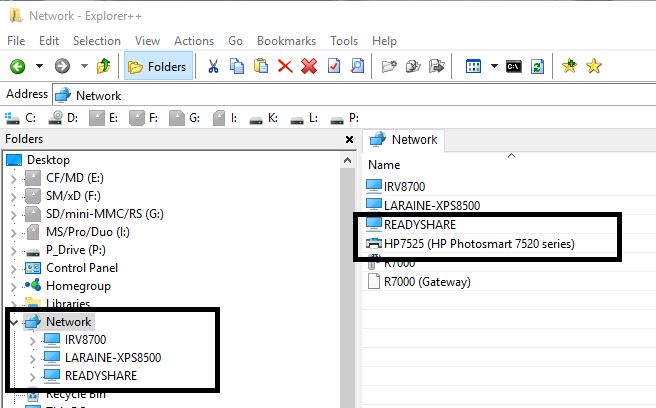
Right now I'm getting the 1231 error. I opened Explorer++ and selected NETWORK. It saw my PC, my wife's PC, and 2 R7000 items, the R7000 itself and the Media Server on it, but NOT the USB share. Same for Windows Explorer, see the attached screen capture.
Now I'm thinking 'possibly' when the printer is turned off that notifies the Master Browser on the R7000 and it deletes the printer, however it doesn't recover?
I'm going to test this again, reboot the router, test NET VIEW, turn on the printer, test NET VIEW, and the turn off the printer, and then test NET VIEW again. I will capture the Explorer++ with the Router working on NET VIEW and post this as well. If nothing else, you can see the difference that is shown for the Router, which to me indicates a router problem, not W10.
Not sure how to tell who is the master browser? Everything seems to point to 192.168.1.30 which is my PC?
Ok, I need to make two posts here. First is this one with BOTH the PRINTER and the USB Share showing.
Only using Explorer++ here. You'll see the Printer and READYSHARE are in the NETWORK.
Next one with the PRINTER OFF!
Notice the change? Printer is gone, as expected, so we know the Master Browser updated itself, BUT also notice part of the R7000 is missing, the device itself. Compare this file with the one above. It is the GATEWAY... but what is ODD is that it is NOW back a few minutes later?
As for the Master Browser I found this link, https://scottiestech.info/2009/02/14/how-to-determine-the-master-browser-in-a-windows-workgroup/ and from it:
==================
Now, what happens when you have Network Neighborhood turning up blank on you sporadically, or possibly missing several of the computers on your LAN from time to time? Well, in that case, you need to determine who is the Master Browser so that you can narrow down the problem to one computer and see if maybe you need an updated ethernet driver, or there are firewall problems, or whatever.
The “fun” way of doing this is with DOS commands. Here’s how you’d do it:
============
That doesn't seem to work?
Tried that:
================
C:\>net view
Server Name Remark
-----------------------------------------------------------
\\IRV8700 Irv's 8700
\\LARAINE-XPS8500
\\READYSHARE readyshare
The command completed successfully.
C:\>nbtstat -a IRV8700
Ethernet:
Node IpAddress: [192.168.1.30] Scope Id: []
Host not found.
Bluetooth Network Connection:
Node IpAddress: [0.0.0.0] Scope Id: []
Host not found.
C:\>nbtstat -a LARAINE-XPS8500
Ethernet:
Node IpAddress: [192.168.1.30] Scope Id: []
NetBIOS Remote Machine Name Table
Name Type Status
---------------------------------------------
LARAINE-XPS8500<00> UNIQUE Registered
LARAINE-XPS8500<20> UNIQUE Registered
HOME <00> GROUP Registered
MAC Address = 08-BD-43-A5-8C-AA
Bluetooth Network Connection:
Node IpAddress: [0.0.0.0] Scope Id: []
Host not found.
C:\>
C:\>nbtstat -a READYSHARE
Ethernet:
Node IpAddress: [192.168.1.30] Scope Id: []
NetBIOS Remote Machine Name Table
Name Type Status
---------------------------------------------
READYSHARE <00> UNIQUE Registered
READYSHARE <03> UNIQUE Registered
READYSHARE <20> UNIQUE Registered
HOME <00> GROUP Registered
HOME <1E> GROUP Registered
MAC Address = 00-00-00-00-00-00
Bluetooth Network Connection:
Node IpAddress: [0.0.0.0] Scope Id: []
Host not found.
==================
Something REALLY screwy here?
However when I use the -n on the command to show NETBIOS names, I see it on my PC?
===========
C:\>nbtstat -n
Ethernet:
Node IpAddress: [192.168.1.30] Scope Id: []
NetBIOS Local Name Table
Name Type Status
---------------------------------------------
IRV8700 <20> UNIQUE Registered
IRV8700 <00> UNIQUE Registered
HOME <00> GROUP Registered
HOME <1E> GROUP Registered
HOME <1D> UNIQUE Registered
☺☻__MSBROWSE__☻<01> GROUP Registered
Bluetooth Network Connection:
Node IpAddress: [0.0.0.0] Scope Id: []
No names in cache
=============
Odd?
Here are some of my results ...
C:\>net view
System error 1231 has occurred.
The network location cannot be reached. For information about network troubleshooting, see Windows Help.
*** *** ***
C:\>nbtstat -a READYSHARE
Ethernet 2:
Node IpAddress: [192.168.1.15] Scope Id: []
NetBIOS Remote Machine Name Table
Name Type Status
---------------------------------------------
READYSHARE <00> UNIQUE Registered
READYSHARE <03> UNIQUE Registered
READYSHARE <20> UNIQUE Registered
☺☻__MSBROWSE__☻<01> GROUP Registered
WORKGROUP <00> GROUP Registered
WORKGROUP <1D> UNIQUE Registered
WORKGROUP <1E> GROUP Registered
MAC Address = 00-00-00-00-00-00
NOTE: Looks like the router/READYSHARE is the master browser ...
Bluetooth Network Connection:
Node IpAddress: [0.0.0.0] Scope Id: []
Host not found.
Wi-Fi:
Node IpAddress: [0.0.0.0] Scope Id: []
Host not found.
Local Area Connection* 2:
Node IpAddress: [0.0.0.0] Scope Id: []
Host not found.
*** *** ***
WIN7 system on my network:
C:\>nbtstat -a XPS15USCJ
Ethernet 2:
Node IpAddress: [192.168.1.15] Scope Id: []
NetBIOS Remote Machine Name Table
Name Type Status
---------------------------------------------
XPS15USCJ <00> UNIQUE Registered
WORKGROUP <00> GROUP Registered
XPS15USCJ <20> UNIQUE Registered
WORKGROUP <1E> GROUP Registered
MAC Address = REDACTED
Bluetooth Network Connection:
Node IpAddress: [0.0.0.0] Scope Id: []
Host not found.
Wi-Fi:
Node IpAddress: [0.0.0.0] Scope Id: []
Host not found.
Local Area Connection* 2:
Node IpAddress: [0.0.0.0] Scope Id: []
Host not found.
*** *** ***
ROUTER (The device name in the router admin interface is R7000)
C:\>nbtstat -a R7000
Ethernet 2:
Node IpAddress: [192.168.1.15] Scope Id: []
Host not found. COULD THERE BE AN ISSUE THAT THE READYSHARE DRIVE AND NOT THE ROUTER IS THE MASTER BROWSER?
Bluetooth Network Connection:
Node IpAddress: [0.0.0.0] Scope Id: []
Host not found.
Wi-Fi:
Node IpAddress: [0.0.0.0] Scope Id: []
Host not found.
Local Area Connection* 2:
Node IpAddress: [0.0.0.0] Scope Id: []
Host not found.
*** *** ***
THE OTHER WIN10 system on my network:
C:\>nbtstat -a DISCOVERY
Ethernet 2:
Node IpAddress: [192.168.1.15] Scope Id: []
NetBIOS Remote Machine Name Table
Name Type Status
---------------------------------------------
DISCOVERY <20> UNIQUE Registered
DISCOVERY <00> UNIQUE Registered
WORKGROUP <00> GROUP Registered
WORKGROUP <1E> GROUP Registered
MAC Address = REDACTED
Bluetooth Network Connection:
Node IpAddress: [0.0.0.0] Scope Id: []
Host not found.
Wi-Fi:
Node IpAddress: [0.0.0.0] Scope Id: []
Host not found.
Local Area Connection* 2:
Node IpAddress: [0.0.0.0] Scope Id: []
Host not found.
*** *** ***
C:\>nbtstat -n
Ethernet 2:
Node IpAddress: [192.168.1.15] Scope Id: []
NetBIOS Local Name Table
Name Type Status
---------------------------------------------
INS7353USCJ <20> UNIQUE Registered
INS7353USCJ <00> UNIQUE Registered
WORKGROUP <00> GROUP Registered
Bluetooth Network Connection:
Node IpAddress: [0.0.0.0] Scope Id: []
No names in cache
Wi-Fi:
Node IpAddress: [0.0.0.0] Scope Id: []
No names in cache
Local Area Connection* 2:
Node IpAddress: [0.0.0.0] Scope Id: []
No names in cache
C:\>