Did you try just disabling smbv1 and not actually removing the windowsfeature?
edit: by running this command in an elevated powershell prompt:
Powershell
Set-SmbServerConfiguration -EnableSMB1Protocol $false
NETGEAR is aware of a growing number of phone and online scams. To learn how to stay safe click here.


EruvWeather, TheEther, guys, this is driving me nuts...
As it stands NOW my wife's PC continues to have NET VIEW work properly, and has since I did a clean install of her X64 W10 Pro Ver. 1709. On the other hand mine will only work IF I reboot the Router and her PC is not on. Once her's comes on, it no longer works, and will never work again until I reboot the router.
I opened the POWERSHELL on both PC's and ran "get-smbserverconfiguration" and compared results.
Interesting, on mine EnableSMB1Protocol is set to True, but on her's, it is set to False?
Checking Features installed I have SMB1 Server checked where her's has Client checked?
Odd, what do you have?
I've set mine to Client now but need to re-boot. Will update when I come back on.
EDIT:
FIXED IT!!!!
GET-SMBSERVERCONFIGURATION now matches her's and it WORKS as expected!!!
C:\>net view
Server Name Remark
---------------------------------------------
\\IRV8700 Irv's 8700
\\LARAINE-XPS8500 Laraine's XPS8500
\\READYSHARE readyshare
The command completed successfully.
I don't KNOW how my SMB1 features were set or when, or even why.
Suspect at this point a change happened during one of MS's Updates?
Searching the web I found this page, https://community.spiceworks.com/topic/1995592-disabling-smb1-stops-domain-authentication marked SOLVED.... in it:
-------------
M Boyle May 17, 2017 at 10:37 AM
Did you try just disabling smbv1 and not actually removing the windowsfeature?
edit: by running this command in an elevated powershell prompt:
Set-SmbServerConfiguration -EnableSMB1Protocol $false
---------------------
Wonder if I did that it would have fixed it as well?
EruvWeathergive this a try... might just work!
TheEther wrote:
Ignore the ARP for 192.168.1.6 for now. It's a red herring.
NET_VIEW.JPG doesn't work. All I see is a tiny white square. Did you attach the right file?
Did you post Wireshark capture file somewhere? I don't see it.
TheEther, you actually meant 192.168.1.9. Just discovered WHAT that is... and it isn't a red herring.
It is our wireless HP Printer. Sometime ago we had 2 HP wireless printer, an HP 310A and the only one we have now, an HP 7525. Before we got the HP 7525 I had wireless problems with the HP 310A. The easy solution via HP was to set it on the printer setup for the Network at an xxx.xxx.xxx.10 IP address. That indeed solved the problem. When we added the HP 7525 I automatically within its settings set it to 192.168.1.9.
So, this I think might be a clue? The printer is turned on as needed. Usually it isn't needed often so most of the time it is off. I don't recall it being on when I tried to do a NET VIEW, but obviously something within Windows or the R7000 KNEW it had an IP Address and was trying to see what it was?
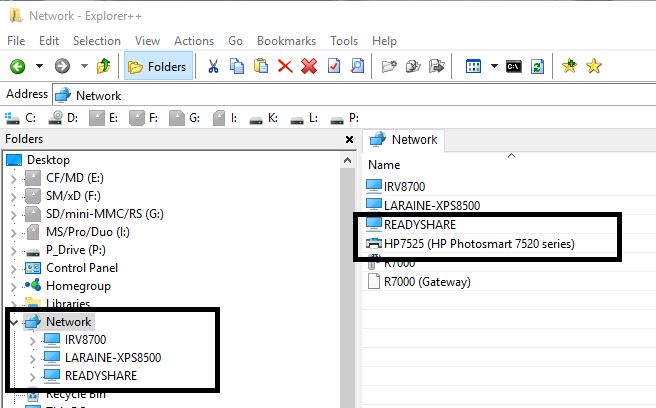
Right now I'm getting the 1231 error. I opened Explorer++ and selected NETWORK. It saw my PC, my wife's PC, and 2 R7000 items, the R7000 itself and the Media Server on it, but NOT the USB share. Same for Windows Explorer, see the attached screen capture.
Now I'm thinking 'possibly' when the printer is turned off that notifies the Master Browser on the R7000 and it deletes the printer, however it doesn't recover?
I'm going to test this again, reboot the router, test NET VIEW, turn on the printer, test NET VIEW, and the turn off the printer, and then test NET VIEW again. I will capture the Explorer++ with the Router working on NET VIEW and post this as well. If nothing else, you can see the difference that is shown for the Router, which to me indicates a router problem, not W10.

Not sure how to tell who is the master browser? Everything seems to point to 192.168.1.30 which is my PC?
Ok, I need to make two posts here. First is this one with BOTH the PRINTER and the USB Share showing.
Only using Explorer++ here. You'll see the Printer and READYSHARE are in the NETWORK.
Next one with the PRINTER OFF!
Notice the change? Printer is gone, as expected, so we know the Master Browser updated itself, BUT also notice part of the R7000 is missing, the device itself. Compare this file with the one above. It is the GATEWAY... but what is ODD is that it is NOW back a few minutes later?
As for the Master Browser I found this link, https://scottiestech.info/2009/02/14/how-to-determine-the-master-browser-in-a-windows-workgroup/ and from it:
==================
Now, what happens when you have Network Neighborhood turning up blank on you sporadically, or possibly missing several of the computers on your LAN from time to time? Well, in that case, you need to determine who is the Master Browser so that you can narrow down the problem to one computer and see if maybe you need an updated ethernet driver, or there are firewall problems, or whatever.
The “fun” way of doing this is with DOS commands. Here’s how you’d do it:
============
That doesn't seem to work?
Tried that:
================
C:\>net view
Server Name Remark
-----------------------------------------------------------
\\IRV8700 Irv's 8700
\\LARAINE-XPS8500
\\READYSHARE readyshare
The command completed successfully.
C:\>nbtstat -a IRV8700
Ethernet:
Node IpAddress: [192.168.1.30] Scope Id: []
Host not found.
Bluetooth Network Connection:
Node IpAddress: [0.0.0.0] Scope Id: []
Host not found.
C:\>nbtstat -a LARAINE-XPS8500
Ethernet:
Node IpAddress: [192.168.1.30] Scope Id: []
NetBIOS Remote Machine Name Table
Name Type Status
---------------------------------------------
LARAINE-XPS8500<00> UNIQUE Registered
LARAINE-XPS8500<20> UNIQUE Registered
HOME <00> GROUP Registered
MAC Address = 08-BD-43-A5-8C-AA
Bluetooth Network Connection:
Node IpAddress: [0.0.0.0] Scope Id: []
Host not found.
C:\>
C:\>nbtstat -a READYSHARE
Ethernet:
Node IpAddress: [192.168.1.30] Scope Id: []
NetBIOS Remote Machine Name Table
Name Type Status
---------------------------------------------
READYSHARE <00> UNIQUE Registered
READYSHARE <03> UNIQUE Registered
READYSHARE <20> UNIQUE Registered
HOME <00> GROUP Registered
HOME <1E> GROUP Registered
MAC Address = 00-00-00-00-00-00
Bluetooth Network Connection:
Node IpAddress: [0.0.0.0] Scope Id: []
Host not found.
==================
Something REALLY screwy here?
However when I use the -n on the command to show NETBIOS names, I see it on my PC?
===========
C:\>nbtstat -n
Ethernet:
Node IpAddress: [192.168.1.30] Scope Id: []
NetBIOS Local Name Table
Name Type Status
---------------------------------------------
IRV8700 <20> UNIQUE Registered
IRV8700 <00> UNIQUE Registered
HOME <00> GROUP Registered
HOME <1E> GROUP Registered
HOME <1D> UNIQUE Registered
☺☻__MSBROWSE__☻<01> GROUP Registered
Bluetooth Network Connection:
Node IpAddress: [0.0.0.0] Scope Id: []
No names in cache
=============
Odd?
Here are some of my results ...
C:\>net view
System error 1231 has occurred.
The network location cannot be reached. For information about network troubleshooting, see Windows Help.
*** *** ***
C:\>nbtstat -a READYSHARE
Ethernet 2:
Node IpAddress: [192.168.1.15] Scope Id: []
NetBIOS Remote Machine Name Table
Name Type Status
---------------------------------------------
READYSHARE <00> UNIQUE Registered
READYSHARE <03> UNIQUE Registered
READYSHARE <20> UNIQUE Registered
☺☻__MSBROWSE__☻<01> GROUP Registered
WORKGROUP <00> GROUP Registered
WORKGROUP <1D> UNIQUE Registered
WORKGROUP <1E> GROUP Registered
MAC Address = 00-00-00-00-00-00
NOTE: Looks like the router/READYSHARE is the master browser ...
Bluetooth Network Connection:
Node IpAddress: [0.0.0.0] Scope Id: []
Host not found.
Wi-Fi:
Node IpAddress: [0.0.0.0] Scope Id: []
Host not found.
Local Area Connection* 2:
Node IpAddress: [0.0.0.0] Scope Id: []
Host not found.
*** *** ***
WIN7 system on my network:
C:\>nbtstat -a XPS15USCJ
Ethernet 2:
Node IpAddress: [192.168.1.15] Scope Id: []
NetBIOS Remote Machine Name Table
Name Type Status
---------------------------------------------
XPS15USCJ <00> UNIQUE Registered
WORKGROUP <00> GROUP Registered
XPS15USCJ <20> UNIQUE Registered
WORKGROUP <1E> GROUP Registered
MAC Address = REDACTED
Bluetooth Network Connection:
Node IpAddress: [0.0.0.0] Scope Id: []
Host not found.
Wi-Fi:
Node IpAddress: [0.0.0.0] Scope Id: []
Host not found.
Local Area Connection* 2:
Node IpAddress: [0.0.0.0] Scope Id: []
Host not found.
*** *** ***
ROUTER (The device name in the router admin interface is R7000)
C:\>nbtstat -a R7000
Ethernet 2:
Node IpAddress: [192.168.1.15] Scope Id: []
Host not found. COULD THERE BE AN ISSUE THAT THE READYSHARE DRIVE AND NOT THE ROUTER IS THE MASTER BROWSER?
Bluetooth Network Connection:
Node IpAddress: [0.0.0.0] Scope Id: []
Host not found.
Wi-Fi:
Node IpAddress: [0.0.0.0] Scope Id: []
Host not found.
Local Area Connection* 2:
Node IpAddress: [0.0.0.0] Scope Id: []
Host not found.
*** *** ***
THE OTHER WIN10 system on my network:
C:\>nbtstat -a DISCOVERY
Ethernet 2:
Node IpAddress: [192.168.1.15] Scope Id: []
NetBIOS Remote Machine Name Table
Name Type Status
---------------------------------------------
DISCOVERY <20> UNIQUE Registered
DISCOVERY <00> UNIQUE Registered
WORKGROUP <00> GROUP Registered
WORKGROUP <1E> GROUP Registered
MAC Address = REDACTED
Bluetooth Network Connection:
Node IpAddress: [0.0.0.0] Scope Id: []
Host not found.
Wi-Fi:
Node IpAddress: [0.0.0.0] Scope Id: []
Host not found.
Local Area Connection* 2:
Node IpAddress: [0.0.0.0] Scope Id: []
Host not found.
*** *** ***
C:\>nbtstat -n
Ethernet 2:
Node IpAddress: [192.168.1.15] Scope Id: []
NetBIOS Local Name Table
Name Type Status
---------------------------------------------
INS7353USCJ <20> UNIQUE Registered
INS7353USCJ <00> UNIQUE Registered
WORKGROUP <00> GROUP Registered
Bluetooth Network Connection:
Node IpAddress: [0.0.0.0] Scope Id: []
No names in cache
Wi-Fi:
Node IpAddress: [0.0.0.0] Scope Id: []
No names in cache
Local Area Connection* 2:
Node IpAddress: [0.0.0.0] Scope Id: []
No names in cache
C:\>
@EruvWeather, see, the READYSHARE which is the router, IS NOT the MASTER BROWSER as I read it? 192.168.1.15 is, which is your PC's IP Address. Same thing happens in mine:
C:\Users\ispal_000>nbtstat -a irv8700
Ethernet:
Node IpAddress: [192.168.1.30] Scope Id: []
Host not found.
Bluetooth Network Connection:
Node IpAddress: [0.0.0.0] Scope Id: []
Host not found.
C:\Users\ispal_000>nbtstat -a readyshare
Ethernet:
Node IpAddress: [192.168.1.30] Scope Id: []
NetBIOS Remote Machine Name Table
Name Type Status
---------------------------------------------
READYSHARE <00> UNIQUE Registered
READYSHARE <03> UNIQUE Registered
READYSHARE <20> UNIQUE Registered
☺☻__MSBROWSE__☻<01> GROUP Registered
HOME <00> GROUP Registered
HOME <1D> UNIQUE Registered
HOME <1E> GROUP Registered
MAC Address = 00-00-00-00-00-00
I think possibly the Router IS the BACKUP MASTER BROWSER and when you try to discover it, it points to the real Master as it is the BACKUP?
On a side note, again, last night before SHUTDOWN NEW VIEW was working FINE. This morning, my PC was the first booted (and the one I got the above data from) and NET VIEW returns the 1231 error.
Quite possibly this is a problem as I suspect since my PC was the MASTER BROWSER when I shutdown. From what I've read, then the BACKUP, the R7000 (not sure what happens and who would be the MASTER BROWSER if there was no READYSHARE enabled?) should have become the MASTER BROWSER. Now once my (or my wife's PC or any of the other 2 we have which are rarely used) PC powers up it should become the MASTER BROWSER and the R7000 then goes into BACKUP mode. The LIST of shares of course should have been transferred though. Maybe the R7000 didn't sent the list to my PC OR W10 didn't ask for it or possibly process it properly. I think the support for it being an R7000 problem is because if I REBOOT the R7000 then NET VIEW works again? Further 'proof' that is might be the R7000 is because IF the REBOOT of the R7000 when it comes up 'notifies' the W10 PC that something was added to the NETWORK and then NET VIEW works might indicate a W10 problem. That is debunked though because IF I turn on the printer, which as you can see from one of my above screen captures, it shows on the Network, BUT doing that DOES NOT make NET VIEW work when the R7000 is on.
BTW, another thought here on why others DO NOT have this problem! Maybe READYSHARE must be ENABLED to have this happen? I think I did try once with READYSHARE not enabled and I still had the problem? But the fields were still filled in on the Browser. Could be the firmware doesn't look for the 'enabled' but the memory area where the READYSHARE data resides to be blank?
Bottom line, the worked FINE before (but I can't state when it went bad). A few firmware updates have been made recently, and it seems going back doesn't cure it either? I updated on 10/18/2017 to the 1709 W10 version, but I'm pretty sure it was working after that?
I guess unless there is a FIX for this, and IF Netgear even acknowledges this is a problem, or a W10 update fixes this, we'll never know who is the culprit.
Still surprised no other reports of this, especially with different routers? I may try putting on DD-WRT again, but I wasn't happy with it last time and took it off within a week or two? My gut feel is this is a Netgear problem though.
EruvWeather, TheEther, I'm not sure if I'm finding more answers or adding to the confusion on 'who' is the Master Browser.
One last point before I start explaining. My wife turned on her PC, NET VIEW there gets the error 1231 as well.
Ok, I decided to look closer at NBTSTAT and its various forms of parameter. From my CMD prompt on my PC, 192.168.1.30 (IRV8700).
=============
C:\>nbtstat -a irv8700
Ethernet:
Node IpAddress: [192.168.1.30] Scope Id: []
Host not found.
Bluetooth Network Connection:
Node IpAddress: [0.0.0.0] Scope Id: []
Host not found.
C:\>nbtstat -a 192.168.1.30
Ethernet:
Node IpAddress: [192.168.1.30] Scope Id: []
Host not found.
Bluetooth Network Connection:
Node IpAddress: [0.0.0.0] Scope Id: []
Host not found.
C:\>nbtstat -c
Ethernet:
Node IpAddress: [192.168.1.30] Scope Id: []
NetBIOS Remote Cache Name Table
Name Type Host Address Life [sec]
------------------------------------------------------------
READYSHARE <20> UNIQUE 192.168.1.1 464
Bluetooth Network Connection:
Node IpAddress: [0.0.0.0] Scope Id: []
No names in cache
===============
The -a is (adapter status) Lists the remote machine's name table given its name.
Using after -a both irv8700 and 192.168.1.30 yield the same results... good...
However, using -c, (cache), Lists NBT's cache of remote [machine] names and their IP addresses, points to READYSHARE?
According to https://technet.microsoft.com/en-us/library/cc961857.aspx there is some information that might explain some stuff... first is this:
-R Purges the name cache and reloads all #PRE entries from LMHosts.
Problem, I don't have a LMHosts file. Do have the LMHosts.sam (sample file) though. I think this missing file is what is causing the 'Host not found.' message.
Secondly, on that page :
<01><02>MSBROWSE<02><01> | Used by master browser servers to periodically announce their domain on a local subnet. This announcement contains the domain name and the name of the master browser server for the domain. In addition, master browser servers receive the domain announcements sent to this name and maintain them in their internal browse list with the announcer's computer name. |
Well, look at this:
================
C:\>nbtstat -a readyshare
Ethernet:
Node IpAddress: [192.168.1.30] Scope Id: []
NetBIOS Remote Machine Name Table
Name Type Status
---------------------------------------------
READYSHARE <00> UNIQUE Registered
READYSHARE <03> UNIQUE Registered
READYSHARE <20> UNIQUE Registered
☺☻__MSBROWSE__☻<01> GROUP Registered
HOME <00> GROUP Registered
HOME <1D> UNIQUE Registered
HOME <1E> GROUP Registered
MAC Address = 00-00-00-00-00-00
Bluetooth Network Connection:
Node IpAddress: [0.0.0.0] Scope Id: []
Host not found.
==============
What am I looking at? READYSHARE is the Router, no? I get the same output with -A 192.168.1.1? Is that pointing to MY PC (192.168.1.30)?
However LMHosts isn't really needed it seems, worst case you can't resolve and IP Address to a name it seems?
So that I think was that when my PC was booted it never got the Master Browser List from the Router OR when I shutdown last night the Router did NOT take over the Master Browser Function, OR if it did, it didn't get the List, but it would have to IF it was the backup as it already had the list? Does that make sense?
Also, what happens where there are 2 Windows PC's each trying to become the Master Browser? Could there be a situation where the Router was the Master Browser when no PC's were on-line? Then my PC comes on-line and becomes the MB and the Router the backup. Then wife's PC comes on, becomes the MB and my PC is the backup, with the router out of the question? Once both off, the Router is still not the MB (firmware bug that it didn't know the MB was gone as well as the backup?). Of course all this doesn't explain WHY the NEW VIEW command would work again once the Router was rebooted?
TheEther, funny, before looking at your reply I was just reading that one.
Different situation. First on 1703, not 1709. Secondly, it had to do with an Android device that needed SMB 1 and problem connecting (not running NET VIEW) from a non-Windows device.
I've searched all over. No real hits... when I find one that seems promising it has a different error code/message or clearly is very old or like the one above, referencing specific non-windows h/w.
I don't doubt for a minute that Win10 1703 had some problems, and I'd have expected those to be fixed in 1709. The mere fact that it works at some point and then fails leads me to beleive it is more transient on something changing within the LAN. Either the MB isn't doing its job and updating, the backup isn't becoming the MB, or some other oddity. I also KNOW it was working for me on 12/23/17 as that was the last time I transferred over my system backup to the USB drive. It appears to me by looking at the creation date of my stored NG Firmware folders the following day I installed V1.0.9.14! Was on V1.0.9.12 before that. However I recall going back as a test to V1.0.9.12 and it didn't fix it?
I do have 2 other routers here, both with USB ports. A LinkSys 350N V1 and a ASUS RT-N56U. Both are only up to N speed. Not sure I want to go to the trouble changing over. I'm sure it would prove this one way or the other, but still, if I can't get NETGEAR SUPPORT to see it, I suspect it would be a waste of time.
Putting on another 3rd party flash might be the easier way, but in my mind I'm thinking there could be a problem with that. I've seen too many reports here from people with problems with the recent firmware almost all with different solutions that worked for them but not others. There are so many 'options' each person can make in setting up the router who really knows if/how any interact with others? How big a problem is causes by not rebooting the router from a power off state after flashing or even the need to do the 30-30-30 reset? Not to mention the variety of devices and drivers for those that can connect.
Even in this case, we really don't know the root cause? Windows? Firmware? USB drive even? A combination? All we know is that it worked at one point but not now. We also can't find anyone on the web that has the exact same problem on W10 1709, using a router with a USB port being used... and other than EruvWeather here, no one. I'm sure others have routers that have USB ports and use NET VIEW with it? Why no reports from them? Netgear only? Not on Windows 10 1703 or higher?
At this time, unless I can find the smoking gun I might be done with this? It is clear to me that probably me and EruvWeather are isolated cases on this.
Still looking at this, might be wasting my time however. There are somethings that just don't make sense? The NEW VIEW has an oddity.
I issue the command on MY PC (192.168.1.30, name IRV8700) and get this:
C:\>net view
System error 1231 has occurred.
The network location cannot be reached. For information about network troubleshooting, see Windows Help.
OK, I know 'readyshare' exists so I do this:
C:\>net view \\readyshare
System error 53 has occurred.
The network path was not found.
Odd? I use the router's IP Address:
C:\>net view \\192.168.1.1
Shared resources at \\192.168.1.1
readyshare
Share name Type Used as Comment
------------------------------------------------------------------------
Movies Disk read:all-no password;write:all-no password
USB_Storage Disk read:admin;write:admin
The command completed successfully.
Let me try readyshare again:
C:\>net view \\readyshare
Shared resources at \\readyshare
readyshare
Share name Type Used as Comment
------------------------------------------------------------------------
Movies Disk read:all-no password;write:all-no password
USB_Storage Disk read:admin;write:admin
The command completed successfully.
What, it worked? SOMETHING had to have updated the MB, no? Who's to blame here?
Shortlived expectation, NET VIEW still fails with 1231, so was the MB updated or not?
Windows Explorer and Explorer++ both will show everything (on both operating PC's that are on) BUT the readyshare? However one can specify it via \\readyshare or NET USE x: readyshare and use it as a drive letter? What code is run on those programs and commands that it can find it but NET VIEW can't? In this case I'd think it was NEW VIEW code that is the problem, but then again, it might be processing a list that the MB keeps, which should be on the Router, or sent to a PC by the router.
More info is that after a period of time the DLNA Server doesn't operate on the R7000 but the Samba server did? This again could be an R7000 problem or a network problem based on IP Address resolution, again, in Windows or the R7000.
Irv ... I feel your pain! There is something wonky going on with certain W10 systems. No question. The question is what. There are other people reporting similar problems, just not specific to or blamed on the R7000. As I've said, if I open Windows Explore, click on "readylink" shortcut I created in "quick access" (so I don't have the type the address each time) ... if I click right away, Windows throws an error that the address is not reachable. Wait 30 seconds. There it is. As long as explorer stays open, there it is. If I close explorer, and open again after a certain amount of time - then it is rinse and repeat.
EruvWeather, your reply made me search Google again with different variants of W10, 1709, Master Browser, Explorer, missing shares.
Much to my amazement I found these:
Indicates this IS broken in 1703.
https://www.tenforums.com/network-sharing/85283-1703-master-browser-smb-broke-again.html
Another interesting one and SYS mentions he has a NG Nighthawk! Also note he was using Workgroup, NOT Homegroup. I am NOT using Homegroup either? Also his 'fix' is to use a flashdrive in the USB port, would not a USB drive be just as good?
Promising but NET VIEW complains a SERVICE is not started on 1709, not our problem.
https://appuals.com/fix-cannot-access-network-shares-after-update-1709/
Interesting one in that it claims it isn't working at all in 1709 without making changes. However, 2 things are different for us, we do not get the error it shows, and it DOES work for some period of time.
Interesting, on 1703, but it says putting a USB the router, shutdown all PC, reboot the router and IT will be the Master Browser. If so, and the problem continued to 1709, then the problem could very well be within the firmware on the R7000.
However, NONE of the above are a 100% match. In that none mention it would work and then wouldn't, nor get the 1231 error.
EruvWeather, TheEther, OK, I was looking at my Event Log today.. found a lot of these:
==========
Log Name: System
Source: BROWSER
Date: 1/8/2018 3:53:13 PM
Event ID: 8021
Task Category: None
Level: Warning
Keywords: Classic
User: N/A
Computer: Irv8700
Description:
The browser service was unable to retrieve a list of servers from the browser master \\READYSHARE on the network \Device\NetBT_Tcpip_{2EDDE305-16D3-4D87-B966-F36037B37451}.
Browser master: \\READYSHARE
Network: \Device\NetBT_Tcpip_{2EDDE305-16D3-4D87-B966-F36037B37451}
This event may be caused by a temporary loss of network connectivity. If this message appears again, verify that the server is still connected to the network. The return code is in the Data text box.
Event Xml:
<Event xmlns="http://schemas.microsoft.com/win/2004/08/events/event">
<System>
<Provider Name="BROWSER" />
<EventID Qualifiers="32768">8021</EventID>
<Level>3</Level>
<Task>0</Task>
<Keywords>0x80000000000000</Keywords>
<TimeCreated SystemTime="2018-01-08T20:53:13.677274700Z" />
<EventRecordID>21945</EventRecordID>
<Channel>System</Channel>
<Computer>Irv8700</Computer>
<Security />
</System>
<EventData>
<Data>\\READYSHARE</Data>
<Data>\Device\NetBT_Tcpip_{2EDDE305-16D3-4D87-B966-F36037B37451}</Data>
<Binary>CF040000</Binary>
</EventData>
</Event>
===========
This was happening as I was opening Explorer++. Guess we know who the Win10 PC thought was the MB. This is probably because the READYSHARE share isn't seen in Network.
IrvSp... I do not use Explorer++, but have not seen any issues in the Event Log such as you reported.
One thing I did notice yesterday ...
The other W10 computer that does not manifest this issue is connecting to the network on my 2.4GHz band, which has a slightly different SSID than the 5GHz band.
The Win10 system that is experience the issue is connected via Ethernet, but the Network name is reflecting the 5GHz band name. Whereas, my Win7 system reflects the name I assigned to it. This is probably a dead-end, but interesting none-the-less.
I may try to disconnect the Ethernet and connect via the 2.4GHz WiFi just to eliminate any chance of some voodoo here.
IrvSpI have read a pleathora of articles, these three were new to me, so thanks for sharing. All are tantalizing, and at least reassuring the we are not alone. One thing is certain, tracking down the exact cause on a given system is seemingly impossible. One thing I will check later today, is if SMBv1 is still active on my other Win10 system where the issue is not manifesting.
Perhaps the scheduled removal of SMB1 has not yet taken place on that system.
Even if so, I would be hesitant to re-enable due to security issues (the cure perhaps being worse than the disease).
Clearly, there is some combination of Windows networking updates, the router employed, specific network configuration, and specific system settings that are at play here. I am guessing the issue with the R7000 does have something to do with SMB1 being supported, but perhaps not later versions. Regardless, this is clearly a fairly widespread issue, and therefore, Microsoft may be the primary culprit.
Agree with you also --- since I already have a USB drive attached, that is likely not going to solve the issue. FWIW ... I shut down our entire network every Friday evening (for Shabbat). I literally power down the modem, the router, etc. So, when I start up the next evening, the order is boot modem, boot router, power up readyshare drive, connect devices to WiFi. The only two devices that would connect immediately upon reboot are my two Amazon Fire TV sticks, but they are certainly not being assigned MB duties! (Also, I confirmed that "Readyshare"/router is the MB). The issue persists from network restart to network restart.
Keep me posted if you learn anything more. I will do likewise!
EruvWeather, check your EVENT VIEWER, under Warnings, on the first PC powering up, it should try to become the Master Browser. It should be there under BROWSER in the WARNINGS. Error ID:8021.
My PC that is failing is hard wired, Win10 x64 Home 1709 version. The other PC is my wife's wireless Netgear AC1200 adapter on the 5Ghz SSID, W10 Pro x64 1709, but it rarely gets powered up before mine. Her PC gets the 1231 error as well. There was a period of time when it would work fine with NET VIEW and my PC didn't, however not both report the 1231 error.
However her Error is slightly different from mine in the Event Viewer:
==========
The description for Event ID 8021 from source BROWSER cannot be found. Either the component that raises this event is not installed on your local computer or the installation is corrupted. You can install or repair the component on the local computer.
If the event originated on another computer, the display information had to be saved with the event.
The following information was included with the event:
\\IRV8700
\Device\NetBT_Tcpip_{92F8A34C-2411-41B2-932F-177BC1F3AA20}
==========
Now this was on her PC, and points back to my PC IRV8700, which pointed back to READYSHARE...
I suspect that at one point her PC was the MB when everything was working fine. At some point in time, her PC was not the BACKUP MB and that is when it started to get the 1231 error? Right before the warning in her PC she got an 8032 Information entry (under the Windows Logs, System).
Googling any strings in either 8021 or 8032 really doesn't fine much, certainly not new, other than how to shutoff the PC from becoming the MB?
EruvWeather wrote:IrvSp... I do not use Explorer++, but have not seen any issues in the Event Log such as you reported.
Doesn't have to be Explorer++, Windows Explorer should do the same. What I was 'saying' was that was the time I opened Explorer++ and selected NETWORK, and that generated the error. Same should happen if you open Windows Explorer and select Network. That is when the request is made to read the data in the MB.
EruvWeather wrote:IrvSpI have read a pleathora of articles, these three were new to me, so thanks for sharing. All are tantalizing, and at least reassuring the we are not alone. One thing is certain, tracking down the exact cause on a given system is seemingly impossible. One thing I will check later today, is if SMBv1 is still active on my other Win10 system where the issue is not manifesting.
Perhaps the scheduled removal of SMB1 has not yet taken place on that system.
No, the SMB1 I think is a red herring here. First of all SOME SMB1 stuff is still enabled on W10. If you go to Control Panel, Programs and Features, and on the left select Turn Windows Features on or off, and scroll down to SMB 1.0/CIFS File Sharing Support, you'll see ONLY yhe SMB 1.0/CIFS Client is not installed. The other 2 parts are installed.
This would only effect SMB 1.0 network devices anyway I think?
IrvSp... I do not have the warning in the event log. I have checked :-)
EruvWeather wrote:I shut down our entire network every Friday evening (for Shabbat). I literally power down the modem, the router, etc. So, when I start up the next evening, the order is boot modem, boot router, power up readyshare drive, connect devices to WiFi. The only two devices that would connect immediately upon reboot are my two Amazon Fire TV sticks, but they are certainly not being assigned MB duties! (Also, I confirmed that "Readyshare"/router is the MB). The issue persists from network restart to network restart.
Keep me posted if you learn anything more. I will do likewise!
Are you saying after the reboot of all parts (in the correct order) that NET VIEW still gives the 1231 error? I found that rebooting the router alone 'repairs' everything and until that READYSHARE share drops off the network it works fine. You should see the same working.
IrvSpI agree that SMB1 is likely not the issue. However, on my system, none of the SMB1.0 components are checked as installed. It is completely removed at this time.
EruvWeather wrote:IrvSp... I do not have the warning in the event log. I have checked :-)
Have you opened Windows Explorer and selected Network to view contents of the network with NET VIEW failing with a 1231 error? If not, do that and then check the Event Viewer.
IrvSpYes ... I am saying after a complete network re-start, the issue remains ... regardless of what order I boot up various computers that connect to the network. I have tried booting the affected system first, last and everything in between!
EruvWeather wrote:IrvSpI agree that SMB1 is likely not the issue. However, on my system, none of the SMB1.0 components are checked as installed. It is completely removed at this time.
Hmm, wonder why 2 parts are on in mine? Hmm, checked wife's PC, her's are ALL off?
Shouldn't matter but I wonder why mine are on? Possibly some other s/w I'm running? We've got the same Internet Security Suite, Norton's, but at one point I did have McAfee? My PC is newer even, and we both came from W8.1? Her's is also a Dell and Dell says her PC isn't supported for W10 but it works fine?
IrvSp wrote:
EruvWeather wrote:IrvSp... I do not have the warning in the event log. I have checked :-)
Have you opened Windows Explorer and selected Network to view contents of the network with NET VIEW failing with a 1231 error? If not, do that and then check the Event Viewer.
I have, and do not have the same warning that you are getting ...