NETGEAR is aware of a growing number of phone and online scams. To learn how to stay safe click here.
Forum Discussion

AlanAdams
Jan 24, 2021Follower
R6700v3 Capped at 100Mbps (yeah, me too)
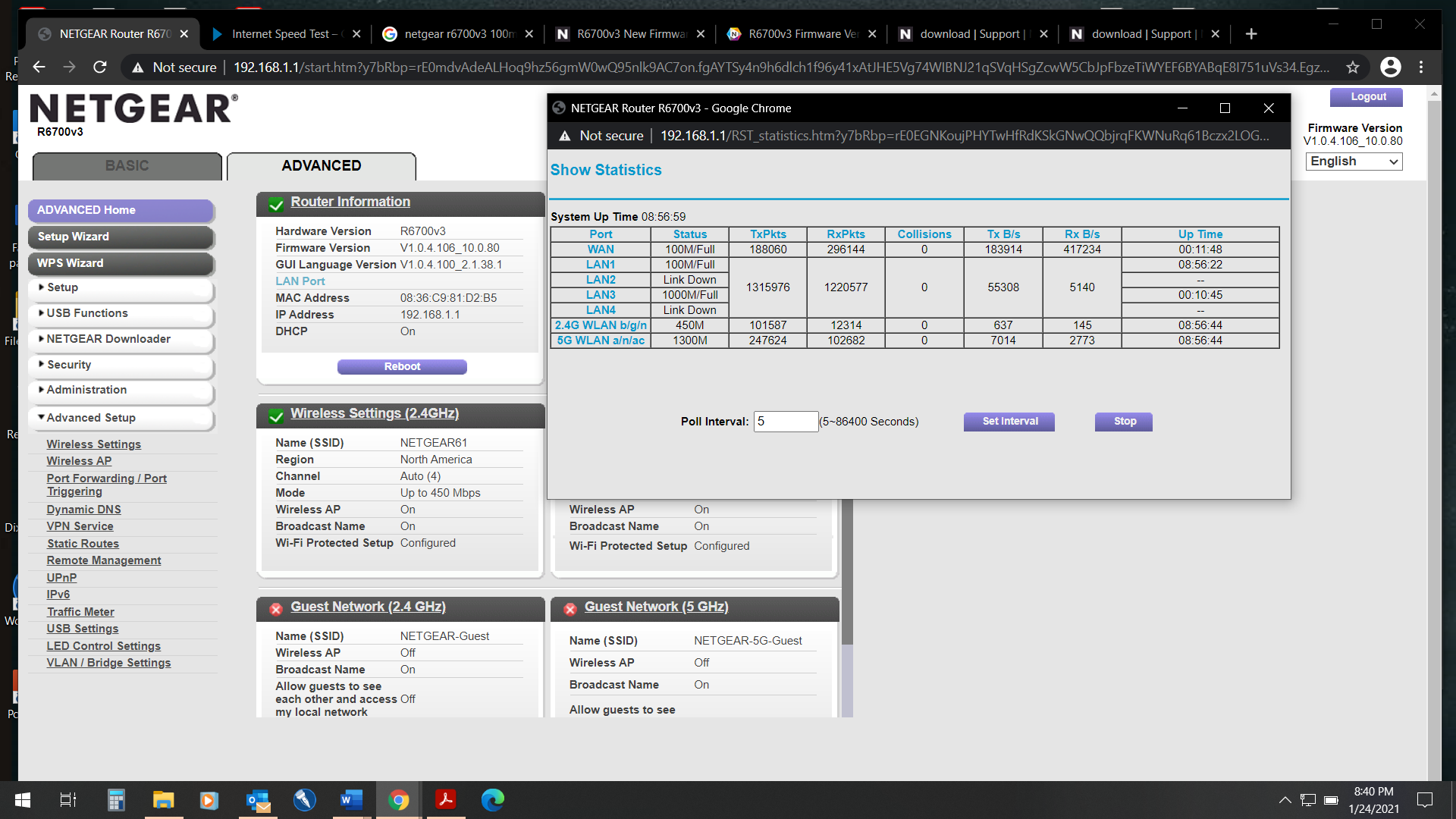
Setup a new R6700v3 on 1Gbps broadband service, and found that I couldn't achieve better than 100Mbps in any speed test. Eliminating the router and connecting directly to the broadband modem showed ...

michaelkenward
Jan 25, 2021Guru - Experienced User
Replacing a router behind a modem requires a network reboot.
As this is a router, there is probably a modem sitting in front of it. You need to get the devices to forget any inherited settings. Among other things, that means rebooting the network.
Be sure to restart your network in this sequence:
- Turn off and unplug modem.
- Turn off router and computers.
- Plug in and turn on modem. Wait 2 minutes for it to connect.
- Turn on the router and wait 2 minutes for it to connect.
- Turn on computers and rest of network.
Maybe you did this. I can't tell from your message.
Perhaps you could also tell people what the modem is.