NETGEAR is aware of a growing number of phone and online scams. To learn how to stay safe click here.
Forum Discussion

psmythirl
Oct 28, 2017Aspirant
R7000 - Admin login constantly looking for password
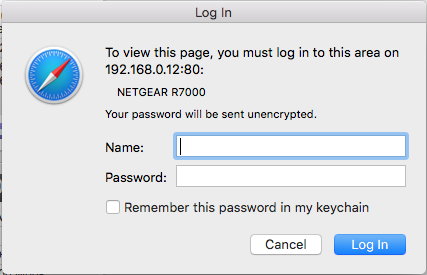
This problem started several firmware updates ago. I'm using a Mac (High Sierra) and the latest version of Safari. When I log in to the router admin page I initially get a white webpage requesting my log in details. After logging in the usual NetGear admin page loads. I then periodically get a pop-up window (see attached screen shot) which looks just like the log in window I used to get previously when logging into the admin page. If I click Cancel the window closes and immediately reopens. If I repeatedly do this then it eventually goes away before repearing again at some later point. Oddly the number of cancels required to dismiss the window varies. The window usually pops up after doing something in the admin window. Very frustrating. The machine I'm usually doing this on is using a wired connection but it also happens if I use a different machine over Wifi.
After further investigation I've narrowed the problem down to a conflict with Ghostery. Whitelisting the IP of the router appears to solve the problem. That still leaves the root cause of the problem to be determined.
4 Replies
 JamesGLNETGEAR Employee Retired
Hi psmythirl,
Try to clear the cache of your browser.
If still the same, reset the router.
- psmythirlAspirant
After further investigation I've narrowed the problem down to a conflict with Ghostery. Whitelisting the IP of the router appears to solve the problem. That still leaves the root cause of the problem to be determined.
> [...] When I log in to the router admin page [...]
How, exactly, are you doing that?
> [...] (see attached screen shot) [...]
"192.168.0.12:80"? ".12"? Isn't the router at ".1"? How are you
getting to it at ".12"?
> [...] Ghostery [...]
You mean this "Ghostery"?: https://www.ghostery.com/
"Cleaner, faster, and safer", and confused? I'd certainly try
disabling/removing it, to see if it's to blame. Sounds suspicious, at
least.- psmythirlAspirant
antinode wrote:"192.168.0.12:80"? ".12"? Isn't the router at ".1"? How are you
getting to it at ".12"?I'm getting to it at x.x.x.12 because that's the IP address I've assigned it.
antinode wrote:You mean this "Ghostery"?: https://www.ghostery.com/
Yes.
antinode wrote:"Cleaner, faster, and safer", and confused? I'd certainly try
disabling/removing it, to see if it's to blame. Sounds suspicious, at
least.I don't think you read my post properly or you'd realise that I've already said that the conflict is with Ghostery and that the solution is to Whitelist my router's IP address in Ghostery.