NETGEAR is aware of a growing number of phone and online scams. To learn how to stay safe click here.
Forum Discussion

StanH
Jul 09, 2021Tutor
R7000 - IP Address Reservation settings won't save.
I am using these instructions:
https://kb.netgear.com/25722/How-do-I-reserve-an-IP-address-on-my-NETGEAR-router
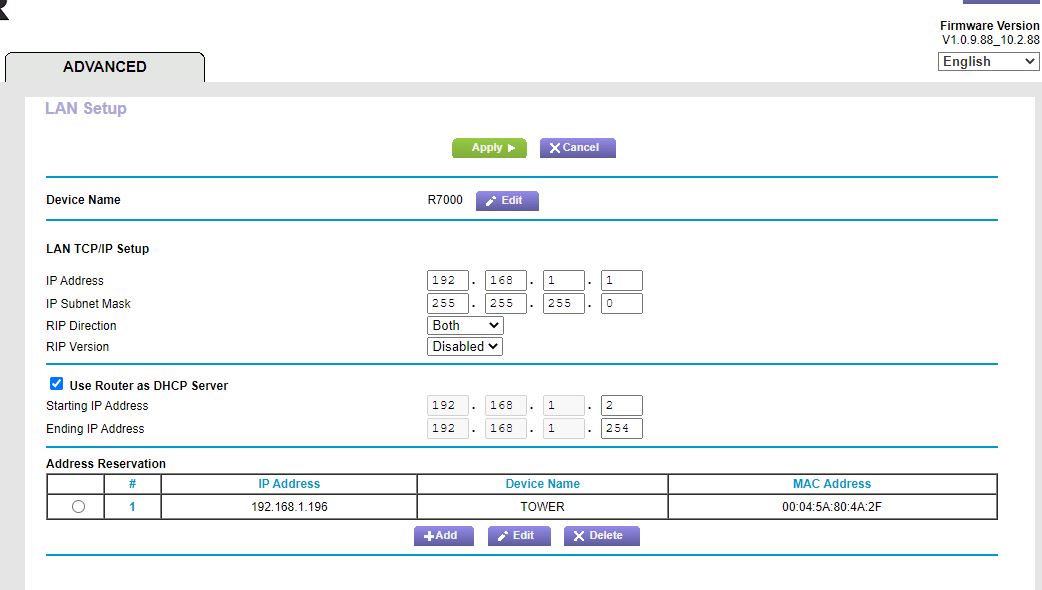
but I can't make the reserved IP perminent. The attached picture shows the page that I got to that I can't implement. It is at [Advanced] [Setuuup] [LAN Setup]. I am probably leaving out a step. I have reached
What steps should I perform at this point to save the reserved IP address that I have specified?
I am not sure the link to picture is working. When I click it, it wants to save rather than open.
2 Replies
> [...] I can't make the reserved IP [address] perminent. [...] I can't
> implement. [...]https://community.netgear.com/t5/x/x/m-p/2109384
> "can't" is not a useful problem description. It does not say what
> you did. It does not say what happened when you did it. As usual,
> showing actual actions (commands) with their actual results (error
> messages, LED indicators, ...) can be more helpful than vague
> descriptions or interpretations.Still true. A vague description of what does _not_ happen is less
useful than a clear description of what _does_ happen.> What steps should I perform at this point to save the reserved IP
> address that I have specified?8. Click the Apply button.
It's the green one that says "Apply".
> I am not sure the link to picture is working. [...]It's fine. What your web browser does with it is an argument between
you and your web browser (about which I know nothing).> [...] When I click it, it wants to save rather than open.
Worst case: Save it someplace, and then open the (newly saved) file.
 StanHTutor
1 Initial conditions:
All devices blocked except T1700 and TOWER, both of those are computers. TOWER is shut down. Internet is connected through the R7000. Routerlogin.net is not accessable unless Internet is connected.2 At [Advanced] [Setup] [LAN Setup], pushed the [Apply] button. The attachment shows the page just prior to pressing [Apply]. After apply, finished I rebooted the R7000.
3 Reconnected the network to the Internet. Login to routerlogin.net. This produced:
"Windows has dectected an IP address conflict"
In Event Viewer: [Error] "The name "SERVICCO :1d" could not be registered on the interface with IP address 192.168.1.2. The computer with the IP address 192.168.1.1 did not allow the name to be claimed by this computer."4 In Genie network map, 192.168.1.2 is the T1700, the name of the Windows 10 computer that I am running. Apparently the R7000 router blocked the computer I used to give instructions to the router!!!
5 Startup of TOWER (00:04:5A:80:4A:2F), IP is unchanged at 192.168.1.9