NETGEAR is aware of a growing number of phone and online scams. To learn how to stay safe click here.
Forum Discussion

Andarc777
Feb 28, 2022Aspirant
R7000 - Unable to update firmware
Evening all, I'm having a little trouble with a Netgear R7000 Router. I purchased this a couple of years ago, but it was never actually used. In a nutshell, it would appear that the router is o...

FURRYe38
Feb 28, 2022Guru - Experienced User
Are you using the routers web page to update FW?
What browser are you using? Try MS Edge or FireFox?
.CHK is the correct file extension...
Your on a verson that isn't listed on NGs download page for this model router.
You might try 1.0.2.164 or some middle ground version of FW to see if you can get the router past v1.0.1x
Andarc777
Feb 28, 2022Aspirant
Hi, thanks for your reply.
Yes, using the router's web page. Tried Firefox, Chrome and Edge. All the same error.
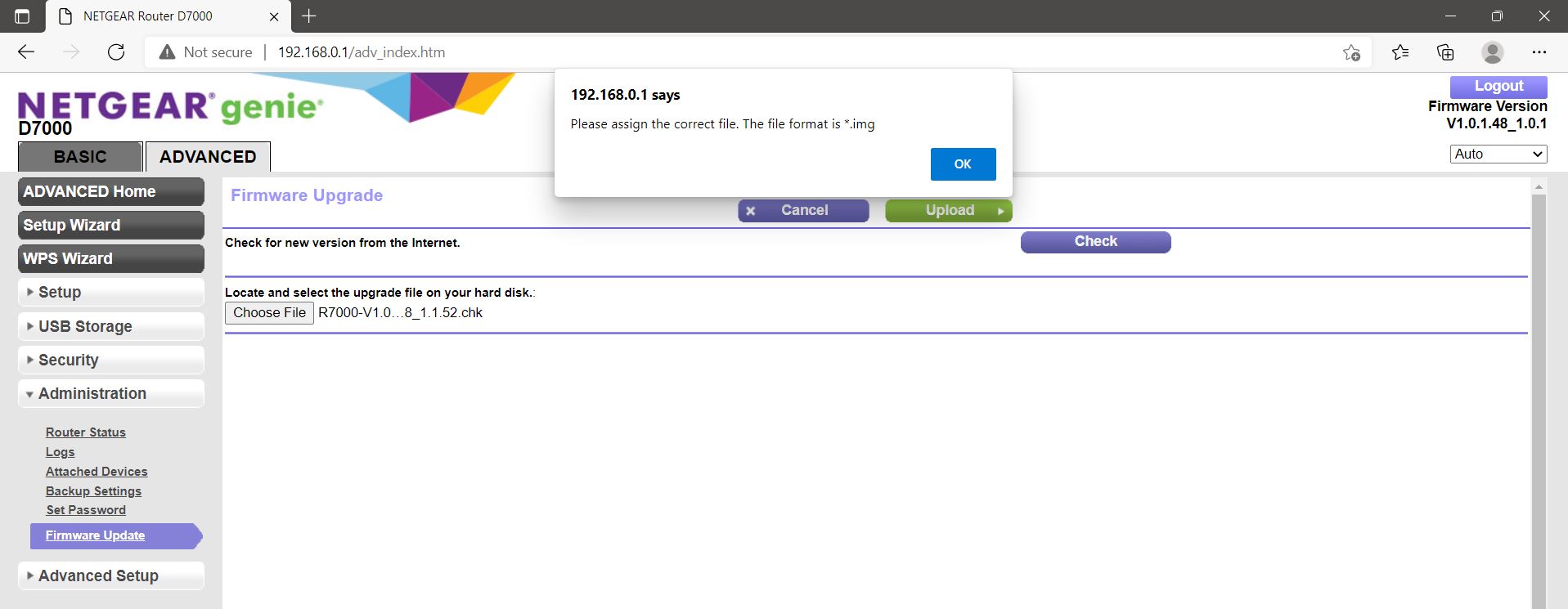
Yup, pretty sure .chk was correct, but it just won't accept anything other than .img - see attached photo.
1.0.2.164 is also .chk - won't accept it!
Really strange.......

- FURRYe38Feb 28, 2022Guru - Experienced User
Ok so for the v1.0.2x file, rename the .chk to .img and see if the router will accept it...
Ya, this is odd...
- Andarc777Feb 28, 2022Aspirant
Unfortunately, it didn't like it. Error saying Firmware file was incorrect.
Really scratching my head with this one.
- FURRYe38Feb 28, 2022Guru - Experienced User
Ok last resort will be this:
https://kb.netgear.com/000059634/How-to-upload-firmware-to-a-NETGEAR-router-using-Windows-TFTP
Need to press the reset button for 30 seconds then release, then it send to PUT the command and upload the FW.
Make sure you enable tftp: https://www.thewindowsclub.com/enable-tftp-windows-10
Video walk through using a tftp client. Use the built in one for windows 10 though. the video is more of an example of how its done:
https://www.youtube.com/watch?v=R9DLrLQrpawTry nmrpflash:
https://github.com/jclehner/nmrpflash