NETGEAR is aware of a growing number of phone and online scams. To learn how to stay safe click here.
Forum Discussion

Sneaks37
Feb 21, 2024Aspirant
R7000 AC1900 Channel 0 on 5Ghz
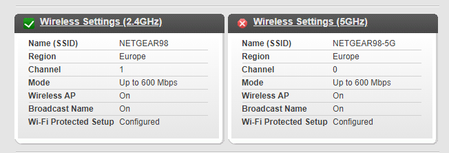
Hello, I'm having problems with my setting up my 5Ghz Wifi. No matter to what channel i change it's shows channel 0 at the home screen. If i change to up to 1300Mbps the channel changes to some Chin...
Sneaks37
Feb 21, 2024Aspirant
Hmm, haven't tried a factory reset. Will try as soon i'll get a moment. I'll post later the results.
I'm using Opera by default, but using a clean MS Edge didn't helped either.
Happens on both Smart connect disabled and enabled.
I'm located in Europe.

FURRYe38
Feb 22, 2024Guru - Experienced User
👍
- Sneaks37Feb 22, 2024Aspirant
I did a factory reset and unfortunately this time it shows some gibberish instead of Chinese symbols in channel number. This is very strange.
 microchip8Feb 22, 2024MasterI think it's time for a new router. The R7000 is over a dacade old.
- michaelkenwardFeb 22, 2024Guru - Experienced User
Sneaks37 wrote:
I did a factory reset and unfortunately this time it shows some gibberish instead of Chinese symbols in channel number. This is very strange.
One thing to try, reinstall the latest firmware. That can break too.
Did you check the region settings?
Then again, the region settings aren't likely to mean anything of your 5 GHz wifi is off. That seems to be what you screen grab shows.
I wouldn't rush to replace it until I have proved that it is bust.
The latest and greatest isn't always a good idea if you Internet service can't support it and the R7000 meets your needs.
