NETGEAR is aware of a growing number of phone and online scams. To learn how to stay safe click here.
Forum Discussion

Pretzel1
Jun 21, 2017Aspirant
R7000 Auto Update came down even though I have it disabled
I had no internet access yesterday morning so I restarted the router and checked the log and it shows that it did a firmware update [Initialized, firmware version: V1.0.8.34] Wednesday, Oct 31,2018 0...
 Aug 03, 2017
Hi Pretzel1,
I have tried to disable the Auto firmware update of my R7000. After 24 hours it is still on the same firmware and did not auto update.

FURRYe38
Jun 21, 2017Guru - Experienced User
What is the model# of the Arris modem?
I recommend doing a factory reset and set up from scratch and disable QoS and IPv6. Save settings and reboot the router and speed test using a wired LAN cable PC.
Set wireless security to WPA2 and AES only on both radios.
Recheck and verify that auto update is disabled.
Pretzel1 wrote:I had no internet access yesterday morning so I restarted the router and checked the log and it shows that it did a firmware update [Initialized, firmware version: V1.0.8.34] Wednesday, Oct 31,2018 07:49:36. I have auto updates disabled besides the fact that the date shows Oct 2018. So what the heck is the deal with that? Since the update which required me to restart the router I have since had slow download speeds and restarting both router and ARRIS modem has no affect. I am seriously regretting this purchase and believe that a once trusted source of equipment has gone the way of the dinasour like so many. I have had more firmware updates pushed since my purchase than I normally would in years of a reliable product.
Pretzel1
Jul 21, 2017Aspirant
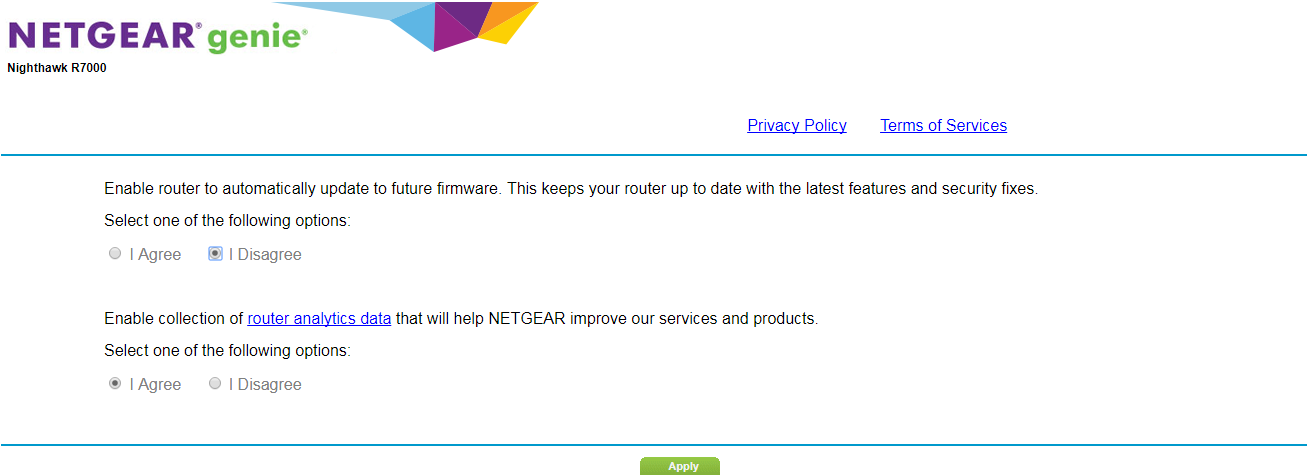
So this just happened again today. I have the Router Auto Firmware Update option set to Disable yet my router is now updated to 1.0.9.6
[Initialized, firmware version: V1.0.9.6] Friday, Jul 21,2017 14:33:48. Looks like it is time to shop for another router. This thing is buggy as hell and I do not trust it to keep my network secure. My log even shows that one of my kids Fire HD's IP address was logged into the device as Admin which she wouldn't have a clue how to do. Hell I can't even upload a screen shot to this site to show you the settings in IE. What the hell ever happen to customer satisfaction and quality assurance. I have been a senior quality assurance analyst for a 100 years and I would never let some up these issues reach a customer.
- JamesGLAug 03, 2017NETGEAR Employee Retired
Hi Pretzel1,
I have tried to disable the Auto firmware update of my R7000. After 24 hours it is still on the same firmware and did not auto update.
- JamesGLAug 06, 2017NETGEAR Employee Retired
Hi Pretzel1,
We’d greatly appreciate hearing your feedback letting us know if you need further assistance.