NETGEAR is aware of a growing number of phone and online scams. To learn how to stay safe click here.
Forum Discussion

Iddo
Jan 08, 2017Aspirant
R7000 DNS settings ignored
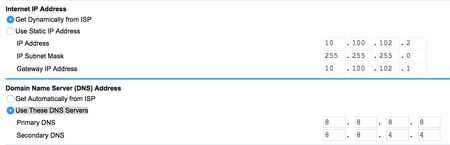
I've tried to get parental control to work, but it didn't. My investigation lead me to understand that the router ignores the DNS configurations and uses the ISP DNS. I've manually configured my ro...
 Jan 08, 2017Are you using the ISP's modem? Can you (or have you) put your R7000 in the dmz of the modem?
clithes
Jan 08, 2017Prodigy
The setup process hasn't been followed correctly or didn't work if you're still seeing google DNS servers on your Internet settings page.
Run through the process in the Genie app, log in or set up an openDNS account, and then choose the protection level you require.
Once you've done this your DNS servers should change to:
208.67.222.222
208.67.220.220
which are openDNS servers.
R7000 Userguide page 57 onwards
Hope this helps
Iddo
Jan 08, 2017Aspirant
Thanks for the reply.
I guess my initial description of the chain of events was not detailed enough...
I will explain it in detail.
I have defined parental control as described in the manual using the Genie App.
Once that was done, I've seen the openDNS servers in the Genie app and in the web UI.
When I saw it was not blocking any sites, I used "traceroute" and saw that domain names were resolved against the ISP DNS and not against the OpenDNS one.
To make sure it is an issue with DNS, I then disabled parental control and manually defined the google DNS servers through the web UI.
As you can see from the tracerout screen capture, the request is still resolved against the ISP DNS and not against the ones defined in the router web configuration wizard.
My conclusion from that experiment is that the router ignores the DNS definitions at all cases. when parental control is defined or when they are manually entered.
Thanks.
Iddo.