NETGEAR is aware of a growing number of phone and online scams. To learn how to stay safe click here.
Forum Discussion

bbarahi
Oct 11, 2018Aspirant
R7000 Latest Firmware V1.0.9.42_10.2.44 broke wifi
Hello Everyone,
My R7000 router just got updated to firmware version V1.0.9.42_10.2.44. When I checked the wifi speed after the update, it's fluctuating and very slow (sometimes in the range of...
- Oct 11, 2018
Always do a hard reset (paper clip thingy) after every firmware upgrade and manually enter all your settings. Your problems should be solved.
Backing up your current settings and loading them to your new firmware won't work and you will just have the same problems.
Actually, I recommend doing a hard reset every time you want to change any setting in your router. I know its tedious to reset and manually input your old settings and the new ones that you want to try out but that's the only way to maintain the performance of this router for longer periods of time.
If you finally notice any performance degredation over time, then it is again time to do a hard reset and manually enter again all of your settings even if you don't have plans to upgrade/downgrade your firmware. Always manually enter your settings through the web browser interface (not Genie app) and don't content yourself in loading just a backup. You will encounter problems with the performance of your router.
Watchmands
Nov 24, 2018Aspirant
I had the same issue with firmware version V1.0.9.42_10.2.44. My 5 GHz network was very slow. Websites sometimes disconnected for no reason. Max internet speed was 2 - 4 Mbps.
I used a diagnostic wifi monitor on my phone and saw that the 5 GHz signal was dropping out completely ( 0 dBm) about every 30 seconds and then coming right back up. 2.4 GHz was also sporadic, but not as bad.
I rolled back the firmware to V1.0.9.34_10.2.36. Problem instantly resolved. all devices are now connecting normally. A new speed test showed 150+ Mbps. Diagnostics showed signals around -40 dBm (very strong).
I recommend skipping this firmware update unless there is something in the readme that you really need.
- JimmyWNov 24, 2018Luminary
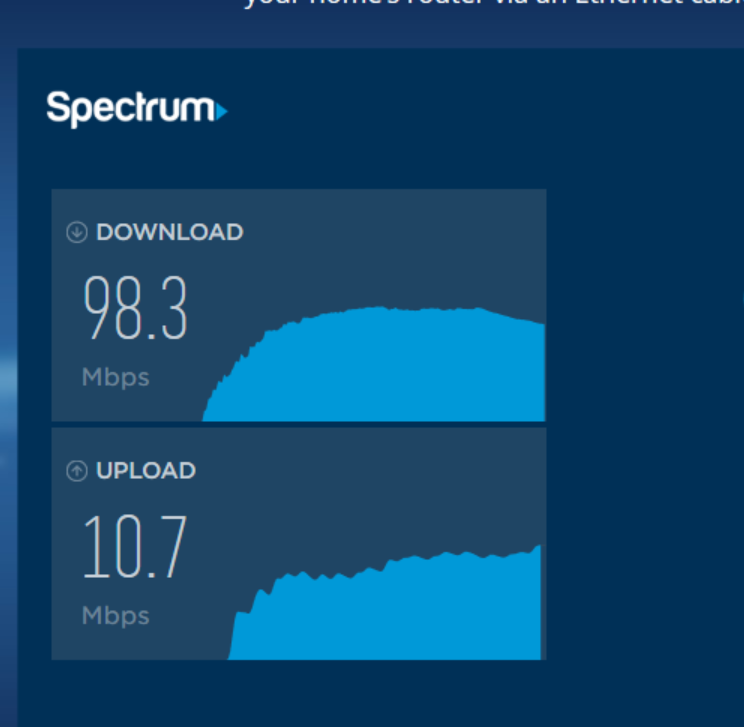
That's interesting as my router speed was terrible on the 2.4 Ghz side, at least after the firmware update. It wasn't that great before, though I didn't test it then. I switched to the 5 Ghz side and it's great: 98/10 (screenshot). The 2.4 connection typically hovered around 16/9, and my modem is putting out 100+. I'm with Spectrum and have the 100Ghz service. Others have suggested that the issue with the 2.4 might have been related to my drivers/software. I use a MS Surface with Win 10x64. I will add that some other issues with the new firmware were solved with a reset of my modem.