NETGEAR is aware of a growing number of phone and online scams. To learn how to stay safe click here.
Forum Discussion

sb2016
Oct 08, 2016Tutor
R7000 new Firmware disables Access Control
I am using Nighthawk R7000 in "Access Point Mode". With the prior Firmware Version (don't remember the version): I was able to use the "Access Control" link on the Advanced->Attached Devices pag...
- Nov 18, 2016
Access Control feature is disabled in AP mode per design and not considered as a bug.

OmerFaruk
Dec 19, 2016Tutor
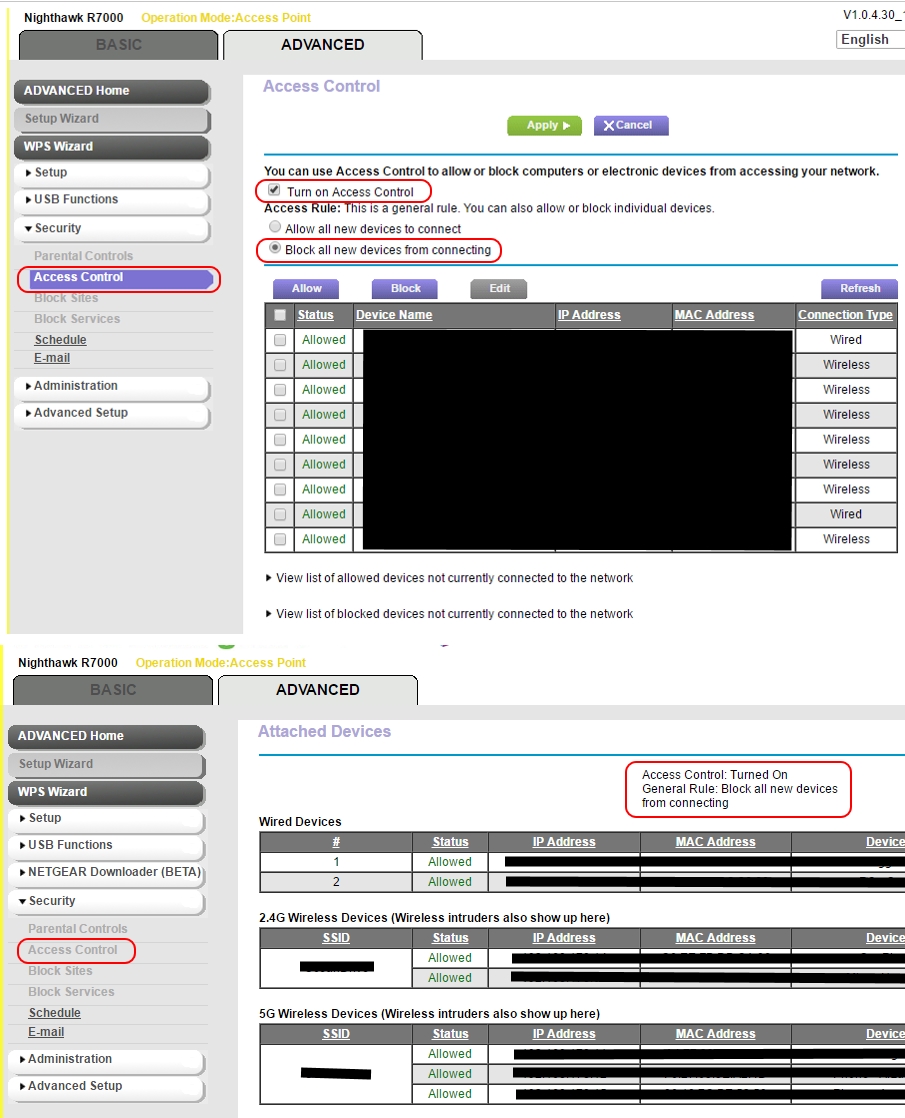
The Access Control issue described by Maxtest is apparently still present in the latest firmware:
- Top: Original firmware: Access Control/'Block all new devices' active;
- Bottom: After upgrading to the latest firmware: Access Control no longer accessible, yet 'Attached Devices' shows Access Control/'Block all new devices' still active.
Question: How to connect new devices in the future? Would I need to do something like a Factory Reset? (Is that even possible on the R7000?).
FrankdeBruin
Dec 21, 2016Star
I ran into this problem earlier this year when the AP mode stopped (!) allowing access control.
Netgear support explained to me that the AP does not support access control any longer but "confirmed it with our engineering team that on the future firmware release they will incorporate the Access Control even on AP Mode." No time frame could be given. As a short term fix I was recommended to revert to an older version of the firmware.
With the latest urgent security fix, this seems no longer an option and I am stuck between a rock and hard place.
Unless I figure out a way to make router mode work in configuration (not all my devices are directly connected to the R7000 and the subnetting makes I can't see them), I am considering switching to another brand or to DD-WRT to increase my security by bringing back access control.
Frank
- OmerFarukDec 21, 2016Tutor
Yep, going back to an older firmware version is not really an option anymore.
If you wanna stay with Netgear firmware, then the only way IMO is to disable Access Control. For this, IMO you'll need to do a Factory Reset. (I understood on Tweakers.net that it's possible to do a Factory Reset on the R7000. Haven't done it myself yet, but probably will have to next time I want to connect a new device (I'm not to keen on experimenting with alternative firmware yet)).
- FrankdeBruinDec 21, 2016Star
Maybe the following sequence would work?
- switch to Router Mode
- change your Access Control settings/add a new device
- switch back to AP Mode
I will have a go at it later today...
Frank
- OmerFarukDec 21, 2016Tutor
Ah ok, let me know if that works!
- FrankdeBruinDec 22, 2016Star
Summary: it didn't do what I'd hoped for: modifying access control settings through Router Mode
starting point - AP mode with attached devices showing "Access Control: Turned On General Rule: Allow all new devices to connect "
end point - AP mode with attached devices screen showing "Access Control: Turned Off"
Details:
Step 1: save the router settings in a cfg file via 'Advanced->Administration->Backup Settings
Step 2: switch from AP mode to Router Mode (careful, the R7000 got a different IP address in the range 192.168.1.x)
After the reboot, I temporarily could not connect to the router via wifi LAN, although I could see it. Not sure why. I connected through another machine that had a wired connection. Without making any changes, I re-gained access also through the wifi.
Step 3: Activated "Access Control" (was off) and set the option to disallow new devices to connect.
Step 4: Switched from Router Mode to AP mode; reboot occured automatically; in AP mode the access control was found to be off. This showed that what I wanted, is not possible.
Step 5: Loaded configuration settings saved in the step1; reboot occured automatically; in AP mode the access control was listed to be on again with new devices allowed to connect, i.e. back to where I started.
I cannot verify whether the access control is actually on AP mode, since I started with new devices allowed.
It seems that going from AP Mode -> Router Mode -> AP mode resets the access control to off. This might help you out if you get stuck with AP mode+no-new-devices-allowed. If you want to try, I suggest that you make sure you have a way to physically connect to the router, just in case.
YMMV.
Frank