NETGEAR is aware of a growing number of phone and online scams. To learn how to stay safe click here.
Forum Discussion

TheBatman
Aug 03, 2018Aspirant
R7000 not doing gigabit ethernet speeds
I have just upgraded to Comcast Gigabit Internet. It's coming in to a Surfboard SB8200 modem. At the modem, I get correct speed. From the router, notsomuch. I have done factory resets, I have all...
- Oct 30, 2018
I think I have it figured out...as I was *not* getting speed right out of the modem. I replaced the nighthawk with a Linksys router - exact same results - so it isn't the router at all. I had the Comcast techs out for 2 1/2 hr...of course, they connected one of their modems....GIG SPEED!!! I don't want one of their modems...I want mine to work, as it is supposed to be compatible. They kept pointing back to my modem... As it turns out, I'm getting 32 downstream channels bonded/locked...but only 4 upstream (and there should be 8. Comcast, thus far, has been unable to provision the modem correctly...so it's on them.
Thanks for all of the suggestions, etc., and i'm hoping Comcast can get their stuff together (personally, I think they owe me a rebate for the months I haven't been able to get the speed I should have...).

IrvSp
Aug 04, 2018Master
TheBatman wrote:
I have read that, if you enable QoS, it will booger your speeds, and that at Gig speeds, it's unnecessary anyway, so yeah...welcome to my world :o) Thanks for the reply tho...
Yes, true... but it seems that 'some' speed is set internally some say. That limits you. Enabling Qos, testing the speed and applying clears that. Then disable QoS and apply.
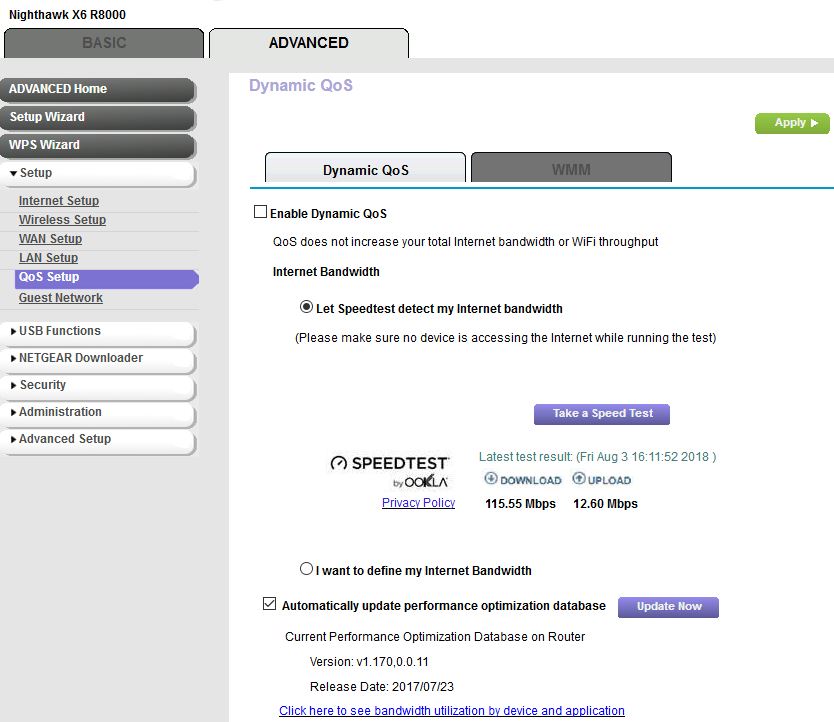
I did that one first setup, and that test always has appeared for me, and I can run it, even with QoS disabled.... see Capture on right.
TheBatman
Aug 04, 2018Aspirant
IrvSp wrote:
TheBatman wrote:
I have read that, if you enable QoS, it will booger your speeds, and that at Gig speeds, it's unnecessary anyway, so yeah...welcome to my world :o) Thanks for the reply tho...
Yes, true... but it seems that 'some' speed is set internally some say. That limits you. Enabling Qos, testing the speed and applying clears that. Then disable QoS and apply.
I did that one first setup, and that test always has appeared for me, and I can run it, even with QoS disabled.... see Capture on right.
Yep -been there, done that...lol... I'm still only showing like 401 Mbps download. Upload speed is good...but that D/L speed is less than half what it should be showing. I was in Best Buy today looking...and it is just going to PAIN me to pay that much $$ again, when I shouldn't have to. There was a D-Link for under $100...and one other one that was around $75, but D-Link has never been good for me, but now that Netgear isn't really being good to me either - not sure what I should do.
- IrvSpAug 04, 2018Master
TheBatman wrote:
I was in Best Buy today looking...and it is just going to PAIN me to pay that much $$ again, when I shouldn't have to. There was a D-Link for under $100...and one other one that was around $75, but D-Link has never been good for me, but now that Netgear isn't really being good to me either - not sure what I should do.I'm not going to be like some others around here and suggest what you buy. Some even suggest different vendors but use 3rd party S/W.
Some swear by 3rd party s/w and claim it fixes whatever ails them. I suspect that is because it is a fresh install and the configuration they had with many firmware updates got damaged somehow. Rarely do you see a complaint the it was working as-is for x months and all of a sudden this happened, although there are a few of those.
To be honest, I too was ready to go somwhere else...
I had an R7000, over 6 years old. A week or so after the last firmware upgrade I did one day the Internet LED was orange? Rebooted the router and it was OK. I was having modem problems where it did reboot randomly. I thought it was modem caused. Then it happened again, but I had the modem replaced by the ISP. It would happen every 3 or so days... I felt the router served me well over the time so I didn't mind replacing it, but I wasn't too thrilled about NG's 3 month support for problem, and the problems I've had in the past and the slow poor resolution, and my on-going battle with support.
So I looked at other router warranties... I recall them all being about the same. In the past I've had LinkSys and ASUS routers, as well as other NG routers. I had the best experiences with NG though. With all them, usually the newer they were, the more problems one has immediately. Now I used a USB drive for sharing data across iPad's, Phones, and Smart TV's. So I needed one with that DLNA feature. That right away puts me into the more expensive class. The R8000 seemed to fit the bill and my pocketbook so I got it. I liked the Smart Connect on it being only for the 2 5Ghz radio's and how it divides the devices on those bands. Works fine for me.
Well, if you really really want to, there is a DD-WRT for the R6700, https://www.myopenrouter.com/downloads/dd-wrt-r6700. I did put a DD-WRT build on my R7000 one time, used it for a few weeks, and it was missing some features at the time like logging and I had to install a script to do that. I saw no real advantage using it and went back to stock Netgear firmware (it isn't hard to do). Before throwing the router aside it could be worth a try?
- TheBatmanAug 04, 2018Aspirant
Well, that was an exercise in futility. I Flashed to DD-WRT...the good news is - I didn't brick the R7000...the bad?? No change in speeds. I can get the speed at the modem, so I know it's there. Ugh...probably looking like more money to be spent.
- IrvSpAug 04, 2018Master
I'm at a loss? With 2 different firmware from different vendor's it could very well be the router? If in the 1 year window, get it RMA'ed. Worth a try the new one doesn't have the same problem?