NETGEAR is aware of a growing number of phone and online scams. To learn how to stay safe click here.
Forum Discussion

rbird2
Oct 09, 2017Luminary
R7800 firmware update 1.0.2.36 broke Network Drive - unable to make backups.
Well I unfortunately upgraded to the "Netgear R7800-V1.0.2.36" firmware and found it broke Readyshare with my WD 1TB eSATA drive connected to my R7800. Using Macrium Reflect I was unable to make a ba...
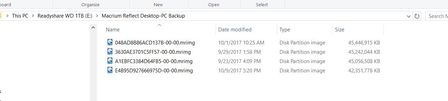
- Nov 24, 2017
Netgear has finally released R7800 firmware version 1.0.2.38 that fixes the Network Drive bug introduced in the version 1.0.2.36 firmware:
http://www.downloads.netgear.com/files/GDC/R7800/R7800-V1.0.2.38.zip

michaelkenward
Oct 10, 2017Guru - Experienced User
Did you reset the router to factory settings after the firmware flash?
New firmware sometimes introduces changes that are not compatible with the old configuration.
So a factory reset is the first thing to try if you have problems with new firmware.
First note down the settings – screen grabs can help here.
rbird2 wrote:
Well I unfortunately upgraded to the "Netgear R7800-V1.0.2.36" firmware and found it broke Readyshare with my WD 1TB eSATA drive connected to my R7800.
rbird2
Oct 10, 2017Luminary
Yes, I already know this. The R7800 router has been reset by both the Netgear web interface and the back button. This problem is still there.
Based on other comments in this forum, It sounds like I am not the only one with this same problem. How do we get Netgear Engineering to acknowledge and fix this bug in the R7800 firmware update 1.0.2.36?
As mentioned before, the main reason I bought this expensive router was to run a network drive. With R7800 firmware update 1.0.2.36 the router is worthless. I know I can revert to R7800 firmware update 1.0.2.32 but it is my understanding that 1.0.2.36 fixes some very serious security flaws.
- avtellaOct 10, 2017Prodigy
Look at post 6 in that link,I mentioned the reason there:
I suggest you fall back to .32 if you need properly working Samba.
- rbird2Oct 10, 2017Luminary
I agree that it sounds like a problem with SMB in the latest update (1.0.2.36). If you look at posts #19 in the "R7800 Firmware Version 1.0.2.36" discussion on the SMB Forums:
https://www.snbforums.com/threads/r7800-firmware-version-1-0-2-36.41329/
Voxel states:
"Reason of problem is obvious: using somewhere in function 32-bit integer (int) instead of 64-bit (int64). As a result value more than 2GB becomes negative. And function fails. Critical values for 32-bit are 2GB for signed variables and 4GB for unsigned variables. It could be even somewhere in C RTL.
I do not understand why Samba 3.6.25 was not used by Netgear but Samba4. Samba4 is too huge. It was discussed in other thread.
Voxel."
Again, we are back to the question: How do we get Netgear to fix what they broke. We all paid a lot of money for an expensive router that now has the network drive feature inoperative.
- rbird2Oct 13, 2017Luminary
Where is the new firmware to fix this major bug?
Many of us were forced to revert back to version 1.0.2.32 to keep network drive functionality. It is my understanding that there were major security vulnerabilities fixed in 1.0.2.36 so by being forced to use version 1.0.2.32 we are now at risk.
I have provided Netgear very detailed information on the problem. I would hope that Netgear has a staff of very competent programmers that could take this information and quickly provide us the updated software we need ASAP to keep us safe.
So far, we have heard nothing from Netgear on this problem. I for one am VERY disappointed with Netgear’s lack of response on this problem.
I purchased an expensive Netgear R7800 router especially for the Readyshare Network feature. If you are not going to fix this bug in a timely basis tell me so I can purchase another router that works correctly. I am NOT comfortable using a router that does not include all of the latest security vulnerability fixes.
