NETGEAR is aware of a growing number of phone and online scams. To learn how to stay safe click here.
Forum Discussion

SidJacks
Nov 27, 2022Aspirant
R8000 Internet port not working
Hello all. I am trying to get my R8000 to successfully connect, but nothing is lighting up the Internet Port. I have tested with other cables on a different router and the cables are good. A loopb...


FURRYe38
Nov 28, 2022Guru - Experienced User
What happens if you use a LAN port after the R8000 is configured for AP mode, does this work?
Possible the WAN port maybe bad. LAN port could be used I believe while in AP mode.

SidJacks
Nov 28, 2022Aspirant
Thanks for the response. 2 things to now provide.
1. When I power on the router, the internet light comes on with all of the others during the boot sequence. So I know it's not just a blown led or anything.
2. Since I'm now in AP mode and I ran an ethernet cable from one of the modems lan ports (out) to lan 1 on the r8000 (in) that port is now lit.
I guess I try to connect to the router wirelessly and see if I have data?
1. When I power on the router, the internet light comes on with all of the others during the boot sequence. So I know it's not just a blown led or anything.
2. Since I'm now in AP mode and I ran an ethernet cable from one of the modems lan ports (out) to lan 1 on the r8000 (in) that port is now lit.
I guess I try to connect to the router wirelessly and see if I have data?
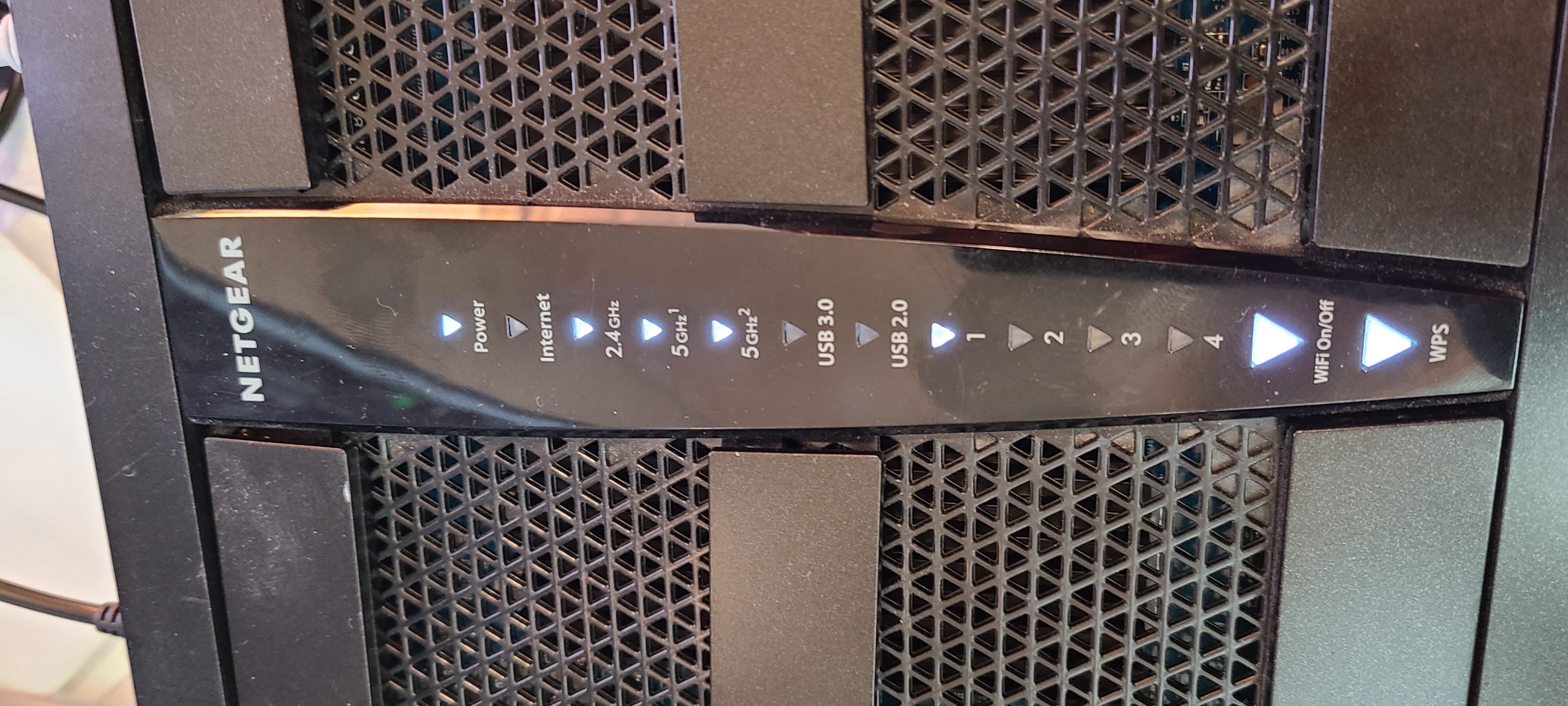
- SidJacksNov 28, 2022AspirantUpdate. After about 30 min, that LAN 1 port that was white in the last pic went orange.
I had not done anything else since the last reply.
I'm certain I'm just overlooking something simple at this point.- FURRYe38Nov 28, 2022Guru - Experienced User
What CAT# lan cable are you using? Might check your cabling and jacks for good operation.
CAT6 is recommended.
- SidJacksNov 28, 2022AspirantThis particular cable that I took from a known working device is 5e.
I tried something else.
I held the wifi on/off button until it turned off and moved the cable back to internet port.
Internet light on the panel is now a slow blinking orange.
- SidJacksNov 28, 2022AspirantMoved down the line to ports 2, 3, and 4. All flashing orange.
The only solid lights are Power, wifi on/off, and was.
2.4, 5G1, and 5G2 are all rapid blinking white