NETGEAR is aware of a growing number of phone and online scams. To learn how to stay safe click here.
Forum Discussion

rutilate
Oct 20, 2015Tutor
R8000 jitter extremely high on Skype voice calls
When running Skype voice call over a wireless connection between my Macbook Pro and Netgear Nighthawk R8000 (both in the same room), jitter is commonly in the 300-400 range and sometimes up into the ...
 Oct 20, 2015
TL;DR Try disabling Dynamic QoS. Leave WMM on, however. Switch to the least congested Wi-Fi channel. Check Wi-Fi signal strength on your Mac. Use 5 GHz.
While Netgear generally recommends disabling QoS for Internet connection speeds of 300 Mbps or higher, I think that's too conservative. Netgear's QoS implementations have trouble managing high speed links; IOW, enabling QoS worsens performance. QoS should only be used on lower speed Internet connections where congestion is likely. For the typical use case with 1 or 2 video streams, and a smattering of web surfing, email and gaming, that amounts to 10 to 20 Mbps in the downstream direction. Your 105 Mbps connection will likely never saturate in the downstream direction. And while your upstream bandwidth is only 10 Mbps, unless you happen to uploading photos or videos, there is little chance it will be fully used. Even Skype traffic requirements are modest (1.5 Mbps for HD video, much less for audio only). My recommendation is to turn off Dynamic QoS on your R8000.
You should survey your area for the presence of other Wi-Fi networks. Someone may be using the same Wi-Fi channel as your network. You will want to switch to the least congested channel. Use the desktop Genie app, or freeware programs like Vistumbler or Acrylic Wi-Fi.
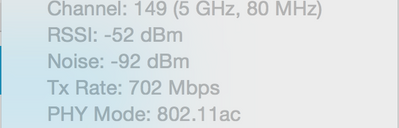
Finally, it wouldn't hurt to double check the strength of the Wi-Fi signal as reported by your Macbook. Hold the option key down and click on the Wi-Fi symbol at the top of your screen. This will display information about the Wi-Fi signal, as shown below, for example:
You will want to make sure that the RSSI and Tx Rates are good. In fact, you should see numbers comparable to mine since your Mac and R8000 are in the same room. By all means, use the 5 GHz network!
Hope this helps.
TheEther
Oct 20, 2015Guru
TL;DR Try disabling Dynamic QoS. Leave WMM on, however. Switch to the least congested Wi-Fi channel. Check Wi-Fi signal strength on your Mac. Use 5 GHz.
While Netgear generally recommends disabling QoS for Internet connection speeds of 300 Mbps or higher, I think that's too conservative. Netgear's QoS implementations have trouble managing high speed links; IOW, enabling QoS worsens performance. QoS should only be used on lower speed Internet connections where congestion is likely. For the typical use case with 1 or 2 video streams, and a smattering of web surfing, email and gaming, that amounts to 10 to 20 Mbps in the downstream direction. Your 105 Mbps connection will likely never saturate in the downstream direction. And while your upstream bandwidth is only 10 Mbps, unless you happen to uploading photos or videos, there is little chance it will be fully used. Even Skype traffic requirements are modest (1.5 Mbps for HD video, much less for audio only). My recommendation is to turn off Dynamic QoS on your R8000.
You should survey your area for the presence of other Wi-Fi networks. Someone may be using the same Wi-Fi channel as your network. You will want to switch to the least congested channel. Use the desktop Genie app, or freeware programs like Vistumbler or Acrylic Wi-Fi.
Finally, it wouldn't hurt to double check the strength of the Wi-Fi signal as reported by your Macbook. Hold the option key down and click on the Wi-Fi symbol at the top of your screen. This will display information about the Wi-Fi signal, as shown below, for example:
You will want to make sure that the RSSI and Tx Rates are good. In fact, you should see numbers comparable to mine since your Mac and R8000 are in the same room. By all means, use the 5 GHz network!
Hope this helps.
- rutilateOct 20, 2015Tutor
TheEther, thanks for the response.
I'm on 5Ghz network, TX Rate down from the router to the mac is 700-850Mpbs.
I moved one of my networks from 149 to 161 to overcome overlap, turned off QOS. I'll test the calls tomorrow and report back in.
- rutilateOct 22, 2015Tutor
I've run the system for two days and found that the calls are quite spectacular now! I think that turning off the QOS was the trick. Who would think that disabling such a highly touted feature would be a good thing?