Forum Discussion

RRSS
Jul 14, 2023Tutor
R8000 usb storage access
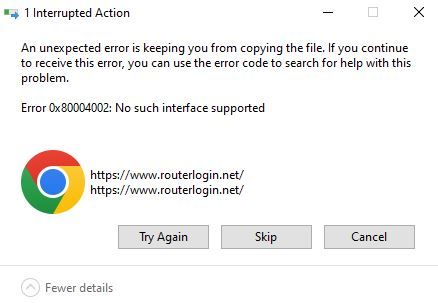
I am setting up a new Win11 Home machine and cannot access the usb storage connected to the router. In Windows Explorer I click on Network/R8000 (Gateway) and see the attached error in image. The wei...
- Jul 15, 2023
michaelkenward wrote:One thing I have found is that in its own inimitable way Windows doesn't always populate the network. However, if I point explorer at \\READYSHARE, it comes to life.
This allowed "USB_Storage" to show up in Explorer and I was able to map it. Thank you for the help! It's crazy that ReadyShare just didn't show up under Network by itself
RRSS
Jul 15, 2023Tutor
Sure wasn't expecting vitriol, but anyways...
I am using current firmware V1.0.4.84_10.1.84
Below the solution post made by SPUBOL there are people (JimmyJohnson, SayMyName) that mention this solution fixed a problem with their smart tvs not being able to access the usb storage. I also experienced this problem on my smart tv years ago and could no longer use Readyshare DLNA after Netgear removed the feature a while back. I am now using VLC app on the tv. It works. This is not what I am posting about today, so I wasn't sure if that solution was applicable.
The modem in front is only a modem.
As stated, I am having problems mapping the usb storage drive in Windows 11, getting the error in the image above when I click on Network->R8000 (Gateway) in Windows Explorer. I have the drive mapped on the old Win10 machine, so I am not sure if the issue came about after I mapped the drive on that machine.
- michaelkenwardJul 15, 2023Guru - Experienced User
RRSS wrote:
Sure wasn't expecting vitriol, but anyways...
You didn't get anyway. Merely a request for better information.
One recent issue that has hit ReadySHARE is the death of ReadyCLOUD.
Support for ReadyCLOUD feature ends spring 2023 | Answer | NETGEAR Support
I have ReadySHARE USB showing on my equivalent to a smart TV. To do that I have to put an app on the Firestick I use to manage the "TV".
But the TV thing is probably a diversion from your quest to get the USB drive to show in Windows 11.
That works fine here. But I have SMB1 enabled.
One thing I have found is that in its own inimitable way Windows doesn't always populate the network. However, if I point explorer at \\READYSHARE, it comes to life.
I'm puzzled by the earlier reference to:
In Windows Explorer I click on Network/R8000 (Gateway) and see the attached error in image.
If you mean Network Infrastructure that is not designed to get you to USB storage. Here at least, it takes me to routerlogin.net so that I can sigh into the browser graphical user interface (GUI).
That seems to be what your PC is trying to do. Although it seems to be looking for an https link, which isn't what Netgear delivers. (You can force that in some routers, but it is a bad idea that breaks other things.)
That looks like Chrome. Have you tried a different browser? Browsers are gettimg increasingly paranoid and will block "suspect" sites, including routerlogin.
It might be worth sorting that out and the USB may also play ball.
One thing that is always worth checking in Windows is the nature of the network connection. Is it Private or Public?
Windows likes to protect us from new networks that might be evil. In reality, it often shuts us out of safe networks.
You could tell Windows that you are on a "private network".
- Settings
- Properties
- Network and Internet
- Ethernet
- Properties
- Network profile type
- Private network
This has worked for me and others in the same boat. It is also suggested here regularly.
This may all be irrelevant, but I am working on the basis of the details you have provided.
- RRSSJul 15, 2023Tutor
Thank you for the input and information. Yes, I was trying to get "USB_Storage" to show up in Windows Explorer so I could map it. In the past clicking on the R8000 (Gateway) in Network Infrastructure would achieve this, You mention ReadyCloud and I see that the service ended on April 4, 2023. It seems likely that this is the problem and I must have mapped it on my Win10 machine prior to that date.
Both machines are connected to the Private network. The Win10 machine uses Chrome and the Win11 machine uses Firefox with the error showing in both machines.
- michaelkenwardJul 15, 2023Guru - Experienced User
RRSS wrote:
You mention ReadyCloud and I see that the service ended on April 4, 2023. It seems likely that this is the problem and I must have mapped it on my Win10 machine prior to that date.
But that's only if you were on a remote connection. I doubt if this had anything to do with the local access. I mentioned it because of the TV thing. Mine is, or was, using ReadyCLOUD.
ReadyCLOUD actually died last week.
Both machines are connected to the Private network. The Win10 machine uses Chrome and the Win11 machine uses Firefox with the error showing in both machines.Brings us back to why Windows is messing about.
These things are sent to try us.
- RRSSJul 15, 2023Tutor
michaelkenward wrote:One thing I have found is that in its own inimitable way Windows doesn't always populate the network. However, if I point explorer at \\READYSHARE, it comes to life.
This allowed "USB_Storage" to show up in Explorer and I was able to map it. Thank you for the help! It's crazy that ReadyShare just didn't show up under Network by itself
- michaelkenwardJul 16, 2023Guru - Experienced User
RRSS wrote:
This allowed "USB_Storage" to show up in Explorer and I was able to map it. Thank you for the help! It's crazy that ReadyShare just didn't show up under Network by itselfAbsolutely. But I have seen the same "missing link" thing for network stuff that has nothing to do with ReadySHARE.
I have just opened Explorer It found just one of the four NAS boxes on my network. It did find \\READYSHARE.
It seems to be a long running issue with all versions Windows.
One tool worth installing if you want to poke around on your network is the desktop genie for Windows. (There is also a Mac version.)
Netgear is trying to kill this useful utility, but for the time being you can find it here:
genie | Product | Support | NETGEAR
Be warned that the genie installation file is wrapped up in a RAR archive that you have to decompress.
It has a useful Network Map that will reveal everything attached to your network.
