Forum Discussion

R8000PFixer
Dec 09, 2021Initiate
R8000P V1.4.1.50 Update workaround
Hello All Infuriated R8000P Owners, Ok I found out a solution to the V1.4.1.50 "Lock-Down" as I call it. I too was not able to install updates through, Automatic Update, Manual Update Upload, or...
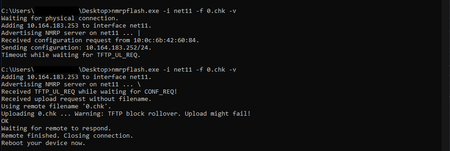
- Dec 28, 2021
HOLY SMOKES!!!!!!!!!!! THIS ACTUALLY WORKS!!!
For me, the timings were completely different than what you said.
Here are the steps that I took that worked for me:
- Turn off the router
- Execute the code "nmrpflash.exe -i PORT -f .0.chk"
- Turn on the Router
- Once the Orange light comes on, press the Reset button
- The upload should do its thing.

michaelkenward
Dec 11, 2021Guru - Experienced User
R8000PFixer wrote:
Sorry, I don't know why the pictures don't load
For future reference, it takes time for images land. To ensure that you aren't posting anything naughty, a Netgear moderator has to approve the pictures.
You can attach images to messages without any delay. But they way you embedded them is better for people who read the thing.
Shoestar
Dec 28, 2021Initiate
HOLY SMOKES!!!!!!!!!!! THIS ACTUALLY WORKS!!!
For me, the timings were completely different than what you said.
Here are the steps that I took that worked for me:
- Turn off the router
- Execute the code "nmrpflash.exe -i PORT -f .0.chk"
- Turn on the Router
- Once the Orange light comes on, press the Reset button
- The upload should do its thing.
- Dave3544Feb 28, 2022Initiate
Folks, I have been battling this for quite a while, and this solution works! Awesome job R8000PFixer ! However, the timing of this thing is really tough. It seems that 3 tries at this solution means you are very lucky. For me, it was 19. AND I found that there are some timing tweaks to get you past errors like "TFTP_UL_REQ" timeouts.
So here are my 19 cents:
1) get Nmrpflash installed
2) get NPcap installed, (gotta have it)
3) For me, I did not need to have the ping window going to get the nmrpflash -L to give me the correct adapterID (mine was net7)
4) The adapterID is case sensitive in the nmrpflash command
5) The LED switch was left on
6) Use router port 1 of the router7) Change your wired IP address to be static but if you have lots of devices pick a number much higher than 192.168.1.10
8) If you can, run your CMD window as admin, to avoid the admin prompt ever time you try this.
9) Then go to c:\users\your_username\desktop
10) copy your firmware file there and rename it to something short, like R.chk
11) turn off the router
12) in the CMD window type the command below, using your adapterID where I have net7. The -t and -T affect longer handshakes
13) nmrpflash -v -i net7 -f R.chk -t 10000 -T 10000 and press enter
14) when the command starts, power on the router and right when you see the power light press the reset button for anywhere from three to seven seconds, and on some tries, even try pressing the reset button before the power light comes on.
15) you will get lots of fails, and if the white lights come on, or the command times out, go back to step 11
16) Suddenly, on your last pass, the timing works out and the R.chk file loads. Don't get impatient as it runs a while.
17) Wait for the instruction to "Reboot your device", and let it sit a minute. Then reboot it.
18) You may have to go back and change your wired static IP back to non-static, or windows may choke on it
19) You can then reconfigure your router from scratch, rebooting several times before it is how you need it
20) Your firmware will indeed be updated, and the nightmare is over.
21) Interesting reading here: https://github.com/jclehner/nmrpflash and consider a donation. This fix is worth it!
---Dave
- zag001Mar 10, 2022Aspirant
I wanted to take the time to thank all of you for your hard work in fixing this problem...for yourself.
I have NO idea of what you write.
I paid $200 for a router that I have to sweat to make it do what should be automatic or easier for the layperson.
I just hope the updated firmware doesn't make or break any security requirements I might need because I can foresee I will not be updated this black box again. I NEVER had this problem in 2 or 3 years. Why now?
Why are we on the brink of war?
Thank you again, Carole
- Jethro2372Mar 12, 2022Guide
Good work around for those that this worked for. That being said this is a consumer grade device and no consumer grade user should be task with advance networking/ programing solutions. Netgear needs to take responsibility for each and every one of their devices having this issue! This issue is well known and wide spread, if you have found yourself on this forum with this issue and can return your device do so and buy something that does not say Netgear on it!
- lumberjackAug 15, 2022Initiate
Hi everybody
I was struggling a while before I got it worked. In my case, the scenario was even more straightforward. The clue was to add IP addresses explicitly and no reset button at all
Precondition:
ETH connected to router port1
Local PC IP address: 192.168.1.10
Interface name: net12
File with firmware name: a.chk
Scenario:
1. Switch router OFF
2. Send command from PC:
C:\ppp>nmrpflash.exe -v -i net12 -a 192.168.1.1 -A 192.168.1.10 -f a.chk
3. Switch router ON check out the terminal:
Waiting for Ethernet connection (Ctrl-C to skip).
Adding 192.168.1.10 to interface net12.
Advertising NMRP server on net12 ... /
Received configuration request from 10:0c:6b:13:4e:7d.
Sending configuration: 192.168.1.1/24.
Received upload request without filename.
Using remote filename 'a.chk'.
Uploading a.chk ... Warning: TFTP block rollover. Upload might fail!
OK (53346382 b)
Waiting for remote to respond.
Remote finished. Closing connection.
Reboot your device now.Powercycle this **bleep** and job is done
- FURRYe38Aug 15, 2022Guru - Experienced User
Are you not using the latest FW update?
