NETGEAR is aware of a growing number of phone and online scams. To learn how to stay safe click here.
Forum Discussion

R8000PFixer
Dec 10, 2021Initiate
R8000P V1.4.1.50 Update workaround
Hello All Infuriated R8000P Owners, Ok I found out a solution to the V1.4.1.50 "Lock-Down" as I call it. I too was not able to install updates through, Automatic Update, Manual Update Upload, or...
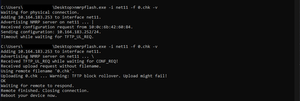
- Dec 29, 2021
HOLY SMOKES!!!!!!!!!!! THIS ACTUALLY WORKS!!!
For me, the timings were completely different than what you said.
Here are the steps that I took that worked for me:
- Turn off the router
- Execute the code "nmrpflash.exe -i PORT -f .0.chk"
- Turn on the Router
- Once the Orange light comes on, press the Reset button
- The upload should do its thing.
zag001
Mar 10, 2022Aspirant
I wanted to take the time to thank all of you for your hard work in fixing this problem...for yourself.
I have NO idea of what you write.
I paid $200 for a router that I have to sweat to make it do what should be automatic or easier for the layperson.
I just hope the updated firmware doesn't make or break any security requirements I might need because I can foresee I will not be updated this black box again. I NEVER had this problem in 2 or 3 years. Why now?
Why are we on the brink of war?
Thank you again, Carole
Jethro2372
Mar 13, 2022Guide
Good work around for those that this worked for. That being said this is a consumer grade device and no consumer grade user should be task with advance networking/ programing solutions. Netgear needs to take responsibility for each and every one of their devices having this issue! This issue is well known and wide spread, if you have found yourself on this forum with this issue and can return your device do so and buy something that does not say Netgear on it!