NETGEAR is aware of a growing number of phone and online scams. To learn how to stay safe click here.
Forum Discussion

peter11742
Dec 07, 2016Luminary
R8500 bricked
Hi All. This is my first report. I purchased on purpose the above router on Ebay. I can not register it Serial 4DG65B7G019C5 it is used like mint. The reason i found it is the best range router an...
- Dec 16, 2016
This is my final procedure after I fixed the second router r8500.
1) J4 connector pins : 1 2 3 4 pins are visable by looking the motherboard and they are located in the front view.
and j4 mark is located next to #1 pin. 1 gets green color, 2 gets white color, 3 gets green color, 4 is not connected.
2) open the bottom cover by removing the 6 tork screws.
Take the cover half way out so you can see the j4 plug and plug the serial cable.Turn on the router.
3) Start Putty let it run for a minite or so and start sending control c commands until you will see CFE.
4) on CFE type nvram erase you will see a 0 as an answer.
5) On CFE type tftpd you will get tftpd server ready ::
6) go on comand mode dos cmd>tfttp -i 192.168.1.1 put C:\r85.chk
r85.chk will be your old firmware located on the c:\ main directory
7) Now you will see a blue led on the #1 port flickering comminicating.
8) if what you did is correct then you will get from dos and putty file tranfered successful.
9) Now hold the reset button with a pin and turn the power off.
10) with the pin on reset turn power on and waight for 3 reboots let the pin go.
11) waight for 2 minutes you will see many led's comunicating and final the main led will be normal.
12) The router is now ready to be configuerd.
13) The network name and password is located on the white paper top right or at the bottom of the router.
I did 2 units the first one it took 1 week the second one it .5 hour.
Good luck.
peter11742
peter11742
Dec 07, 2016Luminary
Hi All.
Some observations during this procedure are the following.
The KiTTY is configuered as serial with baut 11500, databits 8, stop bits 1, no parity, no flow control.
I send the 8500 router firmware and for 20 minutes I see the KITTY sending the file.
At the end I reboot the router and still fails.
At the end also I do tftp -i 192.168.1.1 put R8500.chk it fails.
At this point I will take a brake until we come with a better sequence.
Last my serial cable is good and is connected as following #2 pin blk, #3 pin white @#4 pin green.
If any one sees any mistake is wellcome to edit my files.
Best regards.
Peter11742

TheEther
Dec 07, 2016Guru
You are not supposed to be seeing flickering letters. You should see something like this:
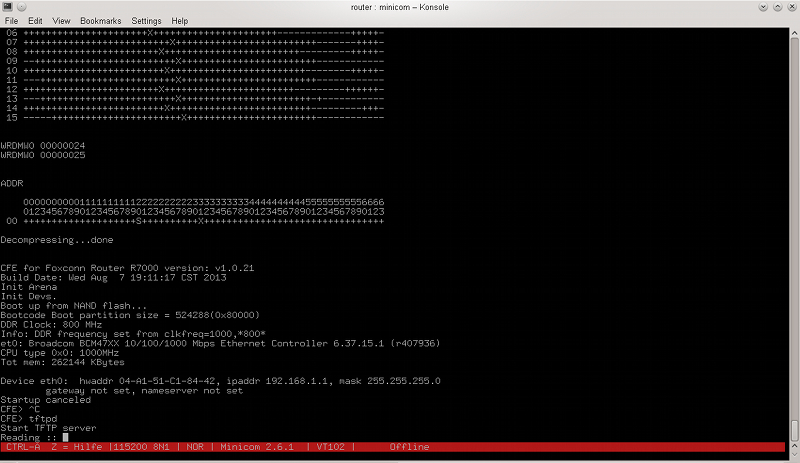
Try swapping the Tx and Rx connections.
Also, I'm not sure if you realize, but the tftp transfer is supposed to happen over Ethernet. The serial cable is only used to start the TFTPD server on the router. I hope that's what you are doing and NOT trying to tftp over the serial cable.
- peter11742Dec 08, 2016Luminary
Thank you.
I will try this swapping the cables but also I will try to repeat this with an XP laptop.
I like to be sure that I get some comunication from the router.
I always have a cat5 connection so I cover both commands.
I will give some information with the foundings later on.
Best regards.
Peter11742
- peter11742Dec 08, 2016Luminary
Updates.
I found that my usb to ttl cable unpluged from the router will give me the scamble letters when I send the script.
I do not know what is cousing this if any one had this before can maybe tell me what is the issue.
The script is good I downloaded twice.
Best regards.
Peter11742
- TheEtherDec 08, 2016Guru
Try a lower baud rate, like 19200.
What does the script do?
- peter11742Dec 08, 2016Luminary
Hi.
I did adjust to 9600 but I still have the characters crazy.
My windows compatibility fails on Kitty.
Thanks for the hint we will fix it somehow.
Best regards.
Peter 11742
- peter11742Dec 08, 2016Luminary
I forgot to ask you which windows platform are you using.
Thanks.
- TheEtherDec 08, 2016Guru
Windows 10. Did you ever try swapping the TX and RX connections?
- peter11742Dec 08, 2016Luminary
Hi.
I am testing the unit unplunged because the display is giving but moving characters.
I will find my other win 10 laptop and I will see if it corrects the problem.
I will pass this problem first before I go to router.
Thanks.
Best regards.
peter11742
- peter11742Dec 08, 2016Luminary
Hi
The wires were swapped but the problem remained bad characters.
Thanks
Peter11742
 VE6CGXDec 08, 2016Master
I did not read whole threads. OP, did you buy the broken router intending to fix it? Then first thing to make sure is CFE is intact. 8500 is not such a robust router with issues as you note else where in the forum. Garbled letters can be caused by wrong baud rate. If CFE is messed
up, reloading CFE is another matter. If you reset the router what is the status of LED indicators? Is power light blinking green?
- peter11742Dec 08, 2016Luminary
Thanks.
First let me start to correct, the router R8500 is the best signal range router for the money.
This is what I found in the internet.
Now if you see all my messages you will see I bought the router from Ebay it has a YELLOW light.
The price was good and the router was brand new still in warranty.
I am an electrical engeneer in the medical field and retired.
I have pleanty time to play with routers.
Now you know why I try to fix it. It is a good chalenge and a good product.
The baud has been changed from low to high numbers have no effect on the error of the router, it is my system that causes the bad letters.
The problem is in the software "KiTTY" when I send the firmware it gives me letters moving that have no sense.
This is my first fix then I will continue with the firmware reload to fix the YELLOW light.
By me doing this many people will read what I do and they are going to learn and fix their problems.
Best regards.
Peter11742
- peter11742Dec 08, 2016Luminary
Thanks for the infomation for win 10.
It seems my laptop on win 10 do not like the software is incopatible.
So I will play with win 7 and i5 cpu.
I reloaded all the software.
Now I cannot load the script.
I do not see the reason but I will see what is causing this error.
If you have any other software that is as good as Kitty that sends scripts to the usb port.
I will soon report some good news.
Best regards.
Peter11742
- VE6CGXDec 08, 2016Master
First what does amber light mean? Have you checked if CFE is intact? Tried Putty?
You may get more help at smallnetbuilder forum or dd-wrt forum. Tried to load fresh CFE?
Have a copy of right CFE?
 raven_auDec 08, 2016Virtuoso
Hi,
I'm a little confused reading this thread.
Questions have been asked and not answered.
The process that's needed has not been defined.
Leading to a whole host of wasted time.
But I think the aim here is to connect a USB-TTL serial cable to an R8500 and upload a fresh copy of the firmware, nothing more!
To do that you need to break the procedure into steps.
The first step is to choose a terminal emulation program and understand how it needs to be configured, connect the USB-TTL cable and work out what USB port the router is connected to, which can be a bit difficult.
You need to get a CFE prompt within you serial communications program first, whithout that you cannot proceed!
On windows the emulator program is often PuTTY (or similar).
You must select a connection type that is a plain hardwired terminal.
There must be no dail or any other script executed to establish communication.
You must get this setup right first.
Typically the communication parameters are 128k, 8, n, 1 (ie. 8 bit words, no parity, 1 stop bit and the baud rate might be different but can be varied to establish communications).
You need a USB-TTL serial cable and you need to connect three wires of it to the serial header on the mother board.
Connect only the corresponding transmit, receive and ground of the TTL cable to the corresponding pins on the router mother board.
I see from pictures the pins on the router header are labled R T G V, in that order with router mother board facing you and the header on the edge closest to you.
I assume R = receive, T = transmit and G = ground, match them up, connect them and plug the USB end into a USB port on your computer.
I have always been a bit confused whether it's R <-> R, T <-> T or R <-> T and T <-> R (strickly speaking it should be T(ransmit) connects to R(ecieve) and R(ecieve) connects to T(ransmit)), but that can be worked out by exchanging the R with the T on the router mother board and retrying.
There are only three things that need to be identified here, the USB port that the cable is using on the computer, the speed the CFE communicates at (maybe 128k as above, start with that), and whether transmit and receive need to be exchanged on the router mother board.
If there is no dialer or other script issuing output to the port you have chosen you should not see continous garbage on the screen, make "certain" nothing is sending anything to the communication port before continuing.
Having said that somethimes you will see some garbage on the screen, and occassionally it will continue, but if pressing the enter key a couple of times results in more garbage or nothing at all then, assuming the emulator is correctly setup for a hardwired serial connection, you need to try another combination of the three variables.
Start by exchanging the transmit and receive wires, if that doesn't work, change them back and try again with a different USB port selected in the emulator program until you get a CFE prompt.
There is no point in doing anything else until you get a CFE prompt, don't waste you time!
Notice I didn't talk about changing the baud rate becuase it's least likely to be the problem with the communication but, sometimes, might need to be changed.
If you do, reduce it by half on each try, ie. 128k -> 64k -> 32k -> 16k. Once you get down below 16k the only other likely rate to try is 9600 and it's also unlikley to be 16k.
Ian
- raven_auDec 09, 2016Virtuoso
raven_au wrote:Having said that somethimes you will see some garbage on the screen, and occassionally it will continue, but if pressing the enter key a couple of times results in more garbage or nothing at all then, assuming the emulator is correctly setup for a hardwired serial connection, you need to try another combination of the three variables.
Actually just pressing the enter key might not be quite right.
I can't remember now what I had to do to get to the CFE on the R8000, maybe I did need to press ctrl+c a number of times, as described in the linked R8000 serial howto earlier.
In any case, when the communication setup is right you should see english text on the screen after powering on the router and no garbage (perhaps a little at the very start).
Maybe power off, wait several seconds then power on should be the communication test procedure.
Then once you see the english text after power on repeat the power off then power on and use ctrl+c to get the CFE prompt. I'm pretty sure the oppertunity for the ctrl+c escape will not last very long so it needs to be done repeatedly until you get a prompt. If you don't get a prompt and you see the router starting to boot up you've probably missed the oppertunity, try again. You also need to be able to tell the difference between the CFE startup and the router startup. Hopefully, once you get the communication right, it will be fairly obvious.
Ian
- peter11742Dec 09, 2016Luminary
Thank you.
Very good answer.
I used a meter and I found the T terminal is a ground to the the chassy.
I used the blk wire the rest G V are used for communication T and R.
I like the procedure you are explain very well the steps.
I will follow them and see the results.
Best regards.
peter11742
- peter11742Dec 09, 2016Luminary
I remeasured the pins with a meter this morning.
G = Ground.
I veryfied the gound we must look the pins from the front of the unit.
Original I measured from the back this was my mistake.
I still have difficulties but I will work them out.
Peter11742
- peter11742Dec 09, 2016Luminary
Ok some progress.
First the pins #1 R gets the green wire, pin #2 gets the whit wire, pin#3 gets the blk wire.
I start seen information with putty it repeats the procedure continuesly checking CRC.
Now how to stop it or what should I see.
The final is to load the fress firmware for the router.
peter11742
- peter11742Dec 09, 2016Luminary
Hi All.
The yellow light means no boot the router is not working.
Other news.
I made the putty to work .
Connections for the serial pins: Serial plug J4 Pin #1 gets green wire Pin#2 gets the white wire Pin #3 gets the black wire.
No connection for red wire do not use it.
Now on serial communication I see good letters but the unit repeats checking CRC loop.
I can stope it by contron c but it gived me double letters in the commands is anything else we can do.
I see the light comming to fix the unit.
peter11742
- peter11742Dec 09, 2016Luminary
Hi.
Amber light on R8500 router is bad news is bricked.
CFE is a command that putty gives you as a prompt and is called CFE.
Google never gives a software answer fot this CFE acronim.
If you have it let me know how to find it.
peter11742
- peter11742Dec 09, 2016Luminary
Hi.
I finally have a working unit.
My mistake was I did not see the J4 letters in front of it.
Today I use a good light and I read all the information on J4.
It has the letters R T G V 1 2 3 4 pins.
With a meter I verified the ground is pin #3 with a letter G that gets the blk wire. The letter R it gets the green wire and the letter T gets the white wire.
Now I have the proper english letters.
I get a loop checking CRC I can stop it with cntr C.
I go to my cat 5 connectoion I send the firmware it still times out.
Any help here whow to proceed.
Thanks.
peter11742
- peter11742Dec 09, 2016Luminary
Hi
These were the best instructions that I had for long time.
Thank you.
After I got CFE I typed TFTPD in the putty menue.
Then CMD tftp -i 192.168.1.1 PUT C:\ R8500.chk
I see a yellow light LED #1 on off continues.
I did it twice and I get time out.
If this is the only procedure I will do a few times more maybe I will be lucky.
Best regards.
peter11742
- TheEtherDec 09, 2016Guru
Did you configure your computer with a static IP address of 192.168.1.2?
- peter11742Dec 09, 2016Luminary
Hi.
No I did not yet but I will try in a few minutes and then I will post my finding.
I used 192.168.1.1.
Thank you.
peter11742
- peter11742Dec 09, 2016Luminary
Hi.
I just did the same procedure this time I tried 192.168.1.2
I have to inform you that the router has 2 IP addresses 54.218.118.186 54.200.99.0
The IP was detected by GINIE.
The unit failed again timed out 2 times.
I hope we will fix it I will try any thing until I will see the green light.
Thank you
peter11742