NETGEAR is aware of a growing number of phone and online scams. To learn how to stay safe click here.
Forum Discussion

peter11742
Dec 07, 2016Luminary
R8500 bricked
Hi All. This is my first report. I purchased on purpose the above router on Ebay. I can not register it Serial 4DG65B7G019C5 it is used like mint. The reason i found it is the best range router an...
- Dec 16, 2016
This is my final procedure after I fixed the second router r8500.
1) J4 connector pins : 1 2 3 4 pins are visable by looking the motherboard and they are located in the front view.
and j4 mark is located next to #1 pin. 1 gets green color, 2 gets white color, 3 gets green color, 4 is not connected.
2) open the bottom cover by removing the 6 tork screws.
Take the cover half way out so you can see the j4 plug and plug the serial cable.Turn on the router.
3) Start Putty let it run for a minite or so and start sending control c commands until you will see CFE.
4) on CFE type nvram erase you will see a 0 as an answer.
5) On CFE type tftpd you will get tftpd server ready ::
6) go on comand mode dos cmd>tfttp -i 192.168.1.1 put C:\r85.chk
r85.chk will be your old firmware located on the c:\ main directory
7) Now you will see a blue led on the #1 port flickering comminicating.
8) if what you did is correct then you will get from dos and putty file tranfered successful.
9) Now hold the reset button with a pin and turn the power off.
10) with the pin on reset turn power on and waight for 3 reboots let the pin go.
11) waight for 2 minutes you will see many led's comunicating and final the main led will be normal.
12) The router is now ready to be configuerd.
13) The network name and password is located on the white paper top right or at the bottom of the router.
I did 2 units the first one it took 1 week the second one it .5 hour.
Good luck.
peter11742

TheEther
Dec 09, 2016Guru
Did you configure your computer with a static IP address of 192.168.1.2?
peter11742
Dec 09, 2016Luminary
Hi.
No I did not yet but I will try in a few minutes and then I will post my finding.
I used 192.168.1.1.
Thank you.
peter11742
- peter11742Dec 09, 2016Luminary
Hi.
I just did the same procedure this time I tried 192.168.1.2
I have to inform you that the router has 2 IP addresses 54.218.118.186 54.200.99.0
The IP was detected by GINIE.
The unit failed again timed out 2 times.
I hope we will fix it I will try any thing until I will see the green light.
Thank you
peter11742
- TheEtherDec 09, 2016Guru
I'm sorry, but sometimes it's not clear what you are doing. When you said you tried 192.168.1.2, what did you mean?
It sounds like you tried something like tftp -i 192.168.1.2 PUT C:\ R8500.chk. That's not what I meant.
What I meant what for you to set the IP address on your computer to 192.168.1.2. Please go and change your computer's IP address to 192.168.1.2.
Anyway, let's try a few last things.
- Perform a 30/30/30 factory reset. The following may be physically difficult to do with two hands. You may need someone to assist you.
With the router powered on. Push and hold the physical reset button on the router for 30 seconds. While continuing to hold the button in, remove the power and wait 30 seconds. Finally, while still holding the reset button, restore power and wait 30 seconds. The reset button should be pushed in for the entire 90 seconds. - Power off the router.
- Open two Command Prompts. In one of them, prepare the command, tftp -i 192.168.1.1 PUT C:\ R8500.chk, but do not start it.
- In the second Command Prompt, start the following command, ping 192.168.1.1 -n 10000. The router is still off, so the first initial pings will fail.
- Start up the serial connection on KiTTY or PuTTY.
- Power on the router and hit Ctrl-C to get to the CFE prompt.
- The pings you started in step 4 may start to succeed here or after step 8. This is a good sign that the router is listening to 192.168.1.1.
- Type tftpd.
- Immediately, start the tftp.
Good luck.
- Perform a 30/30/30 factory reset. The following may be physically difficult to do with two hands. You may need someone to assist you.
- peter11742Dec 09, 2016Luminary
My answer to the question is cmd> tftp -i 192.168.1.2 put c:\ r8500.chk
Now I will start the second procedure.
I wll update here today.
Thanks.
peter11742
- peter11742Dec 09, 2016Luminary
Thank you.
The procedure 30/30/30 worked I received Transfer successful 30K in 26 seconds.
The board is out in my desk I will reinstall it and see if I get the green led.
The motherboard is installet. I still can ping to 192.168.1.1.
But now I see an orange led flashing.
Is the same problem or a different one.
peter11742
- TheEtherDec 09, 2016Guru
I hope you miswrote. The firmware file is roughly 30M, not 30K.
Anyway, try one more factory reset.
Alternatively, Ctrl-C at the CFE and type nvram erase. Then power cycle.
- peter11742Dec 09, 2016Luminary
I have some observations experamenting with the r8500.
I get script transfered in deferent times 60 to 106 sec this means we do not load the main booting rom because of the time differences.
When I did the 30/30/30 start up the unit came back with the red blinking led after the fix. Before I had a solid yellow.
I tried many more times and I found the software after reboot takes out the IP address 192.168.1.1 and we do not know the new ip and beacause of this the tftp file loading is timing out.
I hope it is me only and no other people have this issue.
In my field we can not have a cat scanner down for more than 4 hours we learned to have dvd's of all the working eproms.
Why the engeneers do not find a similar method that will make life easy and will make netgear a better company.
Let us hope we will continue with a new method after all engineers always are looking for new solutions.
best regards.
peter11742
 raven_auDec 09, 2016Virtuoso
@@peter11742, you made so much progress but it seems you are still having problems.
But first I think a couple of things need clarification.
The CFE is the router boot loader, it is a small sub-system that is responsible for loading the firmware image from persistent storage on the router and starting the router running using the firmware image. It has a number of commands which I'm not familiar with because I have only used it to load a firmware image so it can write it to the router permanant storage.
The CFE bootloader is the one used by most, if not all, Negear domestic routers, there are others.
Now that's pretty much what you need to do here to becuase what you descibed about the CRC failure sounds to me like the firmware was (is perhaps still) corrupt and must be replaced with a valid image. It is possible the permanent storage is faulty (but I hope not) and the image is not being written correctly.
One of the things that puzzles me is why you didn't observe the router boot after successfully having the CFE write a the new copy of the firmware to it.
That would have alerted you to what's happening.
Another thing I was wondering about is why you removed the motherboard (it sounds like you did) when probably the best thing to do would have been to leave it in place and connect the USB-TTL cable in oder to monitor the router boot process after replacing the firmware and it sounds like you still need to do that.
One thing I have found useful is get a pack of female <-> femaile fly leads from an electronics shop (hopefully with leads with matching colours to the ones you are using) and connect them to the router board in place and have them hanging out so you can connect the USB-TTL device whenever you wish, eventually you might choose to take them off not while your debugiing the device of course.
I understand the R8500 has tiny cooling perforations so you probably wouldn't be able to do as I suggest without making a small hole in the router case and you might not want to do that either, anyway ...
Please do not use Genie for anything when working at this level, as we can see it gives nonsense information, the IP addresses you mention for example.
The IP addresses you mentioned above are publicly routeable addresses and will never be used for the IP address of a domestic router and you are unlikely to use publically routable address in your home network either unless you have an assigned block of public IP addresses. The only publically routable address that is used on a domestic routers is one that is assigned to the WAN interface of the router by an ISP gateway when connecting to the internet.
In a domestic environment addresses from private IP address ranges are always used for routers, certainly with those sold at retail outlets.
You can read about the designated private IP address ranges in RFC 1918, a Goggle search for rfc1918 should give a link to the document at ietf.org.
One private IP address range is the B class network 192.168 and Netgear routers mostly use the 192.168.1 subnet of that network.
Essentially giving an address range of 192.168.1.1-254, 0 and 255 being reverved for this device (0, haha, whatever this device means) and the network broadcast address (255).
Also, a gateway for a network is often given the address 1, so we see Netgear routers default to an address of 192.168.1.1. Clearly you must not have duplicate addresses on the network so you must pick another address for your computer when trying to communicate with the router. I won't go into DHCP becuase the subject here is dealing with getting the router to boot up cleanly and DHCP won't be running on the router until that is acheived.
Next your reference to "script" has confused me more than once already but I think you are actually refering to the firmware and that's unexpected.
The firmware file (I think you named it R8500.chk) is binary, it's not a script, it contains (mostly and usually) an operating system kernel and a root file system image.
It's the job of the CFE to write the appropriate parts of the firmware file to the correct sections of persistent storage so the router can use it as its operating system.
There is no script is involved here.
So where to go from here?
You have already worked out how to communicate with the CFE and to run the tftpd server in the CFE to receive firmware so you have what you need to evaluate the state of the router.
I recommend:
1) setup up so you can easily connect the USB-TTL cable.
2) observe what is going on with the router in PuTTY (or whatever your using), both for firmware upload and the boot up of the router.
3) make you evaluation of what problems may exist from 2) above.
The thing is if the firmware upload didn't work properly for some reason there should be a message from the tftpd server on the PuTTY screen saying that and if the upload is successful there should be a message saying something to that effect as well, probably saying something about writing the image to permanent storage or the like.
So you should know when you have a properly written image and you should be able to observe the router boot into the newly loaded firmare image by observing the output in the PuTTY screen.
One thing to you must be sure of though is that the firmware image you have is in fact for the R8500 and that the image is in fact not corrupt.
About all you can do for this is to ensure you have downloaded the correct image from Netgear and, since these are in zip files, if there is no error when extracting the contents of the zip it should be ok. Netgear don't provide checksums for their images unfortunately.
Give it a try anyway, see how you go.
Ian
- peter11742Dec 10, 2016Luminary
Hi. Lan.
Thank you it is a perfect message.
First to monitor the USB cable I use Prolific PL-2303 and it tells me the presense of the cable.
My laptop has an IP: 192.168.1.2 on tcp/IPv4.
My netgear image is good i have 2 of them the same. The R8500.chk is the same with R8500-v1.0.2.80_1.0.71.chk both 29.465 kb.
I so far had good luck with the routr's IP address now is good all the times the last 30/30/30 did it.
Next I will run the software and mark all the interesting locations so we can find how is the system performing.
I will sent a new email as soon I can set up my system as we prefair it closed and the usb cable comming out from the bottom.
The pins are connected and they are in good shape.
Pin #1 green, Pin #2 white, Pin #3 black, Pin #4 red, not connected and taped.
Best regards.
peter11742
- peter11742Dec 10, 2016Luminary
Yes it is 29.495 KB or 29.495 M.
It was a mistke.
peter11742
- peter11742Dec 10, 2016Luminary
Hi All.
I have found that this router has a big issue.
I get a solid orange color for the power led.
Putty is working but every time resets the router so the software reloads again, it is a loop cycle.
I lost the main IP 192.168.1.1
Sofar I did not play for a while and when I started I new I had trouble.
I did 4 times the 30/30/30 it did not work no IP address no ping.
Houston we have a problem.
What will be the next test, this unit needs the main softwere to be reinstalled and is impossible to reload it.
I see now we have 3 botons in the front is any combenation to force it so we can load the software.
Putty fails after crc all the settings that the software sets and reads back are not excecutable.
Best regards.
Peter11742
- peter11742Dec 10, 2016Luminary
HI All.
Now I know I have a router that reboots on it's own every 3 minutes.
I diid a good job loading the software.
I hope we have a cure for this.
peter11742
- raven_auDec 10, 2016Virtuoso
I don't think that doing the 30/30/30 reset is useful here.
I don't think the reset button will do anything until the OS kernel is loaded and listening to button presses.
In any case when working at the CFE level to load the firmware to persistent storage and trying to establish if it has been saved properly it isn't needed.
And that is really what needs to be established at this point before moving on, nothing more.
Having said that though I don't know enough about the CFE to say for sure that it doesn't listen for reset button presses and what that will do, so perhaps someone else can answer that.
The lights on the router aren't really useful at this level either, all you have to work with at this point is the output you see in the PuTTY screen.
That will be present regardless of IP address or anything else as long as the CFE itself is not faulty which is unliklely (but possible I guess).
It sounds like you can easily attach the USB-TTL cable to observe the boot output so what does this show?
I don't use PuTTY so I don't know if it's possible but capturing the boot up output and posting it should give information about what is actually happening, we still don't know exactly what the problem is or at what stage of the boot it's occuring.
How did you establish the firmware image was written to persistent storage successfully?
You don't say whether you have observered the CFE transition to loading the kernel and initiating the boot of the router or whether the CFE is issuing a CRC error trying to read the persistent storage and never starting the boot. If it's a CRC error it could be either the saved firmware image or the settings held in the persistent NVRAM storage.
Without that information it's not possible to work out what the problem is.
The proplem could be faulty persistent storage and if it is and the CFE can't save a good copy of the firmware it's game over.
The problem could also be faulty persistent NVRAM storage where the router settings are stored but that is usually corrupted settings rather than faulty devices.
As was mentioned before erasing the NVRAM usually fixes that.
But we can't know without a boot trace from PuTTY as I desribed above and it might not even be clear then, at least there will be something to work with though.
Ian
- peter11742Dec 10, 2016Luminary
Lan.
Thank you.
Now the unit goes in a loop and the Putty is not stopping with control C 10 of them.
I think the software is corrupt and the memory storage in the nvram is good.
I need a better software to stop the sequence and try to load one more time the R5800 firmware.
I cannot see the ping on the router's IP address Now i use win 10 and a good laptop.
Let us asume the software is bad in nvram how should I try to load it again.
Also let me know if there is better software than PUTTY.
I also have a different software KiTTY in there I see an option to send a script and when I load the R8500 firmware it goes but I do not know if writes on the nvran.
As far the PuTTY gives the same loop messages it sets an input and receives a bad output all of them are the same.
I did not see any message from the PuTTY after I input the command control c the CFE had no indication on any function was blank.
Best regards
peter11742
- raven_auDec 10, 2016Virtuoso
The process that you need to follow has already been outlined above in detail.
You have no other option but to get to the CFE subsystem, and start the tftpd server, and send the firmware image.
You still have not answered a number of questions so I'm not sure what is actually going on and you haven't provided a trace of the output from PuTTY when it is connected to the router serial port and the router is powered on.
You really need to be able to reliably connect to the serial connector of the router and see what is being output by the router (this is not PuTTY, it is console output of the router).
This is the only way to wok out what is going on and you should see "something" even if it is just an error message.
Forget about the ctrl+c for a moment, connect the USB-TTL cable to the serial port of the router and capture the output from power on then post that.
Right now that's all that's needed to try and work out what's going on.
If you don't see any output then I have to think the serial communication is not working for some reason, check the PuTTY settings etc.
Yes, you could have corrupted the CFE, which is also game over, I don't know how to recover that.
While it's possible the CFE has been corrupted it's unlikley.
PuTTY is frequently used for this by Windows users, there's no reason to think it can't do what's required here.
I don't use Windows, if I can possibly avoid it, so I don't know about alternative terminal emulation software.
Ian
- peter11742Dec 11, 2016Luminary
Hi.
I tried to get the information to you.
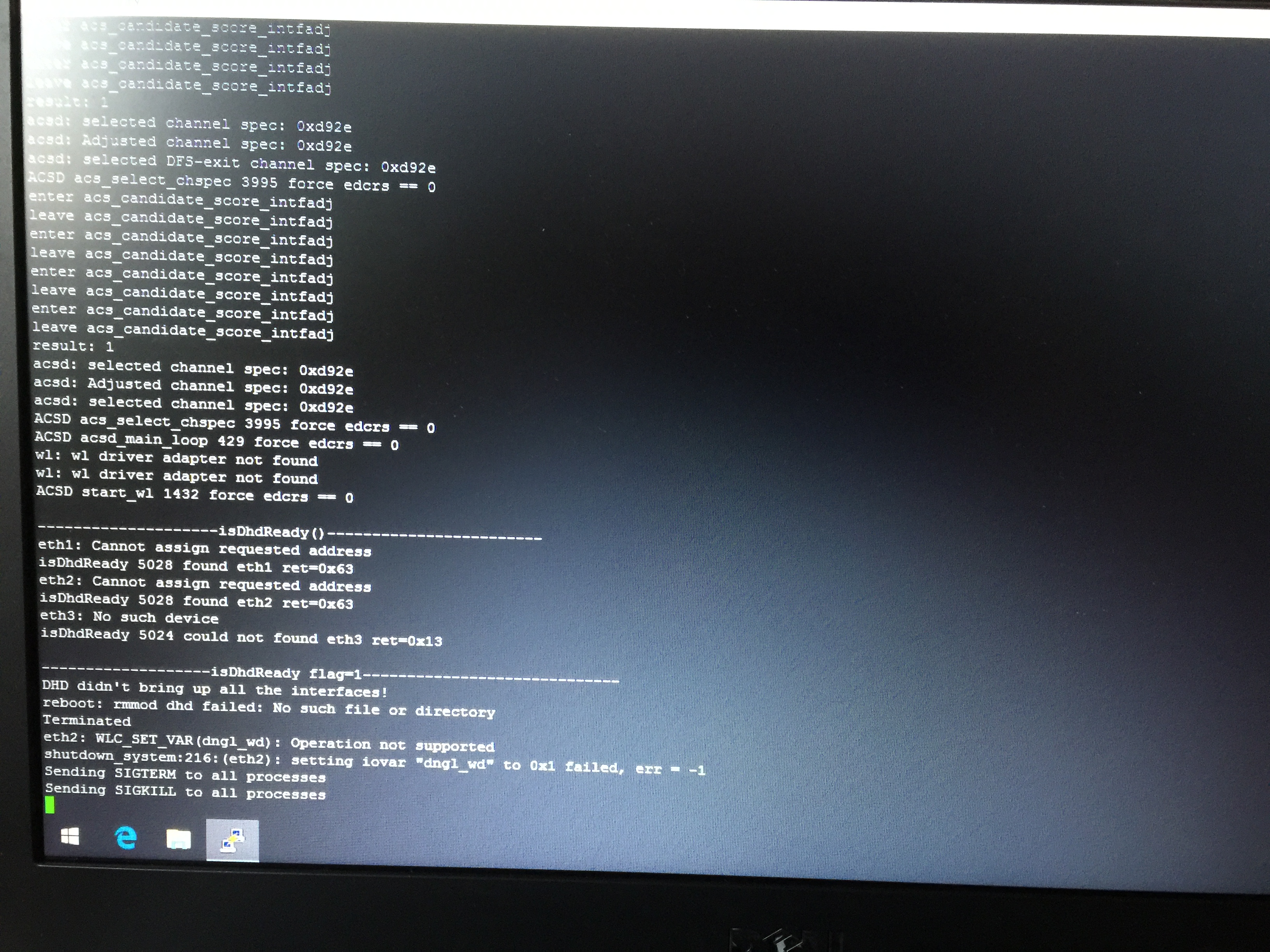
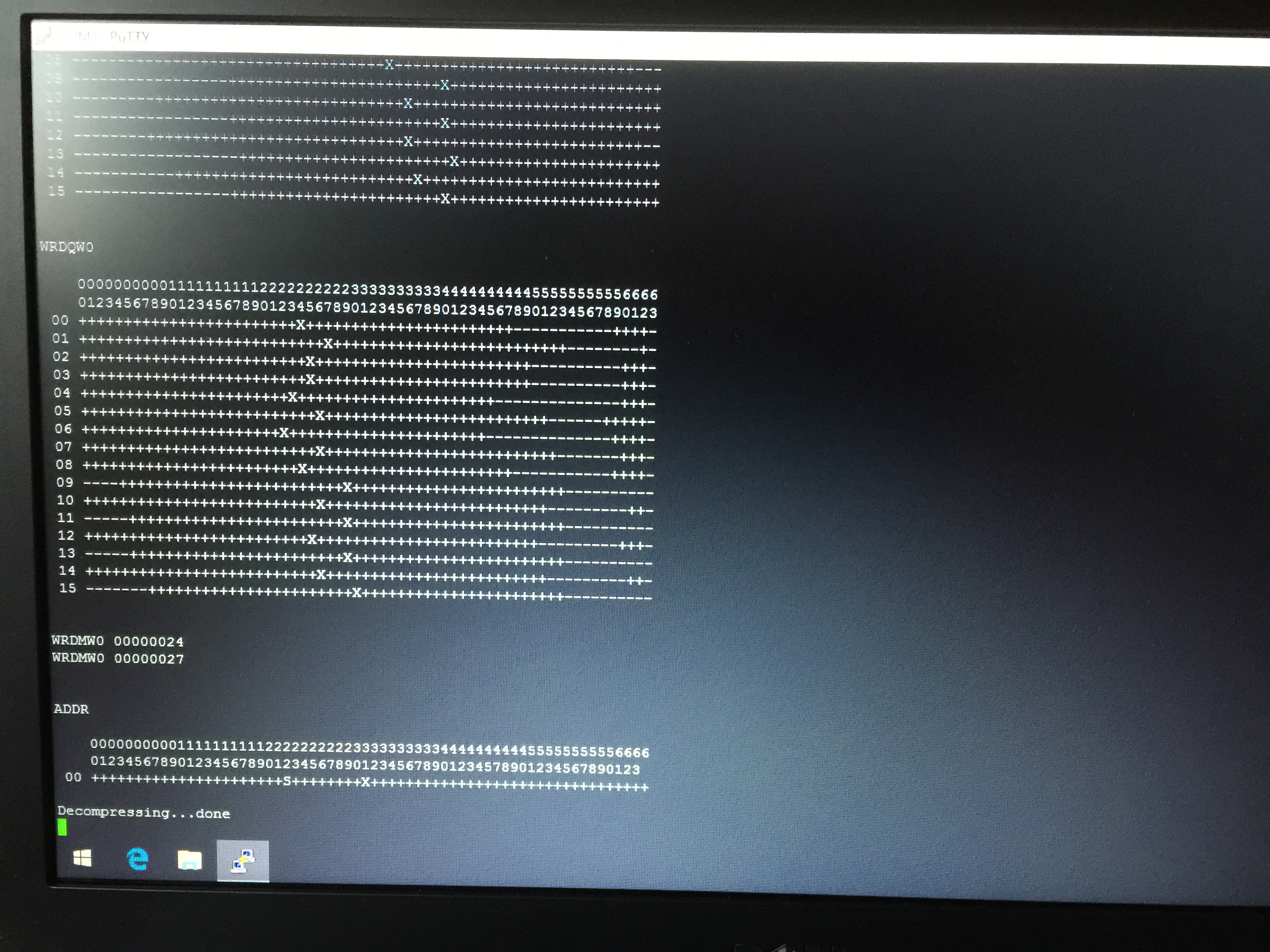
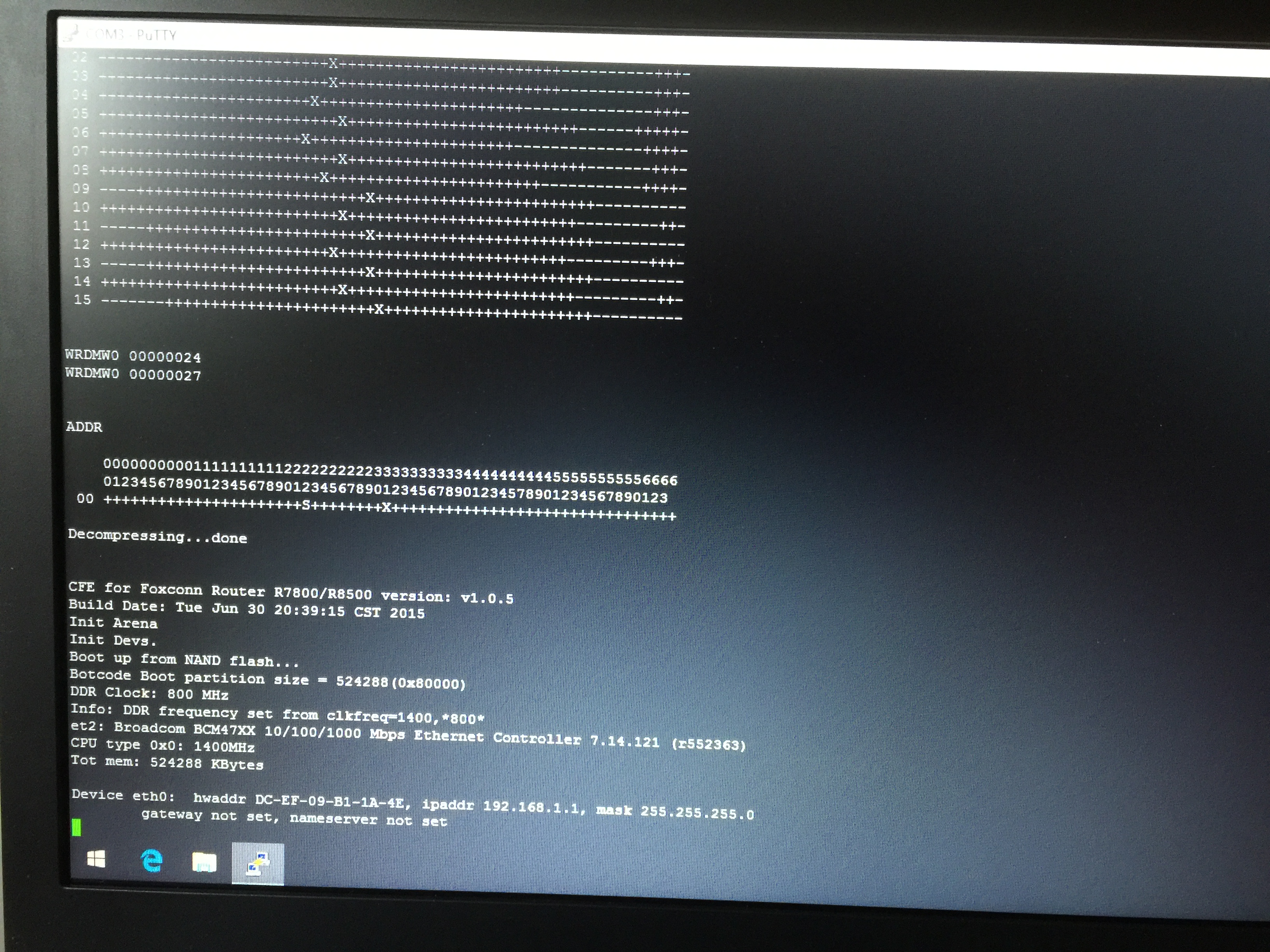
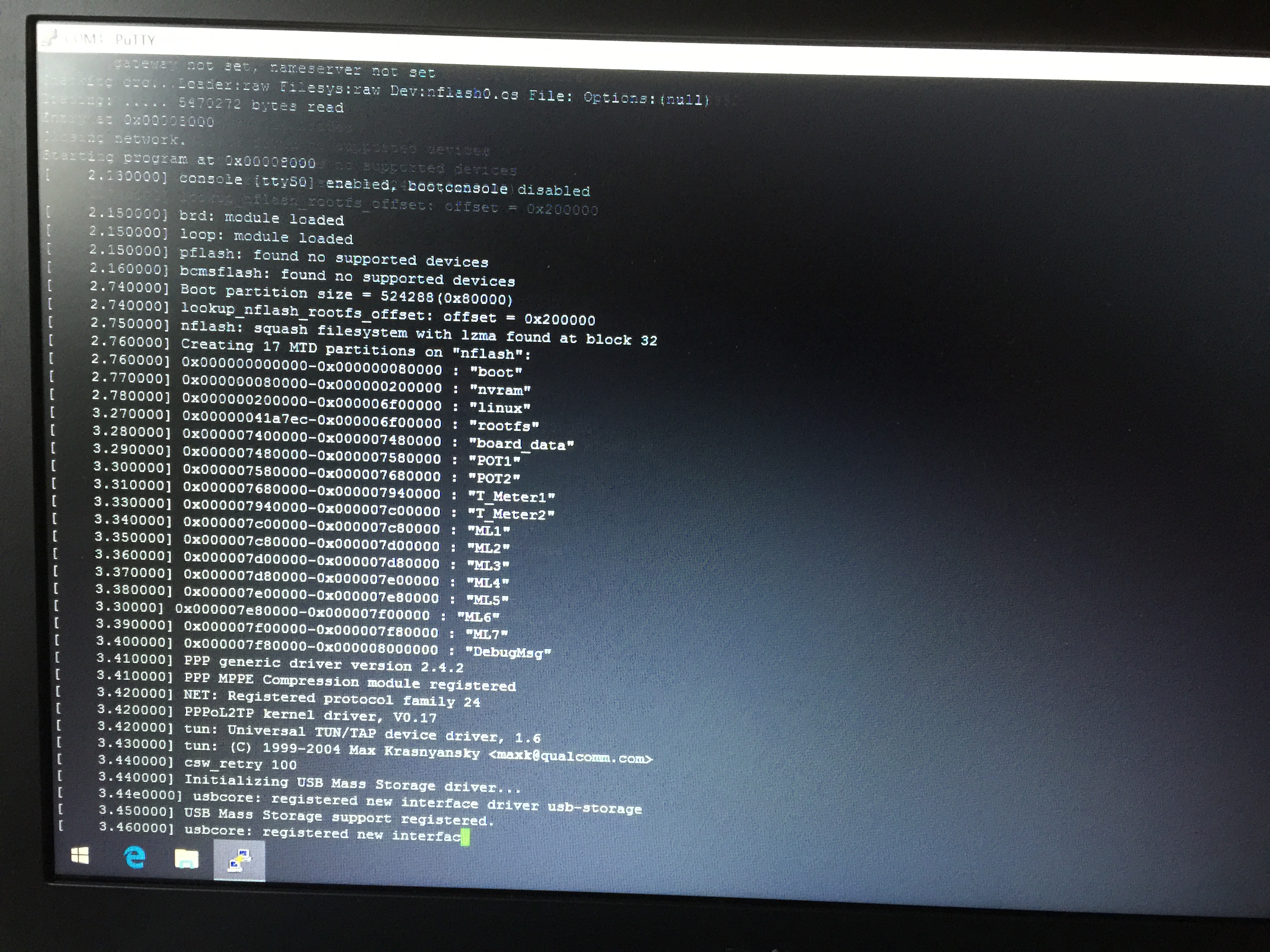
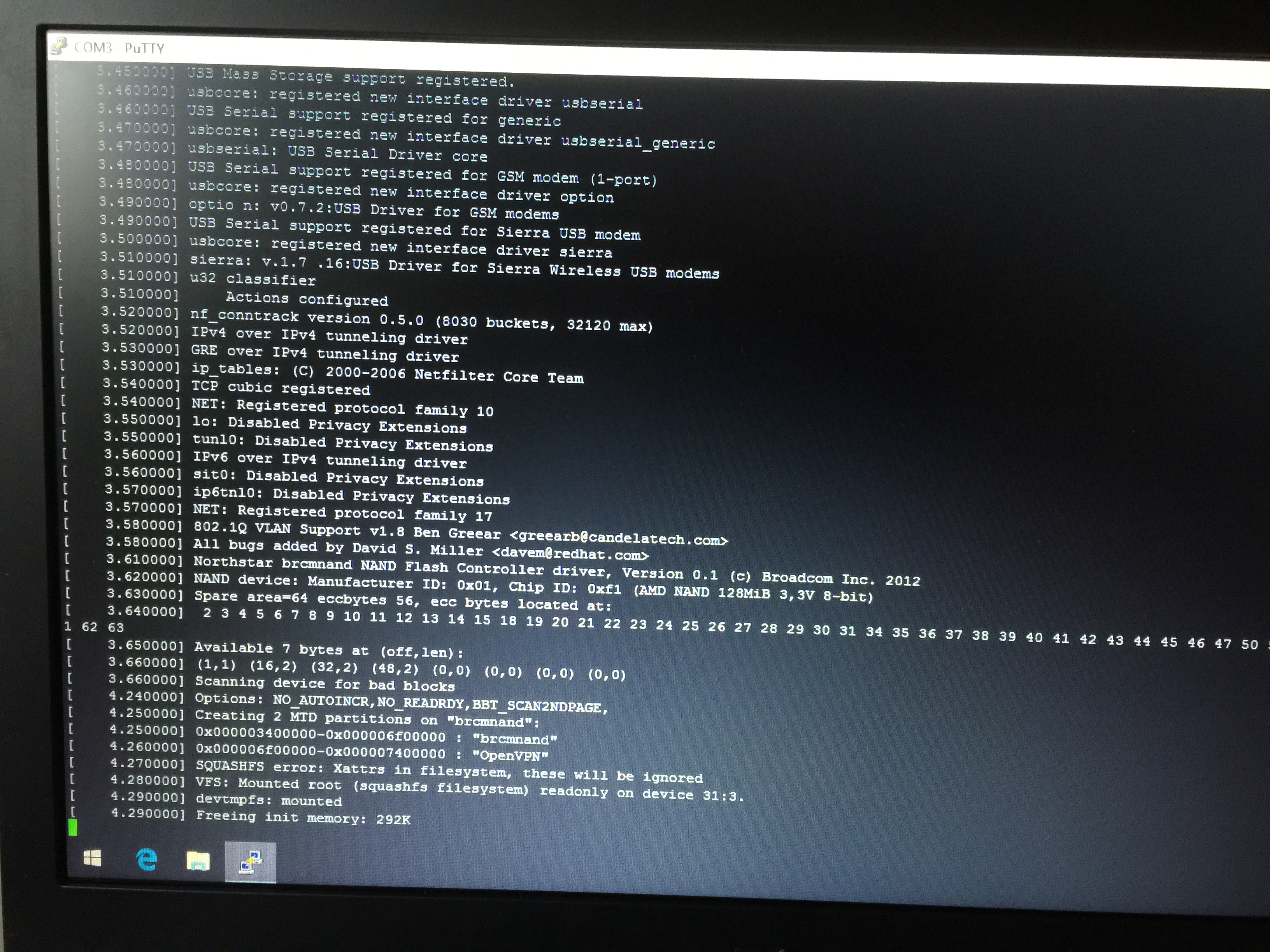
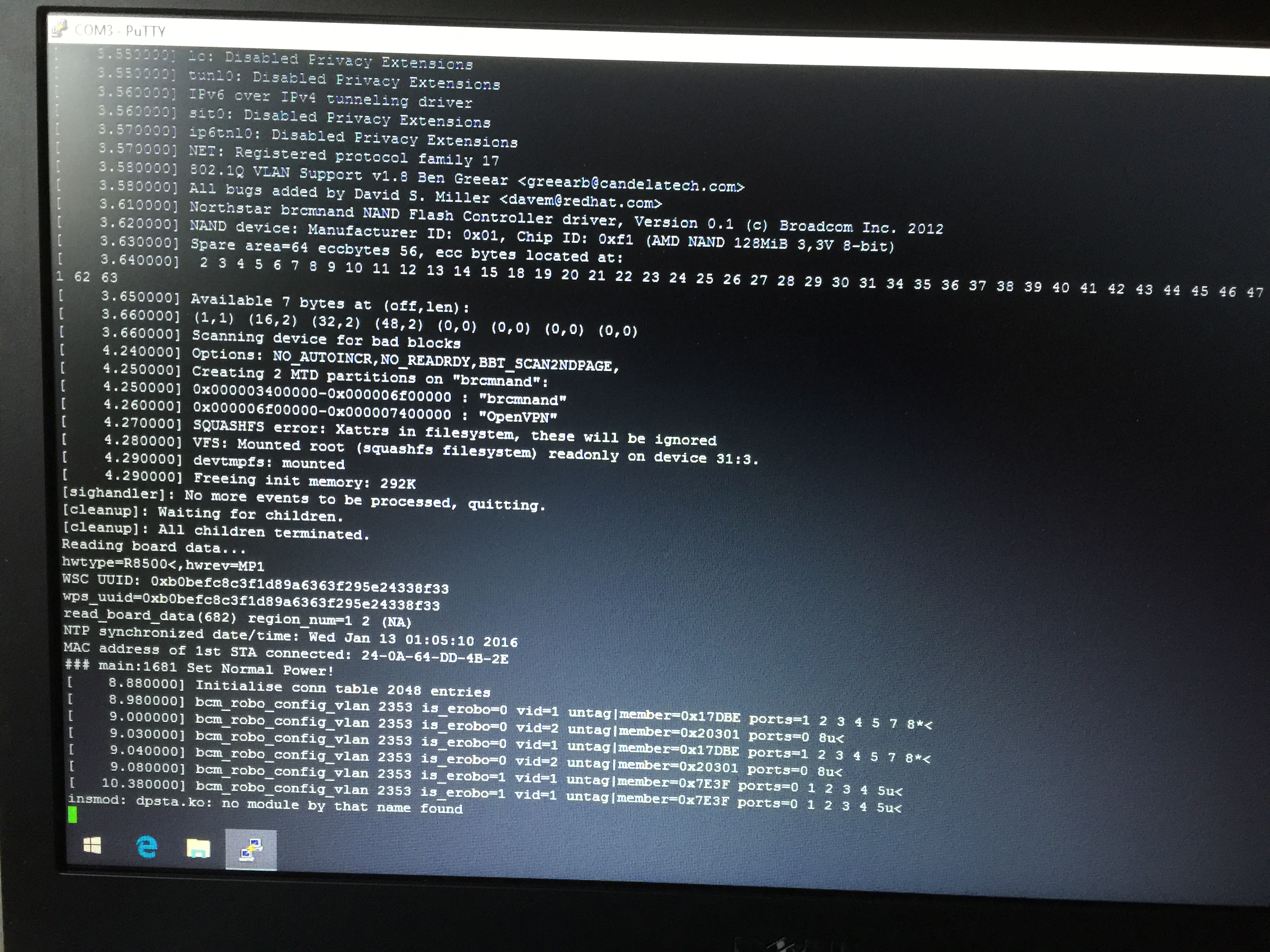
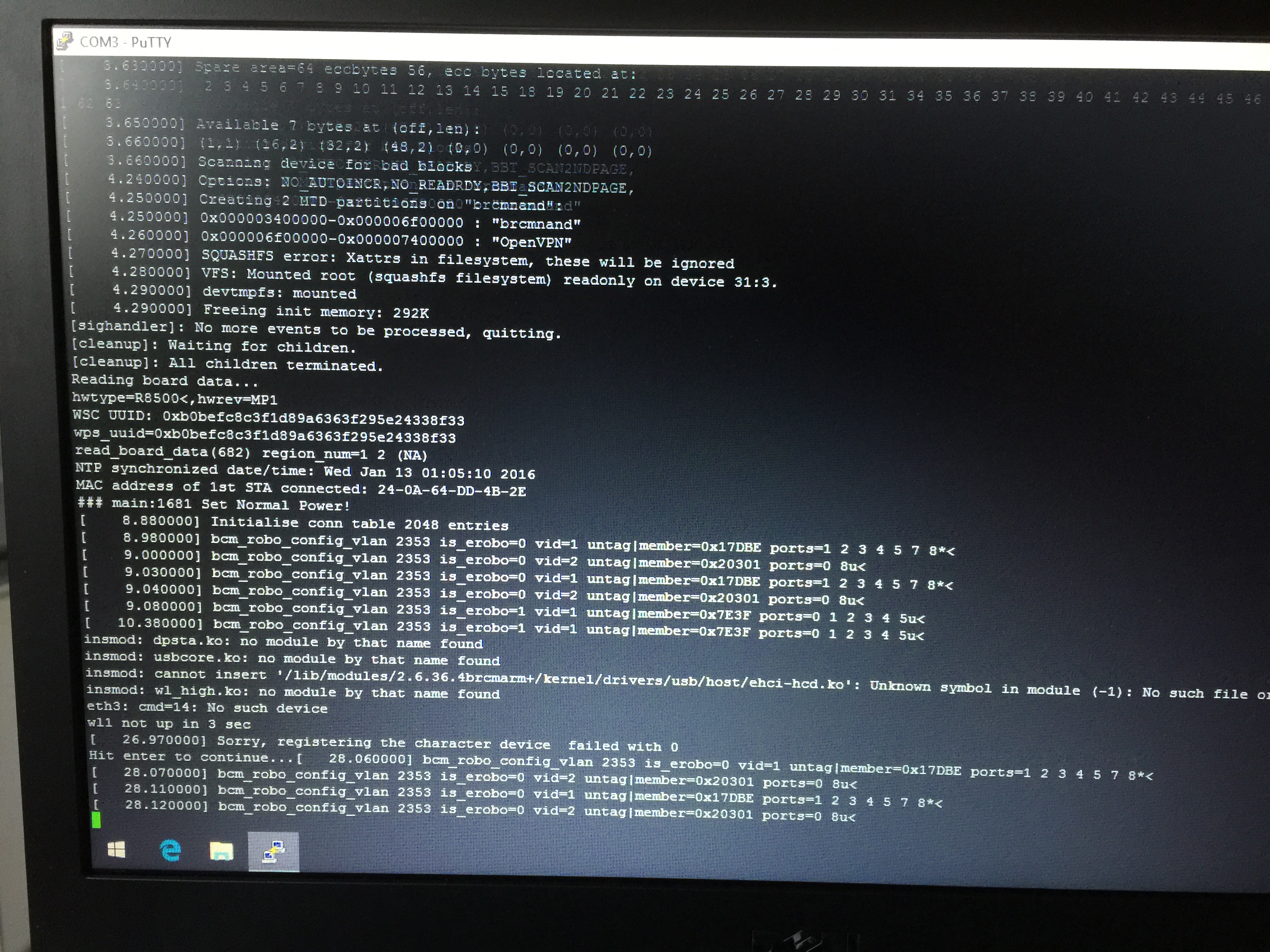
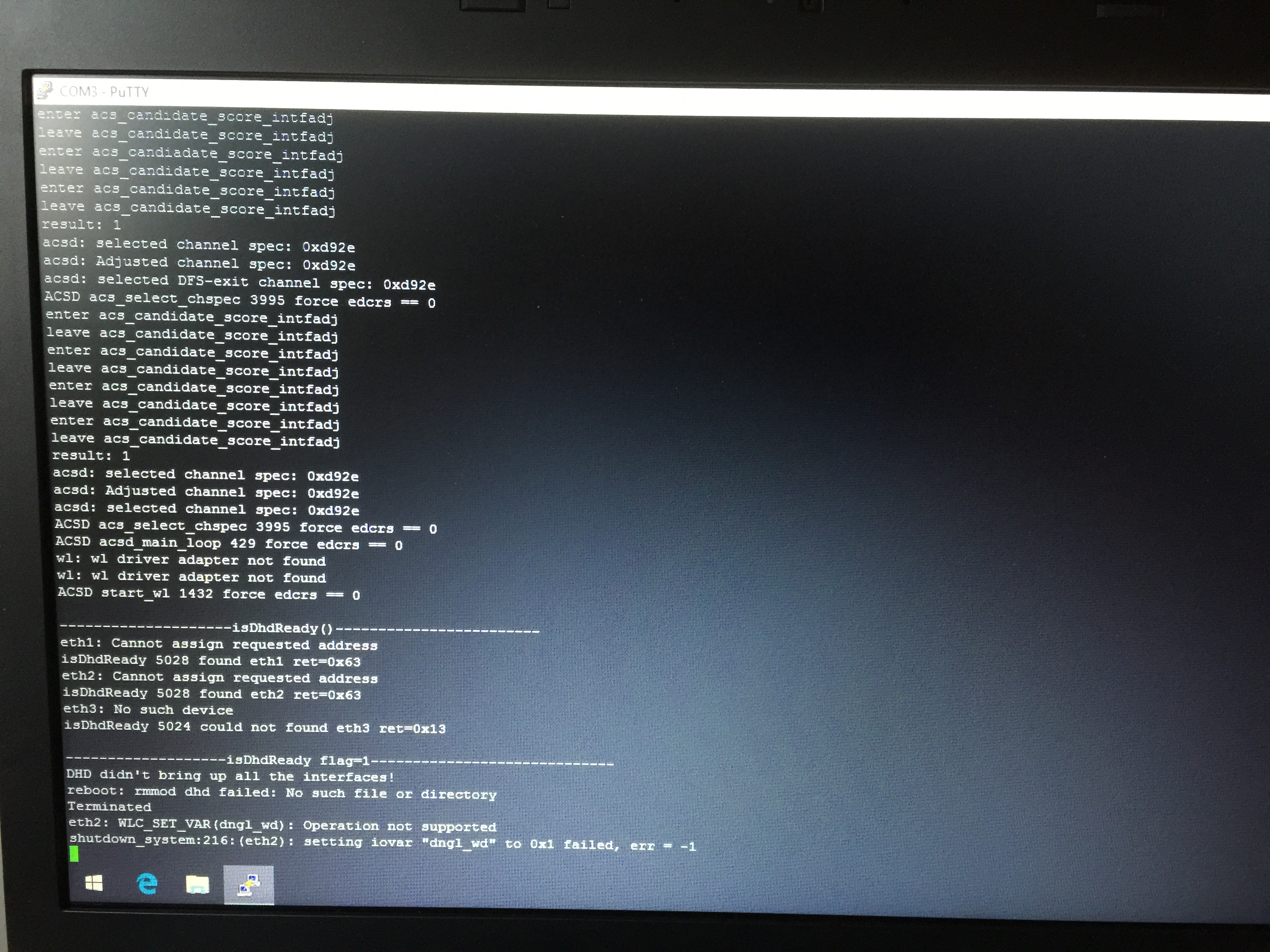
I send you my pictures on the monitoring display. hopefully you see some thing good.
Peter11742
- peter11742Dec 11, 2016Luminary
HI.
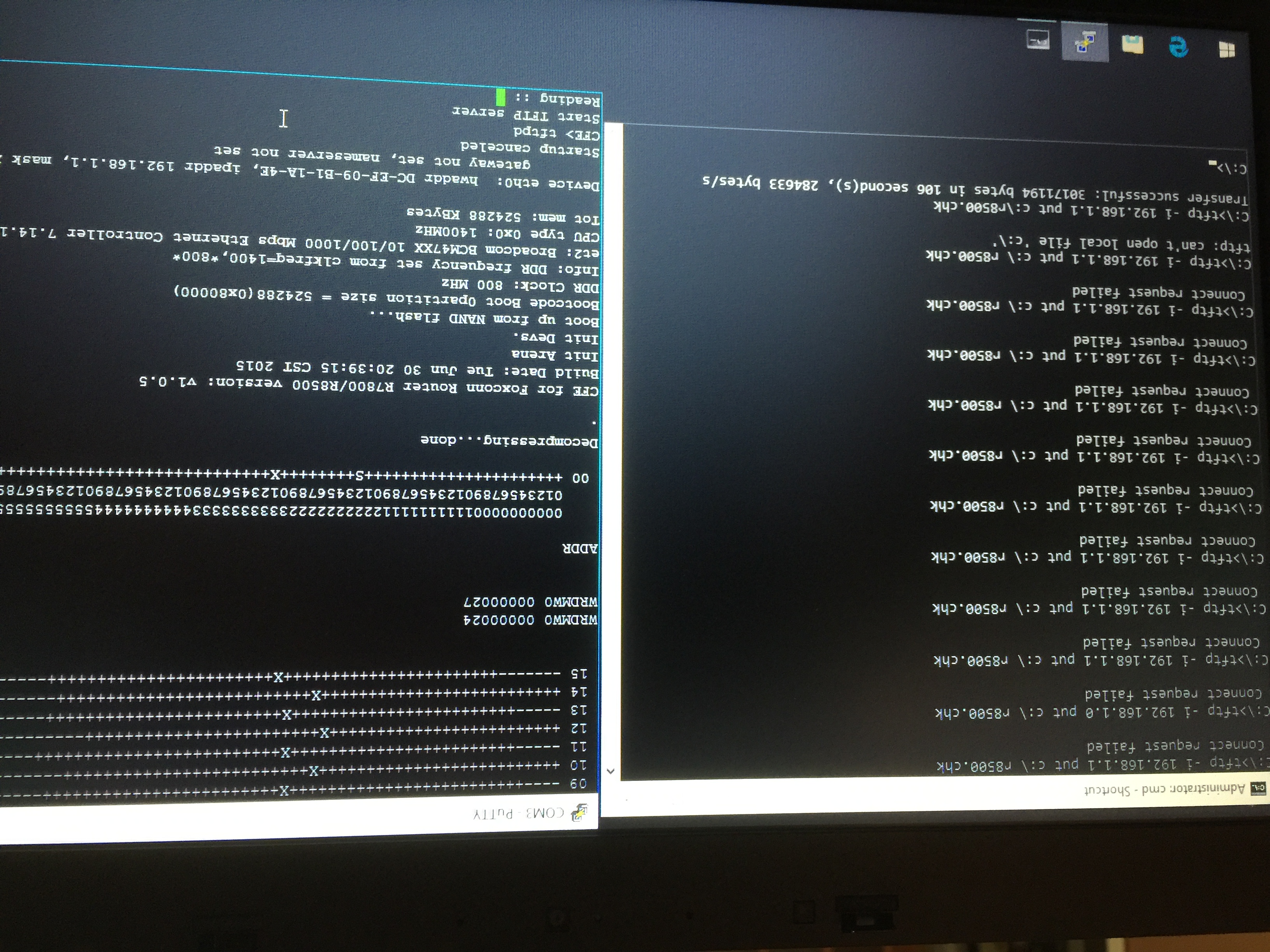
Now I get CFE and I type tftpd i get start TFTP server reading.
From dos sent the firmware and I get connect request failed.
This time I see the router locked and no rebooting this meens the CFE works.
Why I failed the connection probably i have not a good ip.
Let me know what you thing.
peter11742
- peter11742Dec 11, 2016Luminary
Updates.
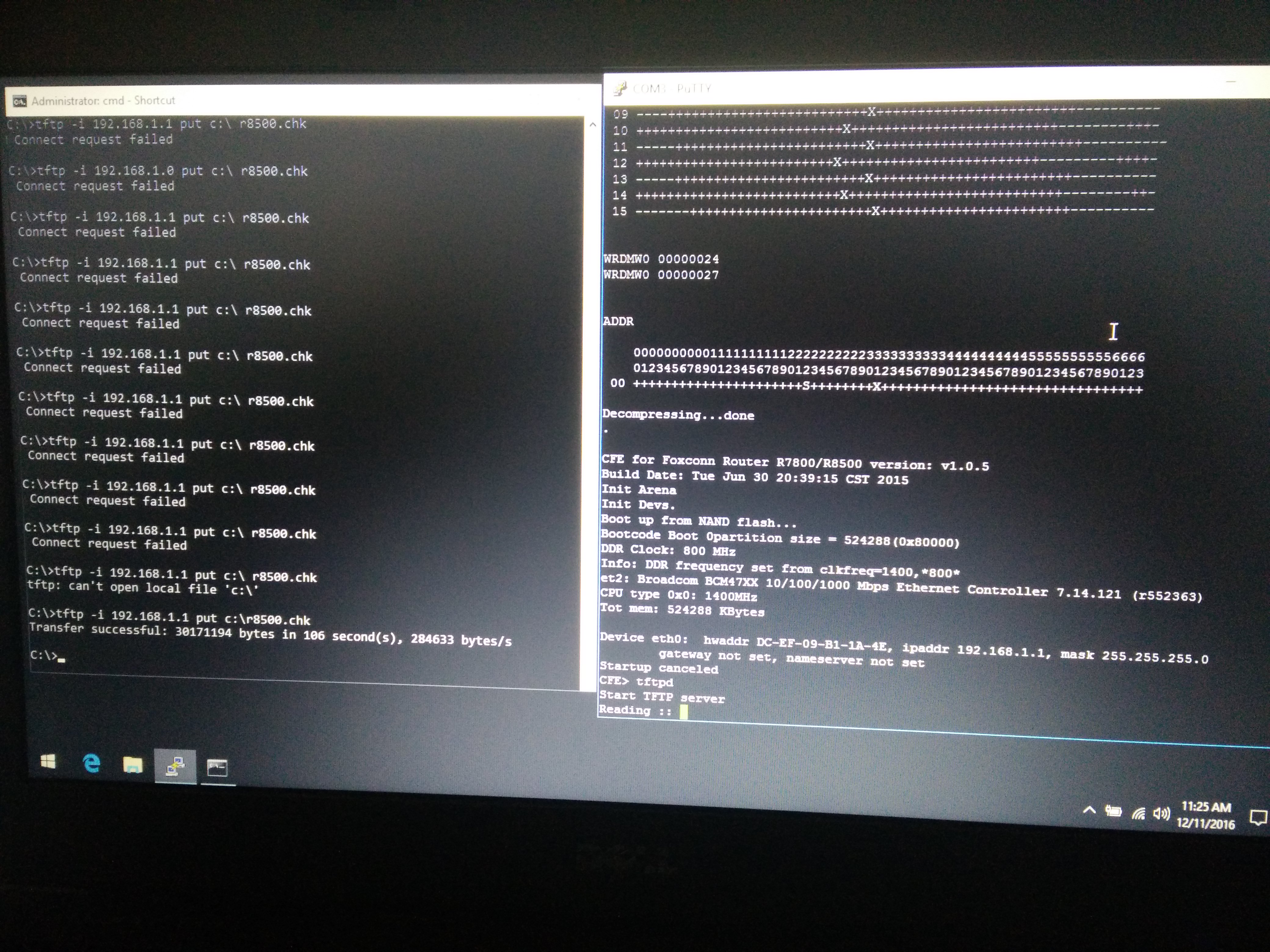
Progress I moved the cat cable to port #3 of the pouter I saw immediatly a blu led flickering.
The dos send the firmware Transfer successful: 30171194 bytes in 106 seconds.
The tft server keeps the unit stable and has no record that a file is transfered.
See my picture.
peter11742
- peter11742Dec 11, 2016Luminary
This is a better picture.
- peter11742Dec 11, 2016Luminary
Hi.
Thanks to all that they helped.
As you see we have an issue Houston.
The pictures prove it.
I reboot the router and of cource I have no pings and an orange steady light. The router reboots every 3 minutes.
I hope there is a solution for this from the people that work before on the routers.
As you see my experiance is only one week knowing nothing for the routers.
Engineers are good because they are trained to tackle any task.
Best regards.
peter11742
- TheEtherDec 11, 2016Guru
There seem to be a few threads on the Internet similar to what you have. One suggestion I found is to do erase nvram or nvram erase at the CFE prompt. Then reboot.
- peter11742Dec 11, 2016Luminary
Thanks.
I fixed my win 10 laptop so now I can work and give you details.
I do not know how to delete the nvram but I will google it.
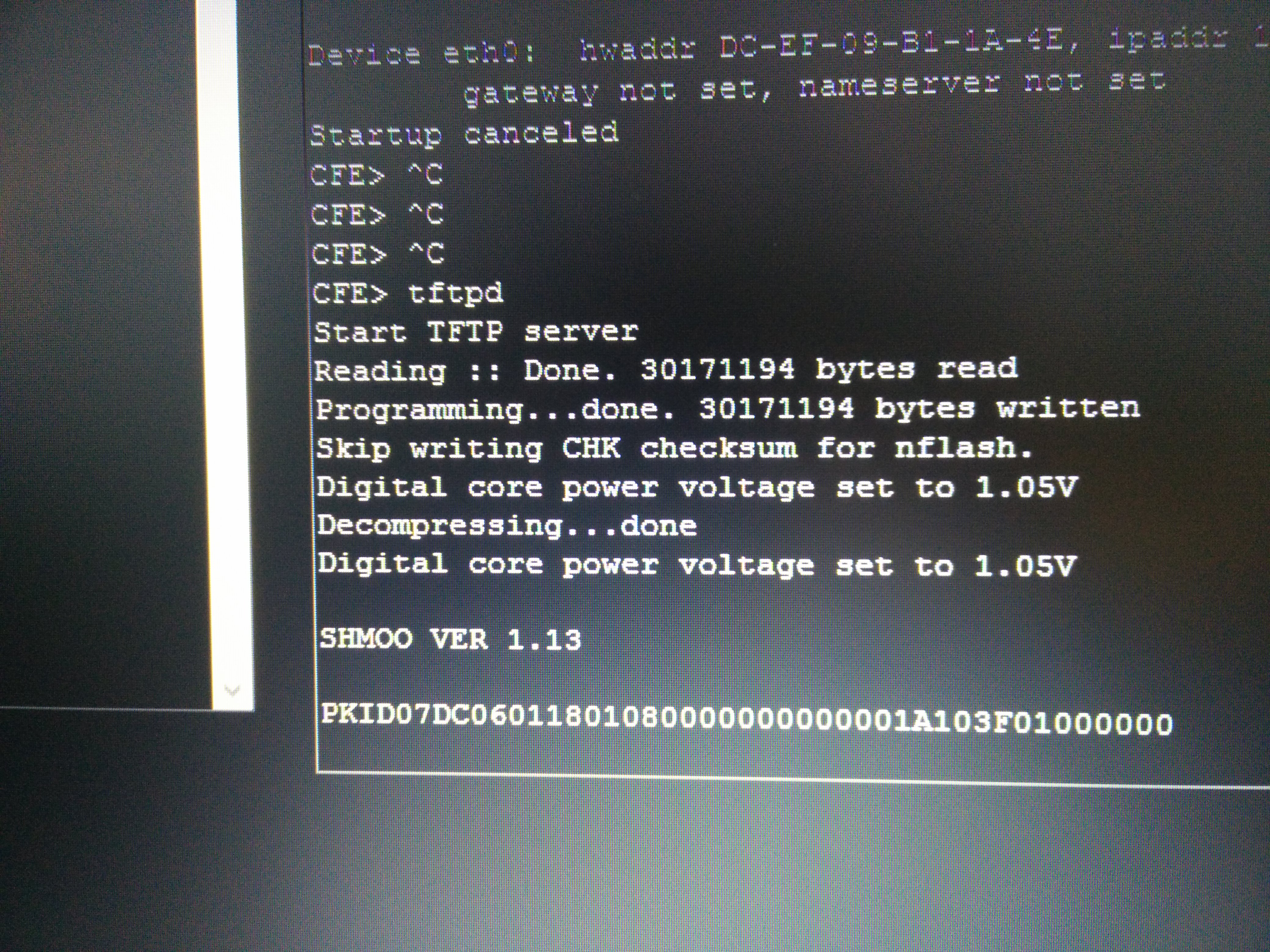
Now I send to everyone a new picture. The CFE worked this time it reported the software was tranfered.
To the people who have trouble transfering software it will be the dos causing it you must restarted dos.
At this point we made a good effort for this router I will tell any one it is the best motherboard I see in a small unit "good job netgear".
We can improove and make it better because it is builded with an engineer that had this in his mind for futer expantions.
peter11742
- raven_auDec 11, 2016Virtuoso
So you've transfered the firmware again and you've seen a confirmation it has been written in the CFE output.
That much seems to clear now.
But you still haven't provided what I asked for.
A text file of the output of the router from the USB-TTL connection from power on until after you see an error or the output stops or the router faults and reboots.
That should show if:
1) the firmware has been saved successfully (so we know the device it is saved to is not faulty).
2) probably give some indication if it is the settings that are corrupted (which is likley).
You are welcome to Google "nvram erase" which is probably what's needed, executed at the CFE prompt.
For my part, I'm not so quick to do so becuase I have wiped out information that could not be recovered in the past.
That shouldn't be the case with Netgear devices though and it looks like you have no choice so, as has been suggested, at the CFE propmt type "nvram erase<enter>".
I'd recommend leaving the router a little while after the erase, probably 30 seconds or so, even though it's probably not needed.
Then I think you can the just type "go<enter>" at the CFE prompt and have the router boot.
Alternately (and probably preferably, and is what I would do) power off the router for a few seconds and then turn it on and observe the boot output in PuTTY to check how far it gets.
Ian
 VE6CGXDec 11, 2016Master
OP, you said you are a retired EE, not understanding serial comm. protocol, router CFE, firmware layout, by the time you figure things out probablly you mess up the CFE. See if you can find a copy of CFE some where. CFE can be reloaded. Or cmpare the file between good and bad CFE and edit the bad one. I myself am EE class of '60. Evolved thru vacuum tubes upto nanotech. Spent whole working life in military worldwide comm. network, digital electronics. I always apply critical path or PMO when I tackle something to minimize wasting time. Good luck.
- peter11742Dec 11, 2016Luminary
Hi.
I have a good CFE because i tried code: nvram erase and I get o return.
I am nort familiar with this software but give some time and I will master it.
If you please tell me why I get 0 in one second putty has simle commands only.
Now I have some time to find how to erase the nvram that it is corrupted.
If you know pass the command.
peter11742
- peter11742Dec 11, 2016Luminary
I forgot to salut you my fellow engeneer.
How about fixing MRI'S and Cat scanners and special procedures cardiology cath labs, x-ray units nuclear units and complex x-ray units.
When you know the above you do not know software for routers or serial communicatios.
My CFE is part of putty free software that i have only 3 days play with it.
It works well and informs me the transfer is done but I still have the red light.
Now I know the fellow that sold me this unit on ebay had hard time fixing it so now will be my hard time, the router is new.
As you see i am almost there if I erase the nvram then i can install the firmware because this part I learned on my own.
Best regards.
peter11742