NETGEAR is aware of a growing number of phone and online scams. To learn how to stay safe click here.
Forum Discussion

DirtyWilly
Aug 20, 2021Star
R8500 Latest Firmware Version V1.0.2.154 Broke DNS!
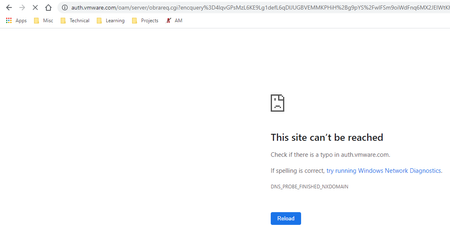
Hello, the latest firmware version V1.0.2.154 for the R8500 router appears to have broken DNS! I have to refresh pages multiple times to get them to load. Attached is the most common error. DNS_PR...
DirtyWilly
Dec 20, 2021Star
V1.0.2.156 (latest as of 12/20/2021) did not resolve the issue. It addressed many DNS issues, but websites that use certain types of SSO, INCLUDING NETGEAR!!! don't load properly the first time. The page has to be loaded multiple times and only once loaded and in the cache does it work. As soon as the cache is cleared it repeats the issue.

CaledonKen
Dec 21, 2021Star
Thanks.
Well I'll be in the market for an AX router soon. Can't say I'm impressed. Seems there would be a lot of people here willing to help NetGear resolve this.
Happy Holidays
 webleeDec 21, 2021Guide
I updated to 156 and everything that was misfiring is now working. My issue now - everytime it has to block a site on the "blocked sites" list -it sends a log email!!
The speed the router is capable of is back and I did just restore the 136 config to this revision so lets see what happens when I reset and config from scratch. Just too many people in the house for the holidays for me to put it on the operating table right now. The speed should make my day easier and keep me from being the IT guy over Christmas.
- michaelkenwardDec 21, 2021Guru - Experienced User
weblee wrote:
I updated to 156 and everything that was misfiring is now working. My issue now - everytime it has to block a site on the "blocked sites" list -it sends a log email!!
On my Netgear routers, in the browser graphical user interface (GUI) I can decide which events to log.
- Advanced
- Administration
- Logs
- Attempted access to blocked sites and services
I can also change the schedule for email notifications.
- Advanced
- Security
- webleeDec 21, 2021Guide
Thanks! In my haste I had overlooked that approach.
I have the logging set to send email when full. I have a script that collects them into 1 file and they stay sequential that way. On a schedule I get overlap so it appears to have duplicate entries for sets of entries.
- michaelkenwardDec 21, 2021Guru - Experienced User
weblee wrote:
I have a script that collects them into 1 file and they stay sequential that way.
Fancy stuff.
Should provide you with some light relief trying to adjust the script. Lots of variables you can play with.
Have fun.
- DirtyWillyDec 21, 2021Star
You're saying this firmware V1.0.2.156 worked for the 8300? This post is for the 8500. The 8500 is still having problems with the V1.0.2.156 firmware, I had to revert back to 144 yet again.
- michaelkenwardDec 21, 2021Guru - Experienced User
DirtyWilly wrote:
You're saying this firmware V1.0.2.156 worked for the 8300?
.
Oh dear. Netgear has used the same numbers for two different devices. Both on the same date.
R8500 Firmware Version 1.0.2.156 | Answer | NETGEAR Support
R8300 Firmware Version 1.0.2.156 | Answer | NETGEAR Support
It doesn't usually do that. For obvious reasons.
Firmware is not transferable between different devices.
- webleeDec 21, 2021Guide
Yeah I got this one at costco and tried DD-wrt on it but had to flash it to R8500 firmware to get it installed. There were some minor differences like usb port count per ddwrt.
in any event after that debacle I reflashed back to stock and thats why my posts are in the wrong thread!!!
Maybe Netgear UNIFIED the models?
- supeyugin1Apr 30, 2022Aspirant
R8500 and R8300 firmwares are exactly the same, downloaded both, and ran cmp byte-to-byte compare. There is no difference.
I was running 1.0.2.144, and it was stable, tried 154 and 156, both had DNS issues. I since switched to Asus RT-AX86U, and Netgear EAX80, both working fine so far. My internet speed increased from 220 to 330 Mbps (my maximum connection speed).
- FURRYe38May 01, 2022Guru - Experienced User
Did you try v.158 version for the R8500? https://community.netgear.com/t5/Nighthawk-WiFi-Routers/New-R8500-Firmware-Version-1-0-2-158-Released/td-p/2207270/jump-to/first-unread-message
supeyugin1 wrote:
R8500 and R8300 firmwares are exactly the same, downloaded both, and ran cmp byte-to-byte compare. There is no difference.
I was running 1.0.2.144, and it was stable, tried 154 and 156, both had DNS issues. I since switched to Asus RT-AX86U, and Netgear EAX80, both working fine so far. My internet speed increased from 220 to 330 Mbps (my maximum connection speed).
- supeyugin1May 08, 2022Aspirant
No, I didn't try 158, I'm selling the router now.
 JFIIMay 13, 2022Guide
in 158 I had to remove the secondary DNS server. I will post what the actual error
returned is.

