NETGEAR is aware of a growing number of phone and online scams. To learn how to stay safe click here.
Forum Discussion

AudiTuner
Oct 12, 2015Star
R8500 slow upload speeds (v1.0.0.50_1.0.25)
Have tried the R8500 v1.0.0.50_1.0.25 firmware multiple times but end up downgrading back to v1.0.0.42_1.0.23 each time since uploads are incredibly slow on v1.0.0.50_1.0.25 (~.2mbps instead of ~12mb...


AudiTuner
Oct 12, 2015Star
Not a problem. Just enabling it seems to cause the problem for me. I had factory reset the router earlier today and started putting in my settings one at a time - when I got to the traffic meter, enabling it immediately slowed my IPv4 uploads to a stand-still.
Below are my "enabled" settings:
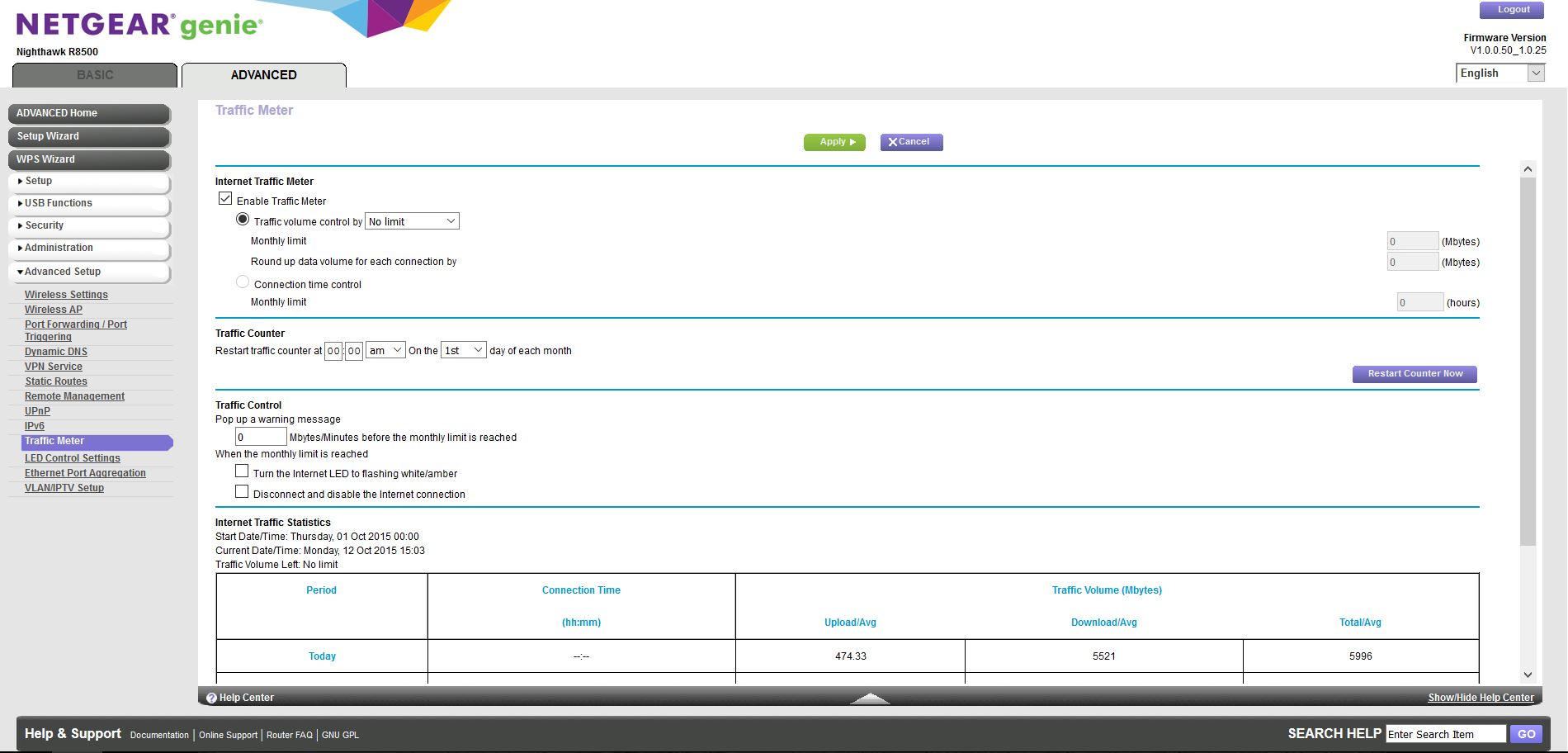
Thank you.

abdsea
Oct 13, 2015Guide
do you have UPNP enabled?
- AudiTunerOct 13, 2015Star
Have Comcast with a Motorola SB6183 modem. Settings on router that deviate from default are as follows:
- 2.4GHz mode is "up to 433mbps" for a single, 20MHz channel
- 2.4GHz and 5GHz are both using a short preamble
- WPS "PIN" is disabled
- I have around 15 reserved IP addresses
- IPv6 set to Auto Detect (uses DHCP mode)
- Traffic meter enabled (this setting caused uploads to drastically slow in my case)
Other settings:
- Dynamic QoS is disabled
- UPnP is enabled
- snagalinOct 13, 2015Aspirant
Hi AudiTuner,
I am not sure why you are using 2.4Ghz with 433mbps mode. R8500 supports 2.4Ghz mode upto 1000 mbps. I am using default settings of the router for Wireless settings and did not enable IPv6 setting.
I have enabled Dynamic QoS and UPnP setting enabled. I have enabled SmartConnect feature to use one 5Ghz channel.
SB6183 supports 16 download & 4 upload channels. But, i am using Netgear CM500-100NAS which supports 16 download & 4 upload channels.
I am getting simillar upload speeds for wired or wireless in R8500.
I will post my router settings this evening.
- AudiTunerOct 13, 2015Star
Hi snagalin,
I am using 433mbps mode since there are a lot of local 2.4GHz channels so I'd rather use a single 20MHz channel for less interference. I am also using Smart Connect on my 5GHz channels, forgot to mention that.
Thank you.