NETGEAR is aware of a growing number of phone and online scams. To learn how to stay safe click here.
Forum Discussion

Randy5235
Dec 05, 2016Aspirant
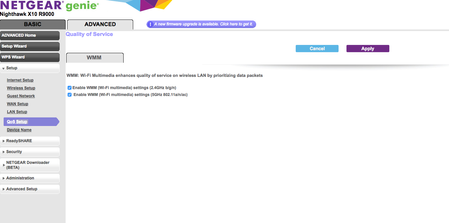
R9000 qos settings are missing.
I just purchased the R9000. I am trying to set up the QOS rules but if I go to Advanced -> Setup -> QOS Setup; I am only seeing WMM settings there. I have tried on both 1.0.1.20 and 1.0.1.18 version...
- May 25, 2017
Hello All, we just released the firmware for R9000 with Dynamic QoS.
https://kb.netgear.com/000038782/R9000-Firmware-Version-1-0-2-32

ElaineM
Apr 12, 2017NETGEAR Employee Retired
Hey all, we have updated the QoS Database.
Release date is on April 12, 2017.
Feel free to provide your feedback.
Boulda
Jun 17, 2017Tutor
ElaineM wrote:Hey all, we have updated the QoS Database.
Release date is on April 12, 2017.
Feel free to provide your feedback.
I would do, if I could update to it.
- FURRYe38Jun 17, 2017Guru - Experienced User
You might try this, download the lastest version of the FW. Use IE11 or FF, clear all browser caches before and after loading the FW. Do a factory reset, manally load the FW, factory reset and set up once more. Enable Dynamic QoS and leave it. Check the date and if nothing has changed to April, come back day two or three days later and check on it.
What is your ISP Mfr and model# modem?
