NETGEAR is aware of a growing number of phone and online scams. To learn how to stay safe click here.
Forum Discussion

whiltonm
Jun 17, 2018Aspirant
Nighthawk X4S won't find modem
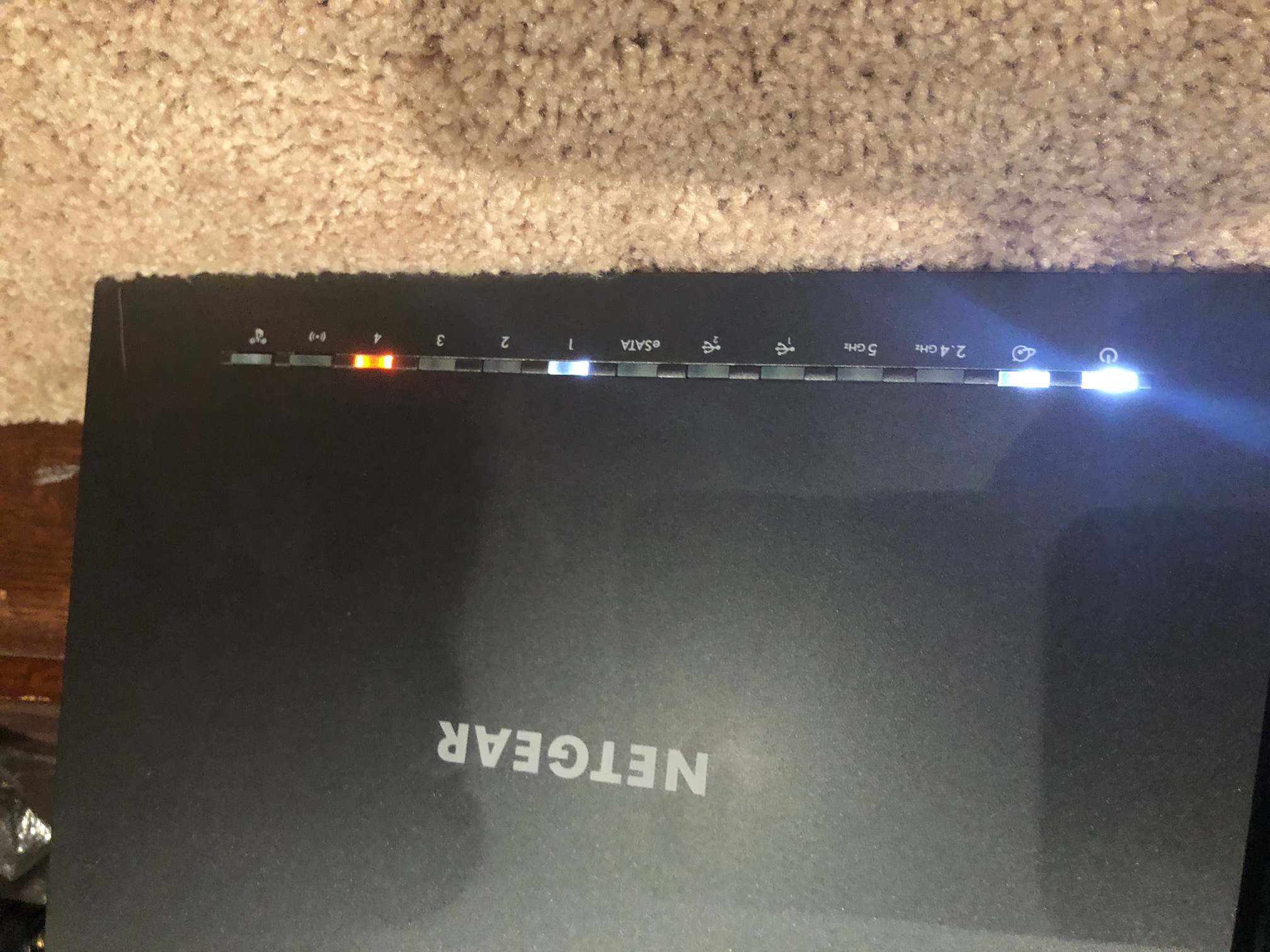
My internet went down altogether, and my local internet provider had to send a tech to the house. He said that somehow our modem had been taken off our account. He reassigned it, and we got the mod...
 Jun 17, 2018
Hi whiltonm,
Welcome to NETGEAR Community!
Just to clarify, do you have Internet access when wired to the router? If so, then we will focus on the WiFi connection. You mentioned that "the wireless won't show up", are 2.4GHz and 5GHz LED lit? If not, please press the WiFi button (2nd button from the right) for 2 seconds to turn on and off the WiFi function of the router. Other option to turn on WiFi radio of the router is to access its user interface. Kindly click this link as your reference.
Regards,
Blanca
Community Team

wcalifas831
Jun 17, 2018Prodigy
Do a hard reset, press the reset button for 30 seconds with a paper clip. After that connect it to the modem and go into your router settings and run the setup so that it can detect your modem. Let us know what happens.