NETGEAR is aware of a growing number of phone and online scams. To learn how to stay safe click here.
Forum Discussion

Mike-Mass
Oct 30, 2021Aspirant
Rocket internet speed, wifi sucks
So all of a sudden, my wifi speed is down to slower than a crawl 20-30 mps. My wired speed on my Mac is thru the roof as it always has been, but I'm trying to stream (anything) on my smart ...
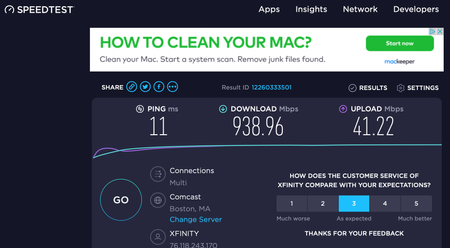
Mike-Mass
Oct 30, 2021Aspirant
Hi Fury...
What Firmware version is currently loaded?
So I got fed up (I'm a grumpy old senior LOL) and did a factory reset. After I did the reset, I was asked if I wanted to update the firmware and I said YES... so thats done. I wasn't sure how to force the router to tell me its firmware version but I eventually found it was V.1.0.2.84.
What is the Mfr and model# of the Internet Service Providers modem/ONT the NG router is connected too?
Its an ARRis SURFboard SB8200 DOCSIS 3.1 Gigabit Cable Modem, and my provider is Xfinity/Comcast.
What is the distance between the router and the TV?
The Kitchen TV (Samsung Smart TV) is about 25 feet from the router.
Ensure the TVs system is up dated as well.
This I'd have to check on to see whether this TV self-updates or whether its even capable of updating.
Is Smart Connect enabled on the router?
I did not select it to be enabled... should I ?
What channels are you using? Auto? Try setting manual channel 1, 6 or 11 on 2.4Ghz and 40 to 48 channel on 5Ghz.
This I havent been able to figure out, can I do that on the Nighthawk App? Or do I need to do the login on a browser?
Any Wifi Neighbors near by? If so, how many?
Yes... when I look on my phone for networks I see a couple of neighbors, One I know is across the street, but houses here are on 1/3rd to 1/2 acre lots so I don't think thats problematic is it?
Try enabling Beamforming and MIMO(MIMO may or may not be needed) and WMM. Under Advanced Tab/Advanced Settings/Wireless Settings
I can't find anything called Beamforming on the login browser.
Thanks for taking the time to respond. I'm 78 and not terribly tech-oriented but I learned to follow instructions pretty well in the military! So go easy on me LOL... simple laymans language that I can follow.
Mike

FURRYe38
Oct 30, 2021Guru - Experienced User
Mike-Mass wrote:
Hi Fury...
What Firmware version is currently loaded?
So I got fed up (I'm a grumpy old senior LOL) and did a factory reset. After I did the reset, I was asked if I wanted to update the firmware and I said YES... so thats done. I wasn't sure how to force the router to tell me its firmware version but I eventually found it was V.1.0.2.84.
What is the Mfr and model# of the Internet Service Providers modem/ONT the NG router is connected too?Its an ARRis SURFboard SB8200 DOCSIS 3.1 Gigabit Cable Modem, and my provider is Xfinity/Comcast.
What is the distance between the router and the TV?
The Kitchen TV (Samsung Smart TV) is about 25 feet from the router.
Ensure the TVs system is up dated as well.
This I'd have to check on to see whether this TV self-updates or whether its even capable of updating.
Is Smart Connect enabled on the router?
I did not select it to be enabled... should I ?
Can try this. If it's not enabled, it the TV connected to the 2.4 or 5Ghz SSID radio?
What channels are you using? Auto? Try setting manual channel 1, 6 or 11 on 2.4Ghz and 40 to 48 channel on 5Ghz.
This I havent been able to figure out, can I do that on the Nighthawk App? Or do I need to do the login on a browser?
Need to log into the routers web page using a PC and web browser to change this.
Any Wifi Neighbors near by? If so, how many?Yes... when I look on my phone for networks I see a couple of neighbors, One I know is across the street, but houses here are on 1/3rd to 1/2 acre lots so I don't think thats problematic is it?
Should be ok then. Just as long as the router is not using same channels as your nieghbors.
Try enabling Beamforming and MIMO(MIMO may or may not be needed) and WMM. Under Advanced Tab/Advanced Settings/Wireless Settings
I can't find anything called Beamforming on the login browser.
Ok.
Thanks for taking the time to respond. I'm 78 and not terribly tech-oriented but I learned to follow instructions pretty well in the military! So go easy on me LOL... simple laymans language that I can follow.
Your doing great.
- Mike-MassOct 31, 2021Aspirant
I am seriously considering going back to Xfinity and renting their equipment if only because if I'm having a wifi problem like this, I call them up and they either walk me through a simple fix or they send a tech out who fixes the problems. That being said, I seem to have problems only on a couple of TVs not all of them.
I'm a car guy and I have a non-smart 37" Vizio in my garage where I work on my 50 yeat old baby... that Vizio has a stunning picture (120 hz?) and great sound. I've been using a Google (Chromecast) TV streaming device with it for almost a year. I was able to download other Apps like Netflix, Prime, HBO Max and others and also YouTubeTV which is my "source provider" and up until last week, it worked great. I even ordered the ethernet power brick (not here yet) because I have a Netgear Switch in the garage that is hard wired into my router system. So all of a sudden I can's stream YouTubeTV live and I can't explain why that is happening. Its almost like YouTubeTV is installed wrong all of a sudden, but other Apps seem to work OK?
Mike
- FURRYe38Oct 31, 2021Guru - Experienced User
Possible this is a wifi coverage issue that with all of your devices connected, the router may be having problems maitaining signals. Distanced from the router to these devices is important as well.
You may need to add a wifi extender to the mix to help with getting more signal coverage. Something like a EX7700 or EX8000 should be looked at.
Or make it easy on your self and go with what works best for you and if that includes using ISP hardware...