NETGEAR is aware of a growing number of phone and online scams. To learn how to stay safe click here.
Forum Discussion

Jumpy121
Apr 12, 2021Aspirant
Router won't connect to modem internet
Hello, I'm writing today to see if anyone can help me with my problem. I recently have encounted a problem on my router after a mini power outage. I have done all the usual steps to get it to wor...
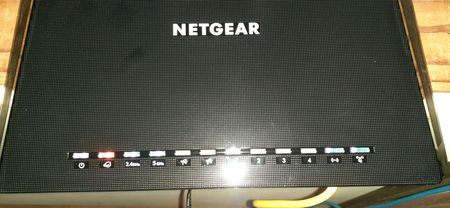

plemans
Apr 12, 2021Guru - Experienced User
photos have to be approved by a moderator and it can take a while.
1. what actual modem do you have?
2. what router do you have? You put r6400 in signature but just confirming
3. what firmware is on the router
4. Does the modem work if you directly connect a pc/laptop to it?
5. are you able to access the router?
Jumpy121
Apr 12, 2021Aspirant
Hey thanks for the fast reply.
1. I have a Ubee Modem from Spectrum
2. My router is r6400 Nighthawk
3. my firmware is: Firmware Version V1.0.4.106_10.0.80
4. My modem works connecting to it via ethernet so I know it's not the modem. The issue is that internet isn't being received from the modem for some reason and I have no idea why this happened after a mini power outage.
5. I have full access to my router
- plemansApr 13, 2021Guru - Experienced User
what ubee modem is it?
- Jumpy121Apr 13, 2021AspirantModel: DVW32C Ubee
- plemansApr 13, 2021Guru - Experienced User
The ubee is a modem/router combo device. It isn't a modem only device. it causes a double nat.
Do you have the netgear in access point mode?
Or the ubee in gateway/modem only mode?
Or even the netgears IP address in the ubee's DMZ?
What is Double NAT? | Answer | NETGEAR Support
How to fix issues with Double NAT | Answer | NETGEAR Support