NETGEAR is aware of a growing number of phone and online scams. To learn how to stay safe click here.
Forum Discussion

AngelaV
Feb 09, 2017Aspirant
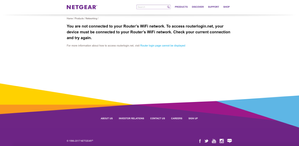
"routerlogin.net" keeps saying I must be connected to my router's WiFi, even though I am
I was having connectivity issues with my Verizon Fios router. They sent out a technician and the problem was fixed. After my netgear wifi router was reset, I attempted to go to "www.routerlogin.com" ...
- Feb 22, 2017There was a white cable running from the FIOS to the NetGear. It's showed in the old pictures. The new pictures is how it's currently configured and it's worked like a dream since the removal of the white cable.
So to anyone with the same issues as mine, check your cables and make sure there aren't extras. All that's needed is the Ethernet cable connecting the FIOS router to the NetGear and the plug in from the NetGear to the outlet. Make sure you reset when removing a stray, unnecessary cable. It worked for me.
AngelaV
Feb 09, 2017Aspirant
I tried to type my router number (gateway default) into the browser. It took me to Verizon and I logged in, changed my SSID, but I couldn't figure out how to change the password. It created another wifi that I can use, but it didn't change the name of my NetGear router. So that wasn't helpful.
As for the wiring, I'm connecting wirelessly. I even tried to disconnect my Verizon router from my Netgear but that still didn't fix the issue (so I reconnected).
And let me just say, I was so desperate to get this fixed that I called the NetGear customer "service". They asked me for information only to tell me that they wanted to charge me in order to help me. I already paid a bunch for this router (that works fine, I just can't change the name) and I wasn't going to pay more.
As for the wiring, I'm connecting wirelessly. I even tried to disconnect my Verizon router from my Netgear but that still didn't fix the issue (so I reconnected).
And let me just say, I was so desperate to get this fixed that I called the NetGear customer "service". They asked me for information only to tell me that they wanted to charge me in order to help me. I already paid a bunch for this router (that works fine, I just can't change the name) and I wasn't going to pay more.
- William10aFeb 09, 2017Master
AngelaV wrote:
I tried to type my router number (gateway default) into the browser. It took me to Verizon and I logged in, changed my SSID, but I couldn't figure out how to change the password. It created another wifi that I can use, but it didn't change the name of my NetGear router. So that wasn't helpful.
As for the wiring, I'm connecting wirelessly. I even tried to disconnect my Verizon router from my Netgear but that still didn't fix the issue (so I reconnected).
And let me just say, I was so desperate to get this fixed that I called the NetGear customer "service". They asked me for information only to tell me that they wanted to charge me in order to help me. I already paid a bunch for this router (that works fine, I just can't change the name) and I wasn't going to pay more.The wifi is still turn on the modem/router not just a modem from the isp it needs to in bridge mode or wireless turned off so only the netgear sees wifi and can access.
Almost every modem supplied by a isp has a router in it today.