NETGEAR is aware of a growing number of phone and online scams. To learn how to stay safe click here.
Forum Discussion

AngelaV
Feb 09, 2017Aspirant
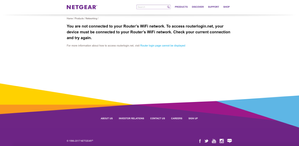
"routerlogin.net" keeps saying I must be connected to my router's WiFi, even though I am
I was having connectivity issues with my Verizon Fios router. They sent out a technician and the problem was fixed. After my netgear wifi router was reset, I attempted to go to "www.routerlogin.com" ...
- Feb 22, 2017There was a white cable running from the FIOS to the NetGear. It's showed in the old pictures. The new pictures is how it's currently configured and it's worked like a dream since the removal of the white cable.
So to anyone with the same issues as mine, check your cables and make sure there aren't extras. All that's needed is the Ethernet cable connecting the FIOS router to the NetGear and the plug in from the NetGear to the outlet. Make sure you reset when removing a stray, unnecessary cable. It worked for me.
Adewale
Feb 10, 2017Luminary
i already gave you the solution to this problem many posts ago and a few others have also pointed you in the right direction but here goes again. From everything you have posted, the following observations are your most likely situation
a. Verizon has configured your Netgear router as an Access Point so it is not working as an independent router and the UI is not accessible by the factory IP address from Netgear or (routerlogin.net or routerlogin.com) but at the IP address supplied by the Verizon FiOS when the router was programmed as an AP
Solution
1. disconnect the ethernet cable that runs from the FiOS to the Netgear router
2. do a hard Reset on your Netgear to allow the router work as an independent router
3. Plug back the ethernet cable BUT make sure it is plug into the YELLOW jack on the back of the Netgear router
4. Connect to the Netgear router wirelessly and you should be able to access the router UI via the default IP address

TheEther
Feb 10, 2017Guru
In order for routerlogin.com or routerlogin.net to work, you need to be connected to either the Netgear's Ethernet or Wi-Fi network. Every indication is that you are not. Instead, you appear to be connecting to your Verizon router's Wi-Fi network. routerlogin.com/routerlogin.net won't work in this case.