NETGEAR is aware of a growing number of phone and online scams. To learn how to stay safe click here.
Forum Discussion

Izzyp7029
Aug 31, 2016Aspirant
Router's white Ethernet LED flashes continuously (at about 5 flashes per second)
The white Internet LED on my Netgear router (R7000 Nighthawk, AC1900) is flashing continuously (approx. 5 times per second), and it is causing the Link LED on my modem to flash constantly. It started...
 Sep 04, 2016
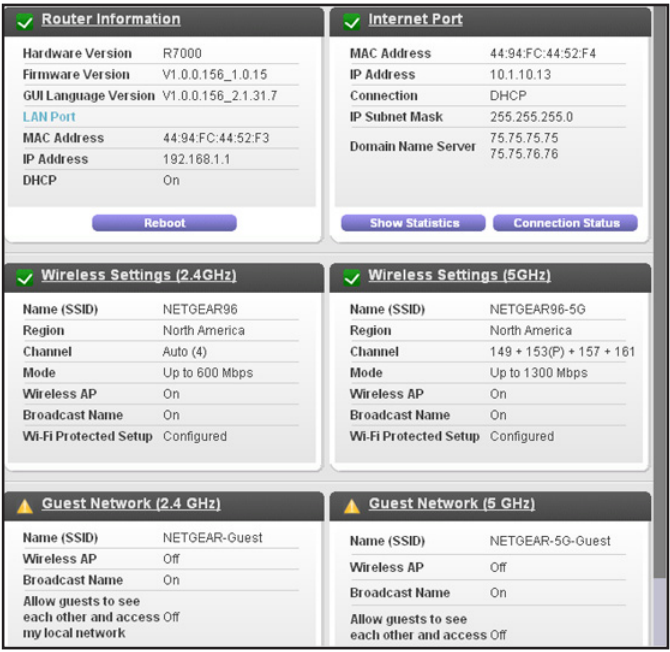
Show Statistics is one of the purple buttons under the Internet Port pane.
Retired_Member
Sep 02, 2016Mine has been blinking for years, did you happen to change the LED blink or LED not blink setting.
You can disable LED blinking or turn off all LEDs except the Power LED. For information about how to do this, see Disable LED Blinking or Turn off LEDs on page 118.
Izzyp7029
Sep 02, 2016Aspirant
Hi Netwrks and Searay,
Thanks for your suggestions. I've had the router for 2+ years and never had any issues. It sits beside my modem and I monitor the Link LED on my modem to see if anyone is trying to illegally use my wireless router to access the internet, in spite of the security measures I've taken. I first noticed the problem about a week ago after I power-cycled the router (and DSL modem) because the connection seemed slower than normal. I did not wish to turn off all of the LEDs because I would have no quick visual way of troubleshooting any issues that may crop up. Searay said that his LED has been blinking for years and it doesn't affect the operation of the router, so I can live with the blinking LED. I'm disappointed that I can't correct a problem caused by power-cycling the router. Could other people experience the same problem if there's an interruption of the AC power in their building/neighbourhood? Is this a problem that the manufacturer should look into? Again, thanks for your prompt offer of help.
Izzyp7029
 netwrksSep 03, 2016Master
There is always traffic on a network. If it's not user traffic, it's scans from the outside world. You can always check your devices for viruses or malware. The latter could generate extra traffic on a network.