NETGEAR is aware of a growing number of phone and online scams. To learn how to stay safe click here.
Forum Discussion

davidk1952
Mar 12, 2023Luminary
Speed test odd results
Just a question. I run both Okla and Spectrum speed tests on my notebook... when I am connected to my ethernet the speed is great push go... Bang I am seeing my speeds... Then, I remove the e...

michaelkenward
Mar 12, 2023Guru - Experienced User
davidk1952 wrote:
Then, I remove the ethernet cable... use the Wifi for a while to make sure its working .. run speed test... dial shows going up to 300 -400mbps and then it drops back as low as 120.... run the test 3 or 4 times and everything comes up to speed and stays up...
Are these tests made with Ookla or via the Nighthawk app?
The latter measures speed between router and outside world, not the link that connects you to the network. You'll see the same things, WiFi or wired.
WiFi is, by definition, slower than wired.
WiFi also depends on the capability of the device tat connecst to the WiFi, along with the connection speed, 2.4 versus 5 GHz.
It also depends on the Netgear hardware you own. You don't say.
Depending on its technology the speed you see is in line with what many bits of 2.4 GHz hardware can deliver.
It might be worth a bit of background reading.
Understand Wi-Fi 4/5/6 (802.11 n/ac/ad/ax)
@duckware knows their stuff and can bust a few myths and cut through marketing hype.
davidk1952
Mar 12, 2023Luminary
Michael, thanks for responding and I actually thought my equipment was listed (I'll fix that)
My router is a Netgear Nighthawk S4 2350 Dual Band. My laptop is a Dell I7 with the intel 9250 wifi card. I sit about 15' from the router. I have both a hardline Ethernet connection and Wifi and switch off from time to time. I do understand that the wifi will be slower than the ethernet, I get 500-580mpbs. My WIFI is as I said mostly runs at 300-400mps.
The Nighthawk application is not compatible with my router so I use the Netgear genie from time to time. My laptop is Windows 10 so it is not Wifi 6 compatible and won't be because the processor will not be compatible for Windows 11. and it's 5 or 6 years old so I won't be go to Wifi 6 until I change laptops ... .On the other hand my notebook is and does everything I need... I am consistent I run Windows 10 on all my desktops as well.
So that should give you an idea of my set up. When I run the Oakla speed test I am always on the g band, my link speed is at 866 on my wifi card. Under properties. The oakla app in windows 10 allows me to close all my windows and run the test with miniium overhead. I am on Spectrum with a 500mbps service (soon to go 1 gb) Spectrum has an a tool to run my Spectrum speeds and wifi. And yes I do understand that the difference from Hard Line to Wifi will take a hit.
The speeds on 2.4 typically runs around 70mbps which is a pretty good average but, I don't run on 2.4 band when I cam checking performance.
To better make my question a bit more clear... running while hooked to the router with an Cat5 ethernet cable my speed is very consistent and with in specs of the service.
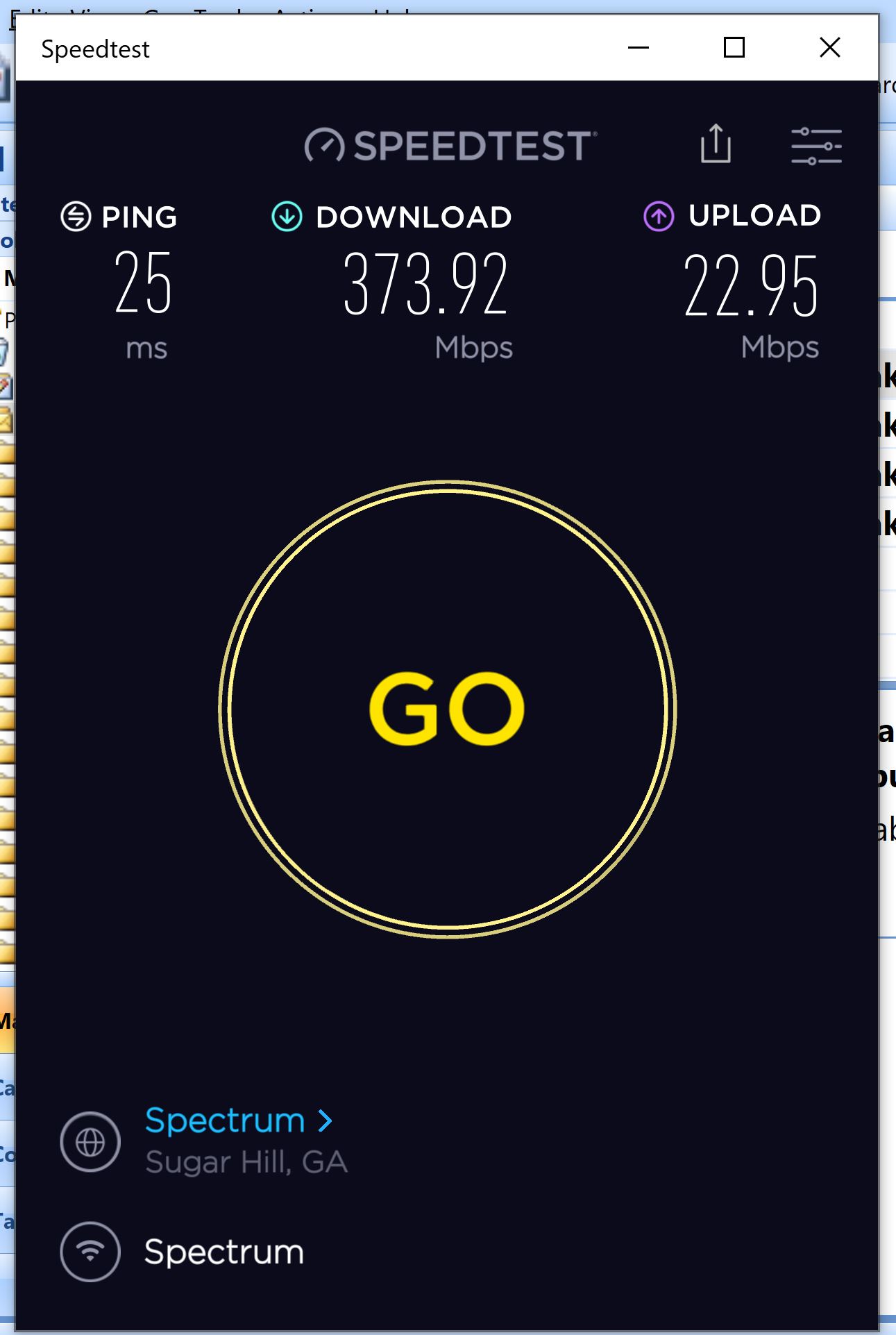
Lately what I have seen is while running my wifi and running the speed test I find that the first few times I run the test my speed will spin up to around 300mbps and then you can watch the speed drop to anywhere from 120 - 160mbps... when I run the test 2 or 3 times it seems to lock in between 300 - 400mbps and holds steady.
I just wondered if anyone else experiences this on their Wifi ... FYI my Ping is usually in the 24 ms range. The good thing is that Netgear has said my router is ready for my 1GB connections... I understand there are other limitations for example, 18 years ago we wired our home with Cat 5, Cat 5e was not on the market so, we will always have a transfer limit . Probably doesn't play in to it but I am running 7 NAS units all connected to ethernet...
Hopefully this will explain my question a little better.
- michaelkenwardMar 13, 2023Guru - Experienced User
davidk1952 wrote:
Michael, thanks for responding and I actually thought my equipment was listed (I'll fix that)
My router is a Netgear Nighthawk S4 2350 Dual Band. My laptop is a Dell I7 with the intel 9250 wifi card. I sit about 15' from the router. I have both a hardline Ethernet connection and Wifi and switch off from time to time. I do understand that the wifi will be slower than the ethernet, I get 500-580mpbs. My WIFI is as I said mostly runs at 300-400mps.
S4 2350 Dual Band is not a router that I can find in the Netgear system. These have model numbers like RXXXX, Orbi RBKXXX. And dual band could be anything.
If this is a 5 GHz connection, then 15 feet could be a stretch, depending on what's in the way. 5 GHz is faster but has shorter range.
The Nighthawk application is not compatible with my router so I use the Netgear genie from time to time.
If Nighthawk app won't work, then we are talking about an ageing router. Just about everything in the past five years has use the app as a way of setting up the router.
Is that the mobile genie or the desktop version?
genie | Product | Support | NETGEAR
I use that even though my routers do support the Nighthawk app.
Lately what I have seen is while running my wifi and running the speed test I find that the first few times I run the test my speed will spin up to around 300mbps and then you can watch the speed drop to anywhere from 120 - 160mbps... when I run the test 2 or 3 times it seems to lock in between 300 - 400mbps and holds steady.
Test of WiFi speed over the Internet are famously all over the place, and can depend on the network between you and wherever the test happens. There are just too many variables ro make a single test meaningful. When I want to do a scientific test, I run tests on a half a dozen different test sites. Then I plug them onto a spreadsheet.
Are you trying to sort out some sort of problem in your network, or simply interested in speed measurements? If speed is what matters. then don't use WiFi when it isn't essential. You seem to have that covered.
As to going up to Gb Internet, you may not get near that with your hardware.
Speeds of 300 to 400 Mbps seem pretty good with most WiFi. A faster Internet connection isn't likely to get you much faster than that.
- davidk1952Mar 13, 2023Luminary
Good Morning Michael, Thanks for your reply, Sorry about not being more specific on my router ... but Yes it is an older device, I think I purchased it in 2016 or 17 to the best of my knowledge... it is an Nighthawlk R7500 V1 and here it is on the Netgear site https://www.netgear.com/support/product/r7500 I am looking at a number of options to upgrade it but I am waiting to see what I do with my ISP. My current Spectrum account is a 500mbps cable and because of some promo's going on I am able to get the 1gb for $20.00 per month less... Yep, it's a nice saving and bump in speed. True with the current equipment I will be hampered some what but, I am not sure which way I want to go in my upgrade.
I also am waiting to see if United Communications will come through and install fiber they are new to our area and have some great promotions which will also drop my monthly cost by $30 for 3 years, believe it or not they are saying that they will start running the fiber soon but it looks like they will be behind the projected date. So either way by changing my connection I will save money through the promo... And again, Yes I do understand that with my current equipment I won't be getting the maximum speed so I am looking at my options I am just not sure which way I want to go but because I have everything set with cables already run I tend to lean twards a desktop like the RAX500 or similar...
15' does not seem to be a hamper, I can take the laptop to the router and my tests don't change and yes, I stay on the 5g AC band. But, you re right hard wire will always be the best if I need extra speed for anything I just plug in to my ethernet cable.
The genie app I use is on my phone, I've not really looked to see if they have a windows 10 version or not... Yes I understand the new app will not work with my hardware and for now that is fine.... If I need to make adjustments I log in to the router over ethernet.
I have been running speed test for years and have a pretty good history, I understand running speed test at different internet sites will bring different speeds and that isn't a problem, I've got a pretty good idea what I am looking for.... Your right even using Oakla and changing servers there can be a huge difference ..I typically run the same known servers that I've run for years and they have been pretty constant..
So, the main reason on my post was that I have noticed that using my wifi lately I using the windows 10 desktop app when I open the app (no other programs running) when I run the test the app will connect and the speed will move up to the 300 or so range then, it will slowly fall back to the 120 -150 range and stay there, I'll run the test again and the speeds again will go up to the 300 or so range and then fall back to say 200 to 250.... then I run it again and the speeds to up past the 300 to 375 range and hold... it is just weird and I am trying to decide is it my laptop or router that is causing it. Once I get up to speed it seems to stay there .... just weird... Its like a car, say you hit the gas, car speeds up to 90mph, then slowly falls back to 50mph like your running out of gas 🙂 It really isn't a problem because it works itself out.. I was just wondering if anyone else had seen this in testing.
As for equipotent, I am leaning towards a robust router as if to future proof the set up at least for a few years! I have considered a mesh system but with my set up Im not convinced it's worth going that way .
Hopefully that covers your questions and again thanks for the comments.
- michaelkenwardMar 13, 2023Guru - Experienced User
davidk1952 wrote:
The genie app I use is on my phone, I've not really looked to see if they have a windows 10 version or not...
There is no Windows version of the mobile genie. The desktop program is completely different. Netgear wants to kill it, but I use it daily for various things.
.... I am leaning towards a robust router as if to future proof the set up at least for a few years! I have considered a mesh system but with my set up Im not convinced it's worth going that way .You are correct. A good router will be future proof. As to Mesh, only you know that, but Netgear is pushing it hard with the Orbi stuff and, perhaps more relevant for someone who doesn't need hand holding, the MK range.
But with new models, beware missing features. I still use an R7800, still recognised by some as Netgear's "work horse" router, because it has access to USB storage, a poor man's NAS. But Netgear is about to cripple that by shutting down ReadyCLOUD.