NETGEAR is aware of a growing number of phone and online scams. To learn how to stay safe click here.
Forum Discussion

dpo91
Sep 17, 2016Aspirant
Trouble configuring hard drive for ReadyShare
I recently bought a WD 4TB Black My Passport Ultra Portable External Hard Drive - USB 3.0 - WDBBKD0040BBK-NESN to setup with the R7800's ReadyShare. I see the hard drive when I log in to routerlogin....
- Sep 25, 2016
I returned the WD hard drive yesterday. I think anybody reading this thread and considering hard drives to buy would be wise to use the"ReadySHARE USB Drives Compatibility List".

JamesGL
Sep 19, 2016NETGEAR Employee Retired
Hi dpo91,
Where do you want to add the drive? Is it on the UI or on your computer?
JamesGL
Community Team
dpo91
Sep 19, 2016Aspirant
I wanted to connect it to the router (R7800) but it doesn't look like the router can identify it.
- JamesGLSep 21, 2016NETGEAR Employee Retired
Hi dpo91,
You mentioned that when logging in to the Readyshare, you were able to see the drive. Am I correct or not?
JamesGL
Community Team
- dpo91Sep 24, 2016Aspirant
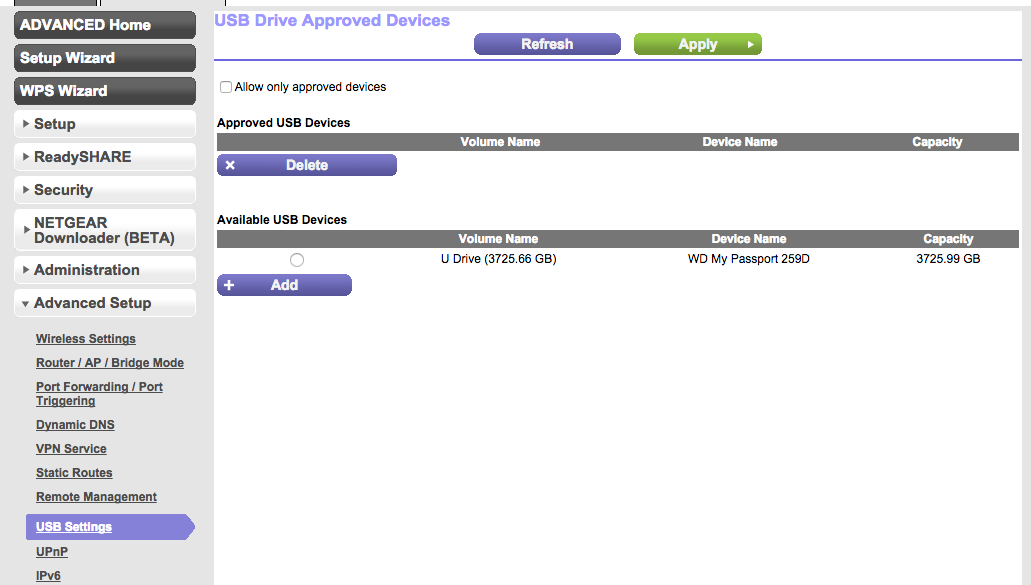
Yes, that is correct. I attached an image of the screen I got to. I saw the hard drive but wasn't able to add it.
- dpo91Sep 25, 2016Aspirant
I returned the WD hard drive yesterday. I think anybody reading this thread and considering hard drives to buy would be wise to use the"ReadySHARE USB Drives Compatibility List".