NETGEAR is aware of a growing number of phone and online scams. To learn how to stay safe click here.
Forum Discussion

flyboynm
Feb 24, 2016Tutor
Unable to connect to other connected devices
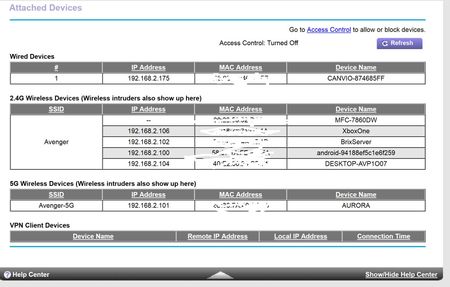
I have a R7000 that is having routing issues with LAN traffic. Here is the connected devices list: The problem is with the Aurora system (2.101) - it cannot connect (nor ping) any of the dev...
 Feb 25, 2016
I really wish I knew what I did to get it to work. I have flushed dns, disable/enabled wireless adapters, full hard reset on the router. I changed the DNS server from being 192.168.2.1 (the router) as primary to Google's 8.8.8.8 as primary with the secondary being the local router. I wasn't able to ping the brixserver via hostname but I was able to ping the IP after about 1000 attempts. When I pinged, I browsed to the server as \\192.168.2.102\ and it came back without a problem. Weird.
flyboynm
Feb 24, 2016Tutor
It didn't let me post the info on the pings for some reason. Here they are:
Microsoft Windows [Version 6.3.9600]
(c) 2013 Microsoft Corporation. All rights reserved.
C:\Users\User>ping 192.168.2.1
Pinging 192.168.2.1 with 32 bytes of data ;
Reply from 192.168.2.101: Destination host unreachable.
Request timed out.
Request timed out.
Request timed out.
Ping statistics for 192.168.2.104:
Packets: Sent = 4, Received = 1, Lost = 3 (75% loss),
C:\Users\User>ping 192.168.2.101
Pinging 192.168.2.101 with 32 bytes of data ;
Reply from 192.168.2.175: bytes=32 time=2ms TTL=64
Reply from 192.168.2.175: bytes=32 time=2ms TTL=64
Reply from 192.168.2.175: bytes=32 time=2ms TTL=64
Reply from 192.168.2.175: bytes=32 time=2ms TTL=64
Ping statistics for 192.168.2.175:
Packets: Sent = 4, Received = 4, Lost = 0 (0% loss),
Approximate round trip times in milli-seconds:
Minimum = 2ms, Maximum = 2ms, Average = 2ms
- flyboynmFeb 24, 2016Tutor
C:\Users\User>ping 192.168.2.1
Pinging 192.168.2.1 with 32 bytes of data ;
Reply from 192.168.2.101: Destination host unreachable.
Request timed out.
Request timed out.
Request timed out.
Ping statistics for 192.168.2.102:
Packets: Sent = 4, Received = 1, Lost = 3 (75% loss),- ElaineMFeb 25, 2016NETGEAR Employee Retired
Hi flyboynm Are you connected on the main network or using Guest network? If you're on Guest network make sure to allow "Allow guests to see each other and access my local network" is checked.
Also, try to disable for any firewalls.
What's the firmware version installed on your firmware?
Can other computers ping that Aurora OS?
- flyboynmFeb 25, 2016Tutor
I have gotten it to partially work - it works with IPs but not by system name so it is something with DNS now.
