NETGEAR is aware of a growing number of phone and online scams. To learn how to stay safe click here.
Forum Discussion

love_cisco
Jun 03, 2017Tutor
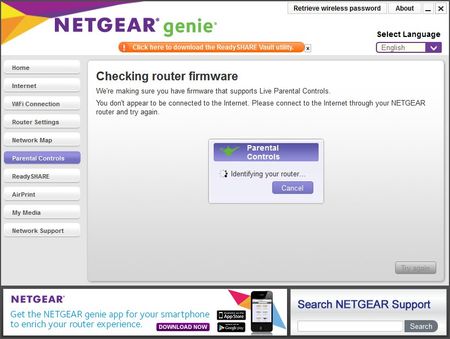
unable to setup parental controls via netgear genie
Hi, I just bought the nighthawk R8000 route and want to setup the parental controls via netgear genie. But it stopped at the checing router firmware page. I can access my R8000 via web page. her...
- Jun 06, 2017
Hi,
I got it working now after power reset the netgear route.
thanks
JaiderGator
Jun 28, 2017Aspirant
I have tried reflashing the unit and it still the same. Tries downgrading as well and the unit still showed V1.0.3.46_1.1.32 as the version, it does not downgrade.
There are many posts online about this same problem.
Just purchased this unit less than a week ago.
Do you have any other suggestions?
There are many posts online about this same problem.
Just purchased this unit less than a week ago.
Do you have any other suggestions?

ElaineM
Jun 28, 2017NETGEAR Employee Retired
How about if you access the Parental Control settings on this site?
Once you have set the settings, check if the settings are
- JaiderGatorJun 30, 2017Aspirant
Hi ElaineM,
You need to use the Genie in order to "turn on" parental controls. The site you provided is to adjust the settings and the level of control.
Looks to me that this firmware has a bug. Any ohter suggestions?
- DexterJBJul 04, 2017NETGEAR Moderator
Hi JaiderGator and NILSUE,
1. Does the issue persist when using another device (Android, iOS, another computer)?
2. If the issue persists, it is most likely related to the login issue being worked on by engineering. We will provide an update on this thread as well if a resolution is available.
Regards,
Dexter
Community Team
