NETGEAR is aware of a growing number of phone and online scams. To learn how to stay safe click here.
Forum Discussion

JohnWDarby
Jun 28, 2016Initiate
Web GUI Password Recovery and Exposure Security Vulnerability
I would like to point out to Netgear that their password recovery options are woefully insecure. I followed their advice to turn on Password Recovery but immediately aborted, Every single question ca...
 Jun 29, 2016
Hi All,
Here is the KB article for the said vulnerability. You can check for the specific model number that is affected.

hawki
Jun 30, 2016Apprentice
TheEther wrote:hawki, the Netgear security bulletin says that the C6300 with firmware version v2.01.14 is affected. Are you running that version?
Are you using the desktop Genie to change passwords?
I could be mistaken but the recovery password option is available directly through the router's web portal (i.e. by logging through http://routerlogin.net or your router's IP address). You will find the recovery option in ADVANCED > Administration > Set Password.
WTF? I bought my NetGear WiFi Router Cable Gateway a year ago and there are no firmware upgrades available on Th eNetgear Support site. Is it no longer supported?

TheEther
Jun 30, 2016Guru
hawki, it's not clear to me what you are seeing when you attempt to log into the C6300. It should look like this (complements of setuprouter.com):
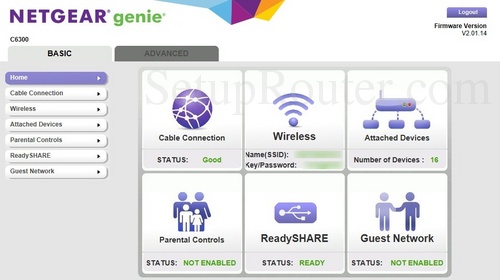
Then you should click on the Advanced tab at the top, then Administration on the side and finally Set Password, similar to this:
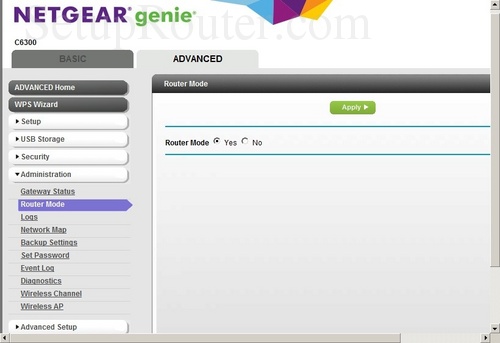
As far as firmware upgrades is concerned, the C6300 is a cable router modem. It is frequently the case for such devices that firmware upgrades are available only through your ISP. If the C6300 is not officially supported by your ISP, then you are outta luck. :smileysad:
- hawkiJun 30, 2016Apprentice
Th
TheEther wrote:hawki, it's not clear to me what you are seeing when you attempt to log into the C6300. It should look like this (complements of setuprouter.com):
Then you should click on the Advanced tab at the top, then Administration on the side and finally Set Password, similar to this:
As far as firmware upgrades is concerned, the C6300 is a cable router modem. It is frequently the case for such devices that firmware upgrades are available only through your ISP. If the C6300 is not officially supported by your ISP, then you are outta luck. :smileysad:
That is what I see. When I go to the set password page there is NO box to check to "Enable PW Recovery when I go to the set password page. I will check with my ISP. Cox has two categories of compatible modems: 1) Cox Preferred Devices; 2) Additional Cox Recommended DOCSIS 3.0 Devices. My C6300 falls under category 2. My modem works fine and delivers more than my guaranteed 100Mbps - It gives me 130Mbps
I will check with Cox, but I doubt they will have a firmware update. In the past all my firmware updates have been downloaded from Netgear after a pop-up appears asking me if I want the upgrade. But firmware squirmware - why do I not have the box to enable PW recovery? Is that something new?
Windows also searched The Net for a firmware update and said I had the latest as does my Genie.
Weird - so now I don't know if I have the vulnerability or not.
Thanks again for your taking the time to try to help :-)
hawkeye
- hawkiJun 30, 2016Apprentice
TheEther
You are correctl. According to Netgear:"Note: There is no option in the web interface to upgrade the firmware manually. Firmware upgrades are pushed down by the ISP."
The security advisory lists Cable Gateway Model and Firmware Version: C6300 v2.01.14 as being subject to the vulnerability. V 2.01.14 is only available to Comcast and Time Warner customers to fix a connectrivity issue.
Am I correct, therefore, in assuming that the security advisory does not apply to my C6300 with its version 1.02.20 firmware?
- TheEtherJun 30, 2016Guru
That's what it sounds like. Given that you cannot act on their recommendation to enable password recovery, you should just make sure that remote management is turned off. You should be relatively safe.
- ElaineMJun 30, 2016NETGEAR Employee Retired
For clarification, C6300 and other Cable Gateways does not have Password Recovery feature.
Just ensure that Remote Management is disabled.
- hawkiJun 30, 2016Apprentice
ElaineM wrote:For clarification, C6300 and other Cable Gateways does not have Password Recovery feature.
Just ensure that Remote Management is disabled.
Thank You ElaineM :)
Perhaps you could inform the Manager of the team responsible for writing Security Advisories to be more accurate, precise, and informed so that in the future Netgear Equipment owners will not have to waste frustrating hours of their valuable time apparently chasing ghosts.
Also, you should advise that Team that copies of all Security Advisories must be be sent to ALL personnel of the Netgear Telephone Support Tech Team so they do not give out misinformation that a legitimate advisory email is a scam that should be ignored.
I enjoy my Netgear Equipment. But Netgear's Support Team needs imrovement in its accuracy and procedures and promptness in informing Netgear owners of vulnerabilites that were posted on the Netgear site nearly two months before myself and several others received the info.
I rate Netgear Equipment A. I rate Netgear support as a near total fail.
I sincerely appreciate your help as well as the time TheEther and michaelkenward invested in trying to help me with what may have been a needless exercise in futility.
The sad fact is that , despite several attempts at clarification, for several reasons I still do not have 100% confidence that my Netgear A6300 is not vulnerable to the issue the security advisory attempted to address. This is due mainly to the inprecise/vague wording of the Security Advisory. If an A6300 with not the latest firmware is not subject to the vulnerability, the advisory should have made that clear. I plan on replacing my A6300 ASAP. Netgear should do the same with its security advisory and Tech Support Teams.
hawkeye
