NETGEAR is aware of a growing number of phone and online scams. To learn how to stay safe click here.
Forum Discussion

a94cobra1
Dec 01, 2023Guide
why is my nighthawk x6 r7850 wireless off
This started last night. Wireless was being weird so I logged off my one PC(wireless) and re logged on the the wifi on the router and that PC went back to working. But some, not all wireless device...

michaelkenward
Dec 03, 2023Guru - Experienced User
a94cobra1 wrote:
So I'm confused why the channels matter.
It is one of those boilerplate responses that we all get lured into.
Routers have various wifi channel options that may or may not work well with all devices you want to connect, and may also suffer from interference from neighbours. If he are on one wifi channel, it can help to use a different one.
Telling someone to investigate channels is a regular suggestion.
As you have said, better to try to track down the problem. To do that you need to know why you are being asked to do various things.
What my cable modem has to do with the situation.
You would be surprised by the number of people who turn up here with that question.
It can be at the heart if the problem and could explain the symptoms you see. It is a regular question, although without any explanation people wonder why it gets thrown in.
The reason is that many "modems", especially those supplied by Internet service providers, are no such thing. They are really modem/routers, sometimes called gateways. If you have one of those, then you have two routers on your network a recipe for chaos.
What is Double NAT? | Answer | NETGEAR Support
And how a bad lan cable would cause the above mentioned problems.
Another boilerplate response that, to be frank, just confuses the picture. (And baffles me.) 99 times out of 100, probably 999 times of out 1000, it is a red herring. Cables do go bad, so there is not harm in turning to that aft6er all else has failed. But early on in the troubleshooting process it is best to start with the most likely issues.
In your case, I would have started with the firmware and modem.
I would also throw in the "restart" advice, because people often get it wrong as they flail around in desperation,
Be sure to restart your network in this sequence:
- Turn off and unplug modem.
- Turn off router and computers.
- Plug in and turn on modem. Wait 2 minutes for it to connect.
- Turn on the router and wait 2 minutes for it to connect.
- Turn on computers and rest of network.
The reset thing could come after that, depending on your answer.
The factory reset is often more a "witchcraft" move than a technically informed solution, but it does seem to fix problems, especially on the wifi front. It is also the first thing that Netgear support will recommend.
Before you go down that road, it can help to create a backup of your settings.
Then, if the reset doesn't rescue you, you can go back to the saved version and its memory of your carefully created settings.
Hope this explains the reasons for some of the questions and answers.
a94cobra1
Dec 03, 2023Guide
I completely understand what all of your questions are and what they pertain to. And you did a great job explaining why on each one.
None of that has anything to do with my questions that I was asking.
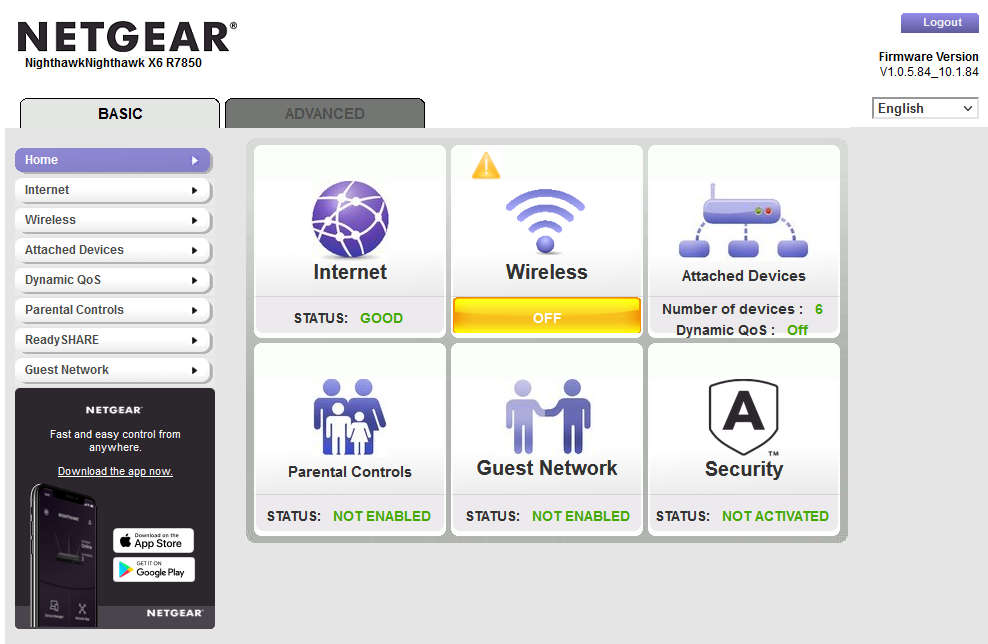
I posted in the original thread that for some reason my router was still up and functioning on ethernet. Any wired device was working properly. Pretty much rules out a bad cable. Or the cable modem as a problem. But the wifi was "off" in the router somehow. I attached a pic in the original post to show what I was asking about. In what cases does the router show wifi off there when the rest of the router setting show it as on?
I am using my own cable modem so no wifi there to conflict with. I have been using the same setup for a year and a half.
So to begin again. My problem started with some devices, not all, not operating on the wifi. I logged a PC I use from the wifi and re logged it back in. It went to working. I tried that with an iphone that wasn't working. It would not log back on. So I did what I have done a few times in the past. Reboot. Rebooting the router, in the past, has always fixed issues I was having on wifi connectivity. This time it did not. All the wifi SSIDs were no longer broadcasting. No wireless device was able to connect. Wifi showed up like the picture I attached. "Off". Even though all the lights on the router indicated it was on. And all the settings in the router showed it on. I went through a little troubleshooting. Turned the wifi off and back on using the setting in the router and the lighted button on the router. All that seemed to function. But the router still reported the wifi as "off". So, I rebooted again. And it seemed to want to reboot a couple of times on its own. So after a while I simply went to bed after rebooting once more. That next morning, the wifi still wasn't up. Ethernet worked the entire time and I could reach the internet. I turned off the router and left it off a good 10 minutes. Plugged it back and went to work. When I returned from work the router had successfully been reset to factory settings. I DID NOT RESET the router. At that point I set my router up again. All is now well.
I realize that is what your were trying to tell me to do to fix the problem. But that wasn't answering my questions I was asking.
Why does the router say the wifi is off and how would you change that?
How does a router reset to factory setting If I don't actually perform that procedure?
Thanks for reading my issues.
- michaelkenwardDec 03, 2023Guru - Experienced User
a94cobra1 wrote:I am using my own cable modem so no wifi there to conflict with. I have been using the same setup for a year and a half.
That tells us nothing.
It has nothing to do with wifi. Modem/routers handle much more than the wifi.
Is there any reason why you will not tell us what that modem is?
Pretty much rules out a bad cable. Or the cable modem as a problem.
No it doesn't. A modem/router and router can work together for months until something odd happens and they start to disagree with each other over which is in charge.
I'm sorry, but if you turn up here asking for help, you need to answer the questions that people ask. We don't pose them just to torture you.
We may be "amateurs", rather than Netgear employees, but collectively we have dealt with hundreds, maybe even thousands of problems here. That has taught us what factors are mostly likely to cause problems. The make and model of the number is high on the list.
Troubleshooting is a case of starting with the obvious possibilities, starting with the modem/router. When we have ruled those out, we move on to other possible causes.
- a94cobra1Dec 03, 2023Guide
My cable modem is a Arris SurfboardSB8200. How can this cable modem make my wifi turn off as in this picture. - michaelkenwardDec 04, 2023Guru - Experienced User
a94cobra1 wrote:
My cable modem is a Arris SurfboardSB8200. How can this cable modem make my wifi turn off as in this picture.There. It wasn't that difficult was it?
That modem will not cause the problem you see. A modem/router could have been responsible. But we aren't mind readers so, without that detail, we could not rule that our of the equation.
Four days later we now have confirmation that this is a standard cable modem with no router components.
Now we can move on to the next step in the troubleshooting process.
As FURRYe38 first asked three days ago, and we have repeated on a daily basis, have you reset the router?
How do I perform a factory reset on my NETGEAR router? | Answer | NETGEAR Support
The factory reset is more a "witchcraft" move than a technically informed solution, but it does seem to fix problems, especially on the wifi front. It is also the first thing that Netgear support will recommend.
The reset does wipe out any carefully created settings, so it might be a good idea to backup your current settings before you reset.
How do I back up the configuration settings on my Orbi WiFi System? - NETGEAR Support
Then, if the problem is still there you can at least roll back to your earlier settings. Even if it does work, you could try restoring the settings. That runs the risk of bringing back the fault. But at least you will know how to revive the device. Just reset it again.
- a94cobra1Dec 05, 2023Guide
Still curious about my question.
How can this cable modem make my wifi turn off as in the picture I posted?
And as stated in a previous post. The router reset itself all on it's own. How can it do that?