NETGEAR is aware of a growing number of phone and online scams. To learn how to stay safe click here.
Forum Discussion

FURRYe38
Oct 28, 2024Guru - Experienced User
New - RS150, RS280, RS300, RS500 and RS600 firmware Version 1.0.1.60 Released
Enhancements: 10/23/2024
Fixes multiple other minor bugs
Adds Advanced Router Protection function. (RS300, RS500 and RS600 series only.)
Download Links:
RS150: https://kb.netgear...
- Dec 05, 2024
Turn it OFF.

matemik
Dec 03, 2024Tutor
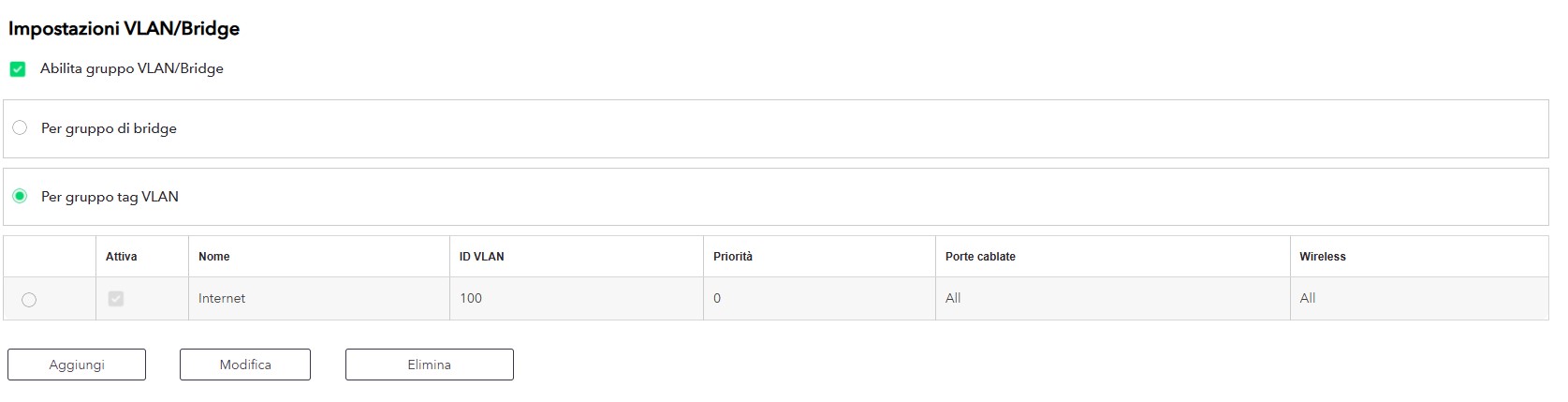
Since update V1.0.1.60, whenever i restart the router, i can't get any WiFi working in any band.
In order to get it working properly i need to acces the interface via browser and disable, then re enable vlan/bridge at every power cycle (my ISP do require it to get the connection working). Everything was working perfectly with the older firmware 1.0.0.38.

FURRYe38
Dec 03, 2024Guru - Experienced User
Has a factory reset and setup from scratch been performed since last FW update?
matemik wrote:
Since update V1.0.1.60, whenever i restart the router, i can't get any WiFi working in any band.
In order to get it working properly i need to acces the interface via browser and disable, then re enable vlan/bridge at every power cycle (my ISP do require it to get the connection working). Everything was working perfectly with the older firmware 1.0.0.38.
- matemikDec 03, 2024Tutor
Yes, I tried a factory reset and also tried to rollback to the old firmware. Then I upgraded again to the latest, and performed the reset again but nothing worked for me.
- matemikDec 03, 2024TutorIt worked flawlessly for months with the old firmware. But i won't rollback to the older version and loose at least another one hour of my time to reconfigure it properly on my network because Netgear is unable to release a non buggy software for a router that costs more than 300€. I'm waiting for a bugfix, by mi research I'm not the only one with that issue. I'm pretty disappointed.
- BH_CDec 03, 2024NETGEAR Expert
Hi matemik,
I would like to confirm if it's WiFi connection lost or Internet connection lost. When the issue happened, if you used wired connection to the router, was the laptop able to access the Internet?
There is a topic in the community reporting WiFi got killed after router reboots when VLAN tag group is enabled. In that case, WiFi did not work but wired connection should work. I think that issue also exists in the FW v,1.0.0.38.
There is another BPDU issue which exists from the FW v1.0.1.60. But that is an internet connection issue, so a wired connection still cannot access the internet when the issue happens.
I have separate trial firmware fixing the two issues. If your issue is like one of them, I can pass you the trial firmware to give it a try.
- matemikDec 03, 2024Tutor
I can confirm that i'm having the first issue you reported. After reboot internet connection on wan port works, wired ports works fine but no wifi radio (even if it is enabled) until i turn off and than back on th VLan tag. But for me the issue appeared only yesterday when i upgraded to the latest Firmware.
.jpg)